Why Is My VPN Not Working? 12 Fixes That Actually Work
VPN not working? Find which of 4 problems you have, then follow 12 fixes in order: server, protocol, firewall, DNS, IPv6, date and time, and device limit.
When your VPN is not working, the cause is nearly always one of 4 things: the network you are on blocks VPN traffic, the server you picked is overloaded, a firewall or second security app is holding the connection, or DNS fails after the tunnel comes up. Match your symptom first, then work through the fixes below in order. Most people are back online after the first 3.
- Switching server and protocol fixes more VPN connection problems than every other step combined.
- Connected but nothing loads is usually DNS, a hotel sign-in page, or the kill switch doing its job.
- On Windows the usual culprits are firewalls, antivirus and a second VPN app; on Android, battery settings.
- Works on mobile data but not WiFi: the network blocks VPNs, so use OpenVPN TCP on port 443.
Which VPN problem do you have?
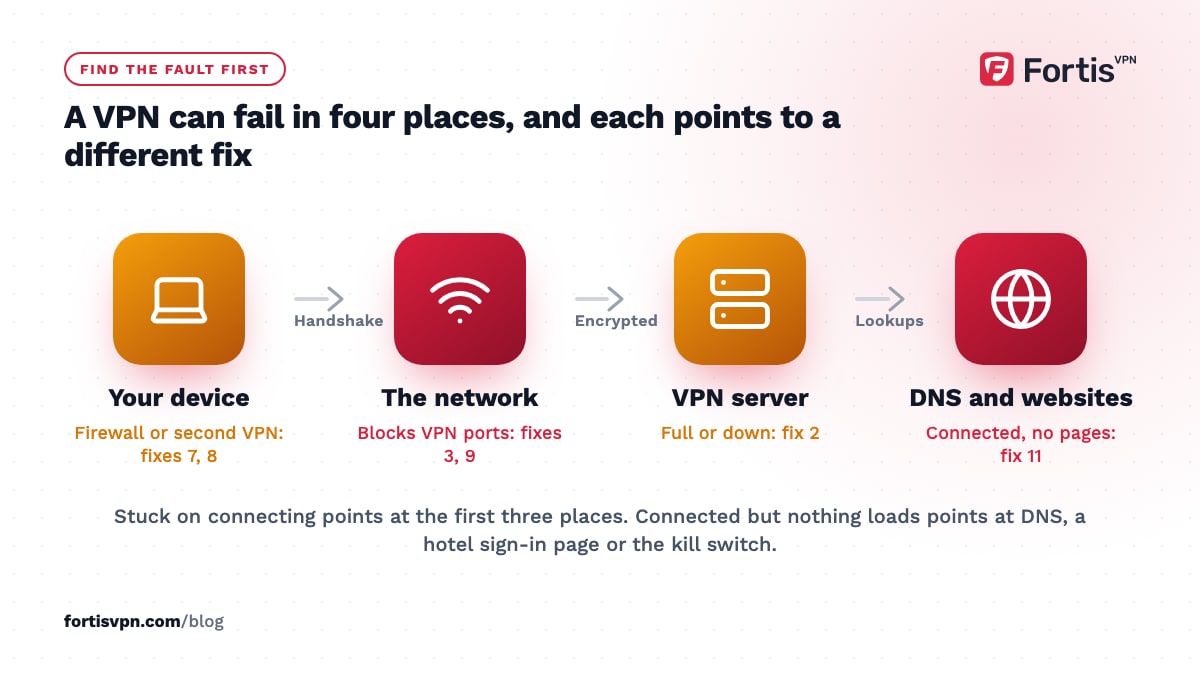
A VPN can fail in 4 different places, and each one points to a different fix.
| Symptom | Most likely cause | Start with |
|---|---|---|
| Stuck on connecting, or an error before it connects | Network blocking the protocol, overloaded server, firewall, wrong clock | Fixes 1, 2, 3, 7 |
| Connected but no internet | DNS not resolving, hotel sign-in page, IPv6 bypass, kill switch | Fixes 11, 1, 4 |
| Connects, then drops after minutes | Weak WiFi, battery optimisation, router timeout | Fix 3, then the disconnecting guide |
| Connected, but a site or app still blocks you | The site detects the VPN's IP, or the app uses GPS | Fix 2, then ask support for a server that currently works |
Quick VPN fixes to try first
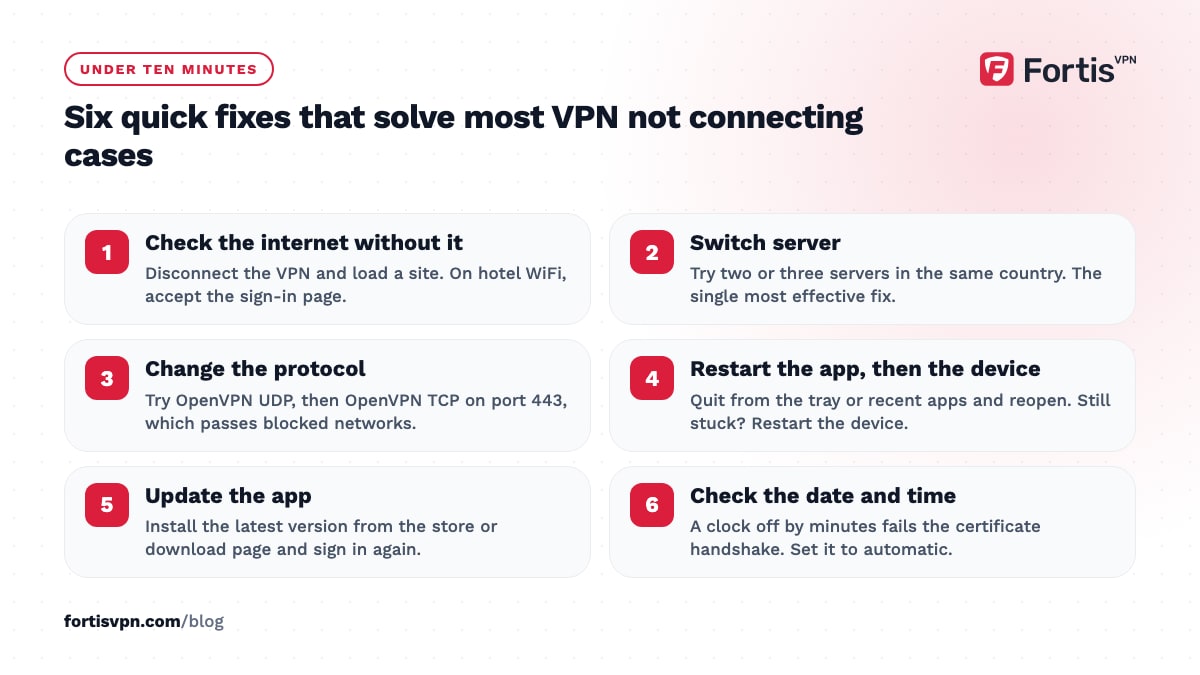
These 6 fixes take under 10 minutes together and solve most VPN not connecting cases. Do them in order.
1. Check your internet without the VPN
Disconnect the VPN and load a website. If nothing loads, the problem is your WiFi, mobile data or router, not the VPN. On hotel, airport or café WiFi, you need to open a browser and accept the network's sign-in page before any VPN can connect; the hotel WiFi guide walks through it.
2. Switch to a different server
Pick another server in the same country, or the next country over. A single server can be full, under maintenance, or blocked by the site you are trying to reach while the rest of the network is fine. This is the single most effective fix on this page, so try 2 or 3 servers before moving on.
3. Change the VPN protocol
Open the app's settings and change the protocol. If you are on Auto or WireGuard, switch to OpenVPN UDP, then OpenVPN TCP. TCP on port 443 looks like ordinary HTTPS traffic to the network, which is why it gets through at offices, schools, hotels and in countries that filter VPNs. It is slower than WireGuard, so switch back when you are on a normal network.
4. Restart the app, then the device
Close the VPN app fully, not only the window. On Windows, right-click the tray icon and quit; on Android, swipe it away from recent apps and reopen it. If that does nothing, restart the device. A restart clears a stuck network adapter, a half-finished update, and a tunnel the system thinks is still open.
5. Update the app
An old app version can stop connecting after a server-side change or an operating system update. Check the store or the download page for an update, install it, and sign in again. On Windows, if the updater fails, uninstall the app and install the latest build fresh from the download page.
6. Check the date and time
VPN connections rely on certificates, and certificates have validity dates. If your device clock is wrong by more than a few minutes, the handshake fails with a generic error. Turn on automatic date and time in your system settings, then reconnect.
Fixes for a VPN that still will not connect
If the quick fixes did not work, something on the device or the network is actively stopping the connection. These 6 fixes find it.
7. Let the VPN through your firewall or antivirus
Security software on Windows often blocks the VPN's network adapter or its outgoing port after an update. Open your antivirus or firewall, find the allowed-apps list, and add the VPN app. If you cannot find the setting, pause the security software for 5 minutes and try to connect; if it works, the firewall is the cause. The antivirus and firewall guide has the exact steps.
8. Remove a second VPN or a conflicting app
Two VPN apps on one device fight for the same network interface. On Android, only one VPN can be active at a time, and a leftover app from an old trial can hold that slot. Uninstall any VPN you no longer use. Some ad blockers, parental-control apps and corporate security clients also create a local VPN, so check those too.
9. The network is blocking VPNs
If the VPN connects on mobile data but won't connect on this WiFi, the network blocks VPN traffic. Try OpenVPN TCP on port 443 first. If that also fails, use an obfuscated server, which wraps the VPN traffic so it looks like normal web browsing. The VPN blocked on network guide covers both options.
10. Reset the network adapter on Windows
A broken VPN adapter on Windows stays broken until it is rebuilt. Open Command Prompt as administrator and run netsh winsock reset, then netsh int ip reset, then restart. If the VPN still fails, open Settings, Network & internet, Advanced network settings, and choose Network reset. That removes every adapter and reinstalls them, so you will need to re-enter WiFi passwords afterwards.
11. Clear the DNS cache and turn off IPv6
If the app says connected but pages do not load, DNS is the first suspect. On Windows, run ipconfig /flushdns in Command Prompt. On Android, check that Private DNS under Settings, Network & internet is set to Automatic or Off rather than a fixed hostname. Then turn off IPv6 on the WiFi or Ethernet adapter: some networks route IPv6 around the tunnel, and the result is a connection that half works.
12. Check your subscription and device limit
An authentication failed or could not sign in message usually means the account, not the network. Sign in to your account dashboard and check that the plan is active and the last payment went through. Then look at the devices list: if you are at the limit, sign out an old phone or laptop and sign in again on the device you are holding.
Why does my VPN say connected but nothing loads?
Connected but no internet means the tunnel is up and something after it is failing. In order of likelihood: DNS requests are not getting an answer, a captive portal on the WiFi is waiting for you to sign in, IPv6 traffic is leaving outside the tunnel, or the kill switch has blocked traffic because the connection flickered.
Work through it like this: reconnect once, then switch server, then run the DNS and IPv6 steps in fix 11. On public WiFi, disconnect the VPN, open a browser, accept the sign-in page, and connect again. If the kill switch is on and you saw a brief disconnect, toggling the VPN off and on resets it. The connected but no internet guide has this as a checklist.
VPN not working on Android, Windows, or your TV
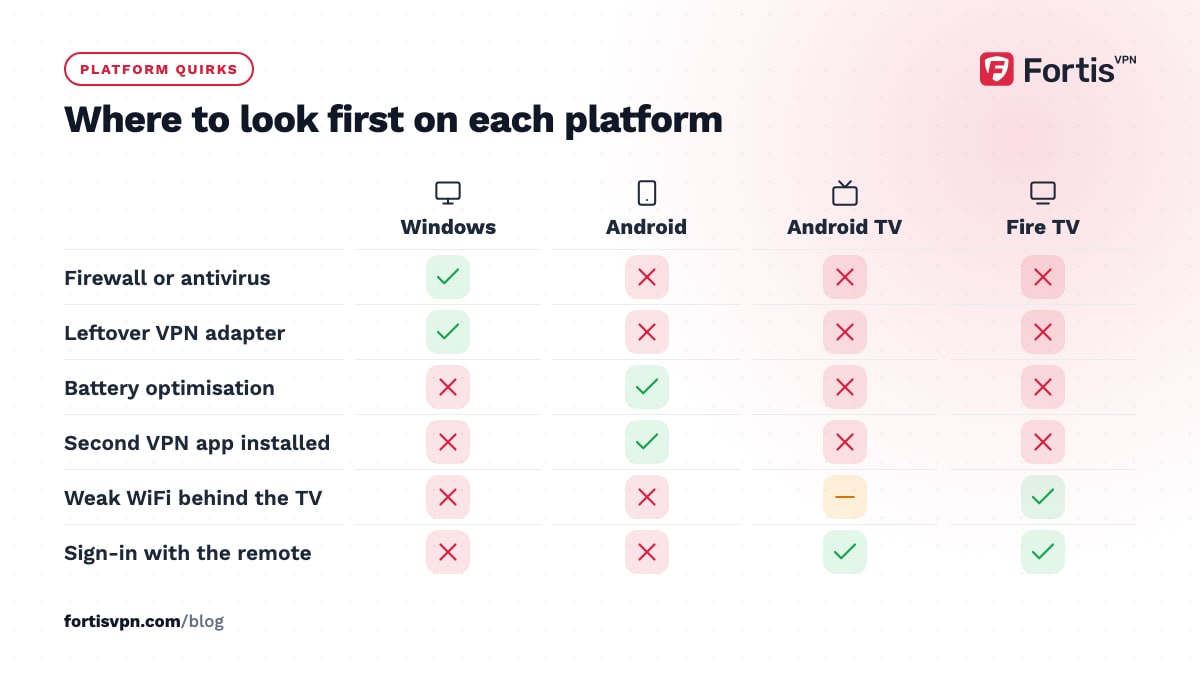
The fixes above apply everywhere, but each platform has 1 or 2 failure modes of its own.
- Windows: the firewall and a leftover adapter from an uninstalled VPN cause most failures. Fixes 7 and 10 solve them. The Windows will-not-connect guide is the step-by-step version.
- Android: battery optimisation can stop the app in the background, and another app may hold the VPN slot (fix 8). In Settings, Apps, pick the VPN app, open Battery, and choose Unrestricted.
- Android TV and Google TV: if sign-in fails, use the short-code sign-in at fortisvpn.com/tv instead of typing the password with the remote. If the TV says connected but apps buffer, pick a closer server and switch to WireGuard.
- Fire TV Stick: a weak WiFi signal behind the TV is the usual cause of failed connections. Move the router closer or use the 5 GHz band if the stick supports it, then reconnect.
When to contact support and what to send
If you have done all 12 steps, support needs to look at the server side. A good support message saves a round of questions. Include:
- The device and operating system version, for example Windows 11 or Android 14.
- The app version from the settings or about screen.
- The exact error text, or a description of where it stops.
- Which protocols and servers you tried.
- Whether it works on mobile data, and the network you are on (home, office, hotel, country).
- The app's connection log, if the app has an export or send-logs option.
FortisVPN support is available through 24/7 live chat and the contact page.
Getting FortisVPN connected again
In the FortisVPN apps, the 2 fixes that matter most sit under Settings. Protocol lets you move from Auto to WireGuard, OpenVPN UDP, or OpenVPN TCP on port 443 for networks that block VPNs. The server list lets you change country or city in 2 taps. The cannot connect troubleshooting page is the short checklist version.
One account covers 10 devices at the same time, and the account dashboard shows which devices are signed in, so a device-limit error takes a minute to clear. If you are weighing up a VPN, you can start a 7-day free trial and cancel before day 7 if it does not connect where you need it.
Frequently asked questions
Why does my VPN not work on certain WiFi networks?
Some networks block the ports and protocols VPNs use, most often at work, school, hotels and in countries that filter the internet. The VPN works on mobile data because the carrier does not block it. Switch to OpenVPN TCP on port 443, which looks like normal HTTPS, or use an obfuscated server if that still fails.
Why does my VPN keep saying authentication failed?
Authentication errors come from the account, not the network. The usual causes are a mistyped password, an expired or unpaid subscription, or reaching the device limit. Sign in to your account dashboard, confirm the plan is active, sign out any device you no longer use, then sign in to the app again with the same email address.
Does a VPN stop working if I do not pay?
Yes. When a subscription lapses, the servers reject the account and the app shows a sign-in or authentication error rather than a connection error. Renew the plan or fix the payment method in the dashboard and the app connects again without a reinstall.
Why does Netflix not work with my VPN?
Netflix checks whether your IP address belongs to a VPN and blocks the stream if it does, even though the VPN itself is connected and working. Connect to a different server in the same country; if Netflix still detects a VPN, ask support for a server that currently works. Clearing the Netflix app data or browser cookies also helps.
Why does my VPN not work on Android after an update?
Android updates often reset battery and background permissions, which stops the VPN app from staying connected or reconnecting. Open Settings, Apps, choose the VPN app, open Battery and set it to Unrestricted. Also check that no other app holds the VPN slot, and reinstall the app if it still fails to connect after a restart.
Last updated: 18 October 2026