Does a VPN Work on Hotel WiFi? Captive Portals Explained
A VPN works on hotel WiFi once you pass the login page. Why the captive portal blocks it, the right connect order, and what to do if the hotel blocks VPNs.
Yes, a VPN works on hotel WiFi, but only after you have accepted the hotel's login page. Connect to the WiFi with the VPN off, open a browser, get through the captive portal, and then turn the VPN on. Do it in the other order and you get "connected but no internet", because the portal has to see your traffic before it lets any of it out. Once you are through, keep the VPN on for the whole stay.
- Hotel, airport and cafe WiFi use a captive portal that blocks everything until you accept it.
- Turn the VPN off, accept the portal, turn the VPN on, confirm your IP address.
- If the hotel blocks VPN traffic, switch to OpenVPN TCP on port 443 or an obfuscated server.
- Hotel WiFi is a shared network; the VPN is what keeps other guests out of your traffic.
What is a captive portal, and why does it block your VPN?
A captive portal is the login page a hotel shows before it gives you internet. Until you accept it, the network lets your device talk only to the portal itself. Every other connection is dropped or redirected to the login page.
A VPN app tries to reach its server the moment you join the network. That request is not the portal, so the hotel network blocks it. The app sits on "connecting", or reports connected with no internet, and your browser never gets redirected to the login page because the VPN has captured all the traffic. Nothing is broken; the two systems are fighting over the same first connection.
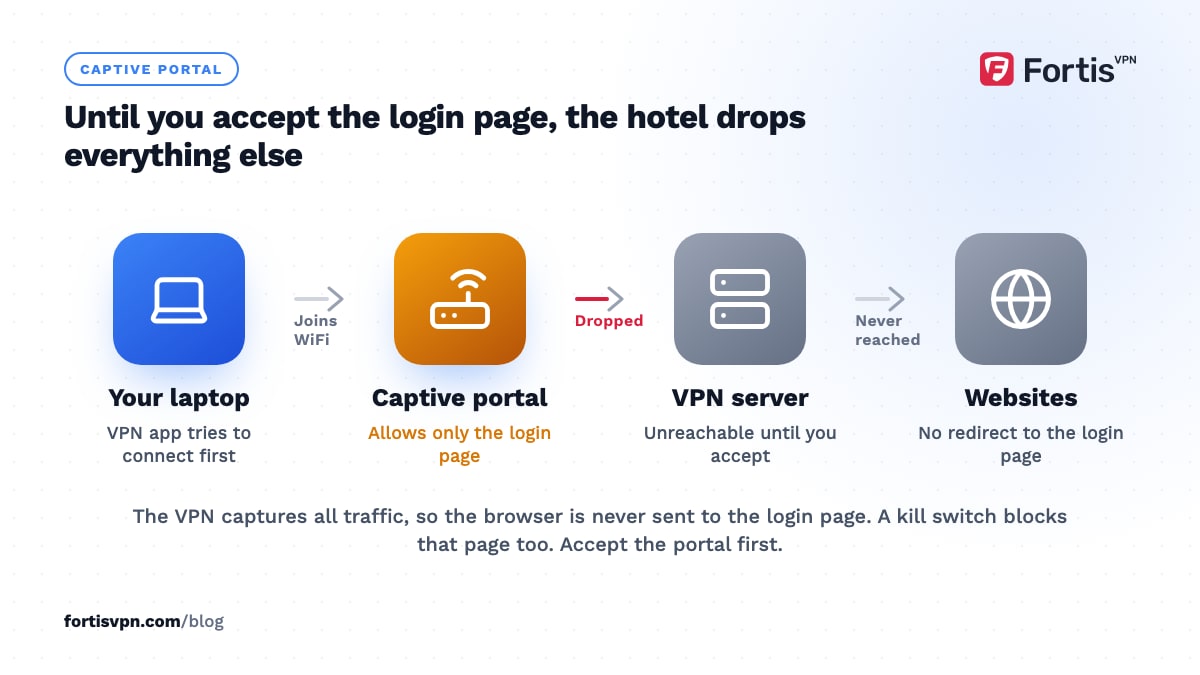
Kill switches make this worse. A kill switch blocks all traffic outside the tunnel, which includes the portal page, so with a kill switch on and the VPN not yet up you cannot even load the login screen. This is why the order matters.
How to connect to hotel WiFi with a VPN, step by step
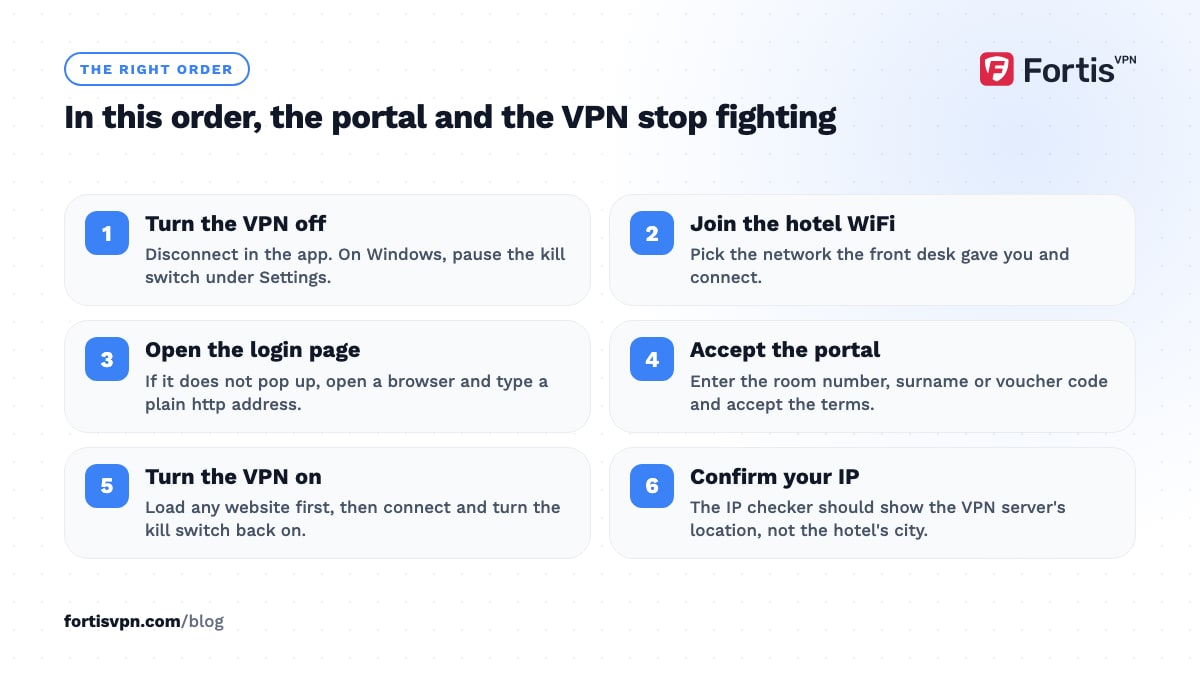
- Turn the VPN off. Disconnect in the app. On Windows, if the kill switch is set to block traffic when disconnected, turn it off for a minute under Settings.
- Join the hotel WiFi. Pick the network the front desk gave you and connect.
- Open the login page. Most devices pop it up: Android shows a "Sign in to network" notification, Windows opens a browser window, iPhone and Mac open a sign-in sheet. If nothing appears, open a browser and type a plain http address such as neverssl.com; the hotel will redirect you to the portal.
- Accept the portal. Enter the room number, surname or voucher code and accept the terms.
- Check that you have internet. Load any website. If it works, the portal is done.
- Turn the VPN on. Connect to the server you want and turn the kill switch back on.
- Confirm the VPN is working. Open the IP checker; it should show the VPN server's location, not the hotel's city.
Hotels usually make you repeat the portal every 24 hours or after a reconnect. If the VPN stops working the next morning, that is the portal, not the VPN: disconnect, accept the page again, reconnect.
Why won't my VPN connect on hotel WiFi?
Work through these in order; the first two cover most cases.
- You have not accepted the portal yet. The symptom is "connected but no internet" or an endless "connecting". Disconnect the VPN and load a website; if the login page appears, that was it. The connected but no internet guide has the other causes.
- The portal session expired. Same fix. Hotels expire sessions daily, when you change rooms, or after your device sleeps for a few hours.
- The kill switch is blocking the portal. Turn it off, accept the portal, turn it back on.
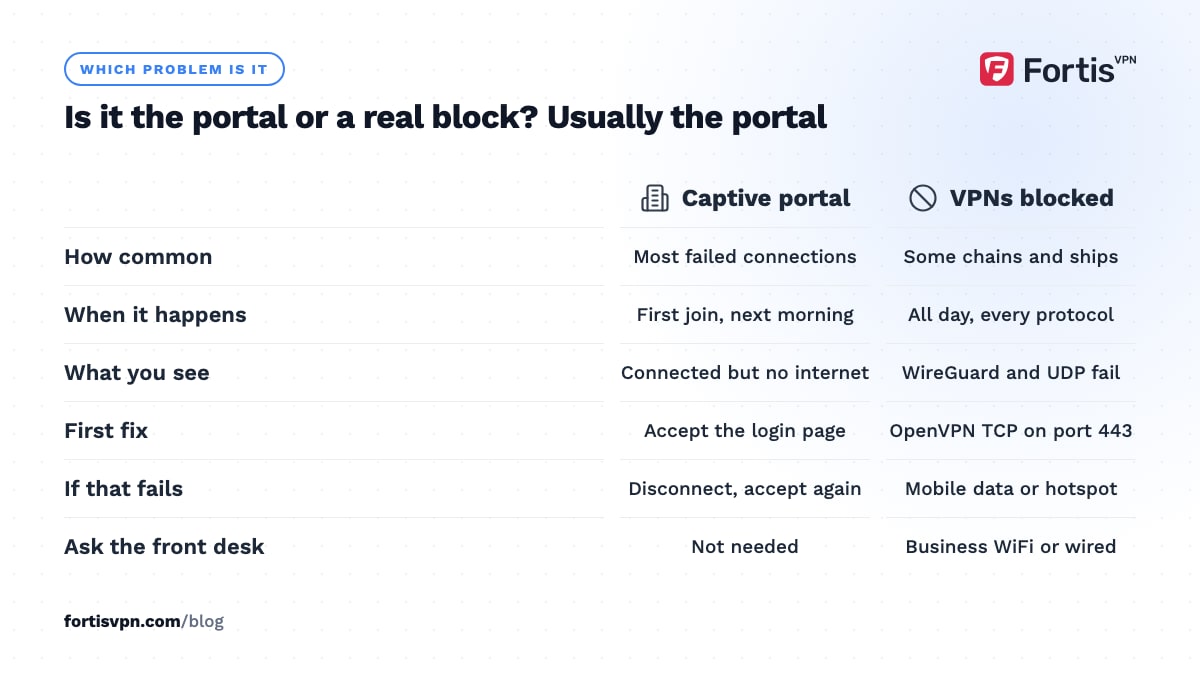
- The hotel blocks VPN ports. Some hotel and conference networks allow only web traffic on ports 80 and 443. WireGuard and OpenVPN UDP fail; OpenVPN TCP on port 443 usually works because it looks like HTTPS. Change the protocol under Settings.
- The network inspects traffic. Rarer, mostly in a few countries and on some corporate networks. Use an obfuscated server.
- DNS is hijacked. Some hotels force all DNS through their own resolver, which can break the app's lookup of its servers. Switching to another server or to OpenVPN TCP usually clears it.
- Device limit reached. If you set up a new tablet on holiday, check you are not at your account's device limit.
The guide for a VPN blocked on a network covers the same steps for offices and schools.
What to do if the hotel blocks VPNs
Most hotels do not block VPNs on purpose; a VPN that fails is usually the portal. But some chains, conference centres and cruise ships restrict traffic, and some countries require networks to. In order of effort:
- Switch to OpenVPN TCP on port 443. This is the protocol that passes most restrictive networks, because blocking it would also block every HTTPS website.
- Try an obfuscated server. These wrap the VPN traffic so inspection tools see ordinary encrypted web traffic. See what an obfuscated VPN server is.
- Use mobile data or a hotspot. A local SIM or an eSIM with a few gigabytes often beats a crippled hotel network for the things that matter, and the VPN connects normally over it.
- Ask the front desk. Business hotels often have a separate network or a wired port for guests who need corporate VPN access.
If the VPN connects but every website is slow, the hotel is probably limiting speed per device rather than blocking; see the FAQ below.
Is hotel WiFi safe without a VPN, and should you keep it on all stay?
Hotel WiFi is a shared network with hundreds of strangers on it, run by a contractor you have never met. The risks are the ones from any public network, and some are specific to hotels.
- Other guests on the same network. Without client isolation, any device on the network can see yours and probe it. With a VPN, your traffic is encrypted before it leaves your device.
- Rogue hotspots. A network named after the hotel is not necessarily the hotel's. A VPN makes a fake hotspot useless to its owner because it cannot read the tunnel.
- Injected content. Some hotel networks insert ads or tracking into pages you load over plain http. A VPN carries the page past them untouched.
- Logging. The portal ties your room number or name to everything you do. Inside the VPN the hotel sees one encrypted connection and nothing else.
So yes, keep it on for the whole stay, with the kill switch on so a dropped tunnel does not quietly fall back to the open network. Our guides on whether public WiFi is safe and how a VPN protects you on public WiFi cover what HTTPS already protects and what it does not. The only times to turn the VPN off are the portal re-login and hotel services that need your local IP address, such as a room-service app that only works on the hotel network.
Casting and streaming on the hotel TV
Hotel networks almost always turn on client isolation, which stops devices on the WiFi from seeing each other. That is good for security and fatal for casting: your phone cannot find a Chromecast on the same network. A VPN does not change this; isolation happens below the VPN.
Three things work:
- Bring a streaming stick and plug it into the room TV. A Fire TV Stick or Google TV dongle joins the hotel WiFi on its own, gets through the portal with its built-in browser, and runs the VPN app so your home streaming services work in the room. Some hotel TVs lock the HDMI inputs; check before you unpack it.
- Use your phone as a hotspot. Phone, stick and laptop all join the hotspot, isolation no longer applies, and casting works. Run the VPN on each device that needs it, since the phone's hotspot does not pass its own VPN through.
- Use an HDMI cable from the laptop. The least elegant and the most reliable.
The VPN for travel guide has a packing list for all of this.
Using FortisVPN on hotel WiFi
The FortisVPN apps for Windows, Android, Android TV and Fire TV all let you change protocol under Settings, so the move to OpenVPN TCP on port 443 for a restrictive hotel network is a two-tap change. On Windows the kill switch lives under Settings too, which is where you pause it for the portal page; the steps are in kill switch and startup settings. A Fire TV Stick in your bag signs in with a code at fortisvpn.com/tv, so you do not type a password on a hotel remote. One account covers 10 devices, which is the phone, laptop, tablet and stick with room to spare. Plans start with a 7-day free trial and have a 30-day money-back guarantee, so you can start a 7-day free trial the week before you travel.
Frequently asked questions
Can hotel WiFi see what I browse?
Without a VPN, the hotel can see every domain you visit, when, and how much data you move, tied to your room number from the portal. It cannot read the content of HTTPS pages or your passwords. With a VPN connected, it sees only an encrypted connection to the VPN server and the total amount of data.
Is airport WiFi safe with a VPN?
Safer than without one. Airport networks have the same captive portal and the same crowd of strangers as a hotel, plus more fake hotspots, because nobody can check which "Free Airport WiFi" is real. Accept the portal, turn the VPN on, and treat anything you did before the VPN connected as public.
Does a VPN work on plane or cruise ship WiFi?
Often, but it depends on the provider. In-flight and ship networks run over satellite, with high latency, and some restrict traffic to web ports or specific apps. If the VPN will not connect, switch to OpenVPN TCP on port 443; if that fails, the network is filtering and the VPN will not work on that trip.
Does a VPN help with slow hotel WiFi?
Only in one case: when the hotel slows video or specific services by inspecting traffic, a VPN hides what you are doing and the limit may stop applying. It cannot add bandwidth to a congested network. If a speed test is slow with the VPN off, the VPN will not make it faster.
Why does the hotel WiFi keep asking me to sign in again?
Portal sessions expire, often every 24 hours, and many networks tie the session to your device's WiFi hardware address, which modern phones randomise per network. If your phone uses a private or random address, the hotel may not recognise it after sleep. Turning off the private address for that one network keeps the session alive.
Last updated: 5 October 2026