VPN vs Proxy: What's the Difference and Which Do You Need?
VPN vs proxy in plain words: a proxy changes your IP for one app with no encryption, a VPN encrypts every app on your device. Which one you need and when.
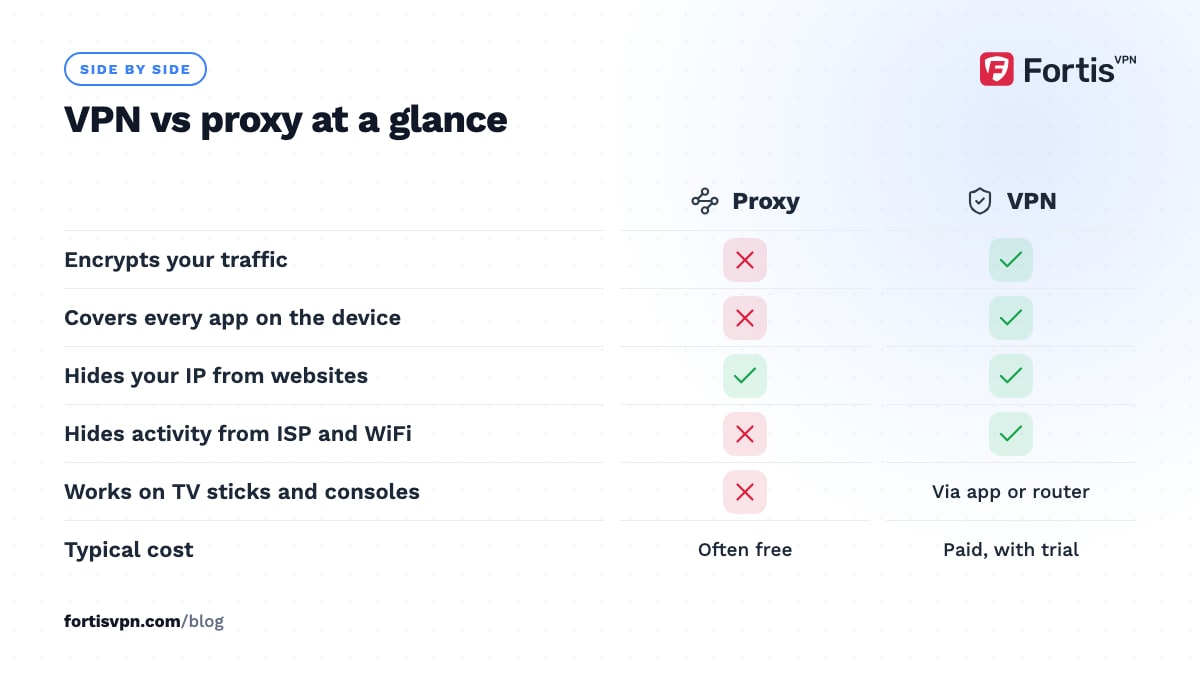
The difference between a VPN and a proxy comes down to encryption and scope. A proxy forwards traffic for one app and changes the IP address that websites see, but it does not encrypt anything. A VPN encrypts all traffic leaving your device and sends it through a tunnel to a server, so your ISP and the WiFi owner cannot read it. For privacy, pick a VPN. For a quick IP change inside a single app, a proxy can do.
- A proxy changes the IP one app shows to websites; your ISP and WiFi owner still see everything.
- A VPN encrypts every app on the device and hides your activity from the local network.
- Free proxies often block HTTPS, log traffic or inject ads into the pages you load.
- Use a VPN for privacy, public WiFi, streaming and torrents; a proxy for light, single-app jobs.
What is a proxy and what does it do?
A proxy is a server that sits between one app and the internet. The app sends its requests to the proxy, the proxy fetches the page on your behalf, and the website only ever sees the proxy's IP address. Nothing on the path is encrypted by the proxy itself.
You set a proxy per app. A browser has its own proxy settings, a torrent client has its own, and most other apps on your device ignore the proxy entirely and go straight out through your normal connection.
There are two types you will meet:
- HTTP proxy. Understands web traffic only. It can read and change any page you load over plain HTTP, and it sees the domain of every HTTPS site you visit.
- SOCKS5 proxy. Works one level lower and passes any kind of traffic without looking inside it, which is why torrent clients and some games support it. It supports a username and password, but still adds no encryption.
There is a third kind you never set up yourself: the transparent proxy. Many workplaces, schools and some mobile carriers route all web traffic through one so they can filter sites and keep logs. You will not see it in any settings page, and on a company-managed laptop it can even inspect HTTPS using a certificate the IT team installed.
What does a VPN do differently?
A VPN app builds an encrypted tunnel from your device to a VPN server and routes every app through it. Your ISP, your router and the owner of the WiFi see a stream of scrambled packets going to one server. They cannot see which sites you visit, and websites see the VPN server's IP instead of yours.
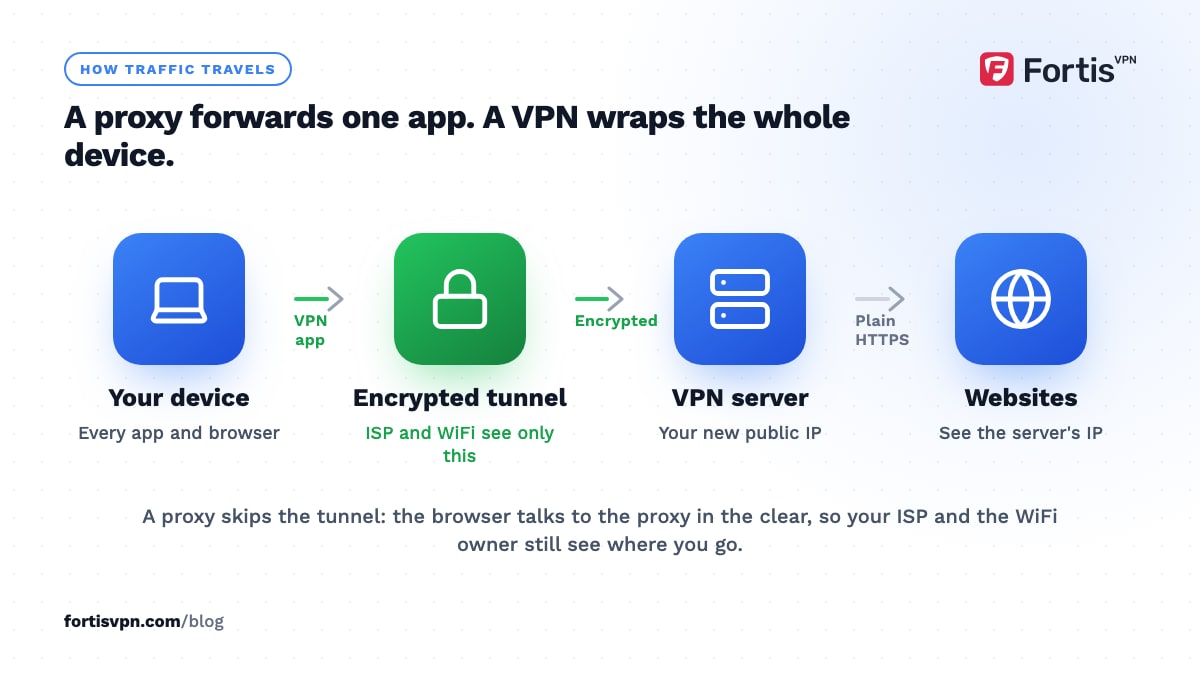
Two things make this different from a proxy in practice. First, the VPN covers the whole device, including apps that have no proxy setting, such as a smart TV app or a game launcher. Second, a good VPN app also routes your DNS lookups through the tunnel, so the names of the sites you visit do not leak to the ISP's resolver.
If you want the full picture of how the tunnel works, read what a VPN is and how it works. For the limits, see what a VPN hides and what it does not.
VPN vs proxy: side by side
| Criterion | Proxy | VPN |
|---|---|---|
| Encryption | None (HTTPS sites stay encrypted by the site, not by the proxy) | Everything between your device and the VPN server |
| Scope | One app at a time | Whole device, or chosen apps with split tunnelling |
| Hidden from ISP and WiFi owner | No, they still see the sites you visit | Yes, they see only an encrypted link to one server |
| Changes your visible IP | Yes, in that app | Yes, for every app |
| Speed | Often fast, but free ones are overloaded | Small overhead from encryption; a nearby server loses little |
| Logging | Usually unknown; free proxies often log | Depends on the provider's no-logs policy |
| Cost | Free or cheap | Paid, with free trials |
| Setup | Type an address and port into each app | Install an app, sign in, press connect |
| Streaming | Rarely works; most services block known proxies | Works when the server IP is not flagged; switch servers if detected |
| Torrenting | SOCKS5 hides your IP from peers only | Hides IP from peers and content from your ISP |
| Best for | Light, one-off IP changes in a single app | Privacy, public WiFi, travel, whole-device protection |
When is a proxy enough?
A proxy is enough when the only thing you need is a different IP address in one app, and nothing sensitive is going through it. Typical cases:
- Checking how a website looks from another country, without logging in to anything.
- Routing a torrent client through SOCKS5 so other peers see the proxy's IP, if you accept that your ISP still sees the traffic.
- Developer or testing work where you need to send requests from a known IP.
- A corporate proxy your employer runs to cache pages and apply a content policy.
The common thread is that a proxy changes where you appear to be, not who can read what you are doing. If the task involves a password, a payment or anything you would not want your ISP to see, a proxy is the wrong tool.
When do you need a VPN?
You need a VPN whenever the network you are on, or the ISP behind it, is part of the problem:
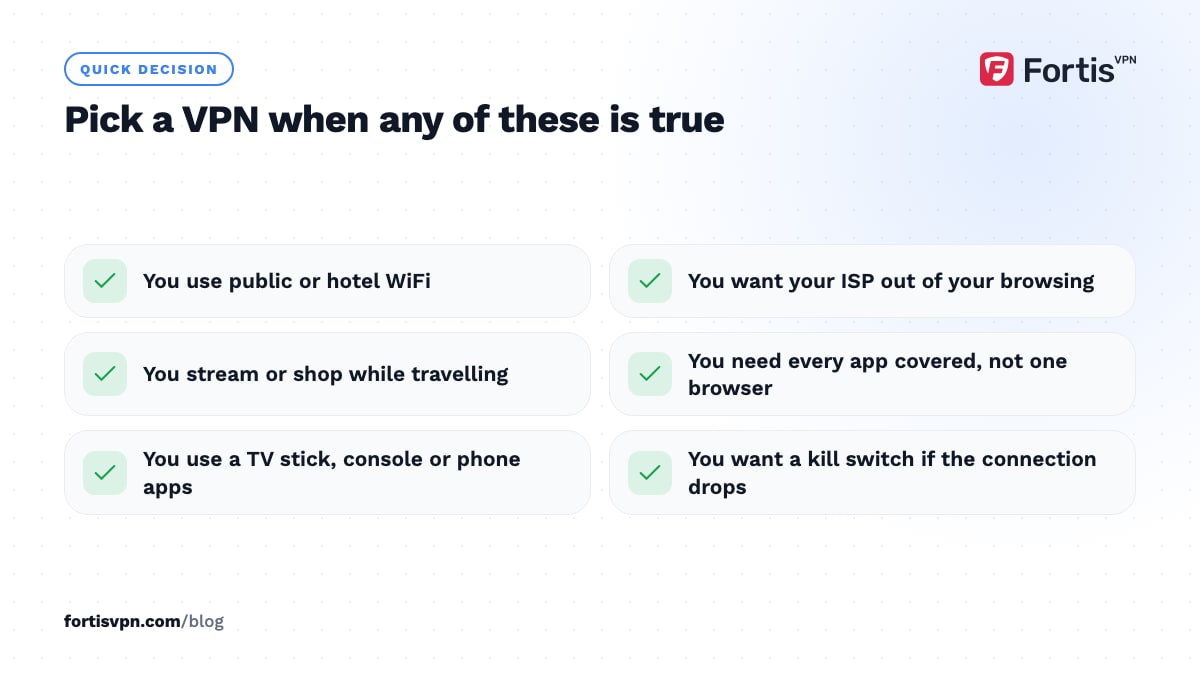
- Public WiFi. Hotel, airport and cafe networks can see every domain you visit and can tamper with unencrypted pages. A VPN closes that off.
- Privacy from your ISP. At home, your ISP sees every site you visit through DNS and connection metadata. A VPN replaces that with one encrypted connection.
- Devices that have no proxy setting. Android TV, Fire TV, consoles and most phone apps cannot use a proxy. A VPN app on the device, or on the router, covers them.
- Streaming while travelling. Services check your IP and your DNS; a VPN changes both for every app on the device.
- Networks that block or filter. On a restrictive network, a VPN running OpenVPN over TCP port 443 looks like ordinary HTTPS. If that is blocked too, obfuscated servers hide the VPN itself.
In the VPN vs proxy decision, the question to ask is not "which is better" but "who am I hiding from". If the answer includes the network itself, only a VPN does the job.
Can you use a VPN and a proxy together?
Yes, and the two do not conflict. If the VPN is connected and you also set a proxy in your browser, browser traffic goes from your device to the VPN server, then to the proxy, then to the website. The website sees the proxy's IP; your ISP sees only the VPN tunnel.
Most people have no reason to do this. It adds a second hop, so pages load slower, and the proxy still sees everything the browser sends. The one everyday case is a workplace that forces a proxy: if the company network allows the VPN at all, your traffic is already encrypted before it reaches the proxy, so the proxy sees only the tunnel. If the network blocks VPN connections outright, the proxy is not the fix; switching protocol or using an obfuscated server is.
If what you really want is stronger anonymity rather than a second IP, compare a VPN with Tor instead. Chaining proxies does not give you Tor's protections.
Free proxies: the catch
Free proxy lists and "web proxy" sites are the riskiest option on this page. Whoever runs the server can see every unencrypted request, and a web proxy site sees everything you type into it, including usernames and passwords, because it loads the page for you.
A widely reported 2015 test of several hundred free proxy servers found that most of the ones that were online blocked HTTPS, which forced users onto plain HTTP where the operator could read the traffic. A smaller share rewrote the pages they served, mostly to inject ads. The economics have not changed since: a free server has to be paid for somehow, and your traffic is the obvious currency.
If you must use one, use it only with HTTPS sites, never sign in to anything through it, and check what it exposes with an IP address check afterwards.
Using FortisVPN instead of a proxy
FortisVPN covers the cases where a proxy falls short. One app encrypts every connection on the device, so you do not configure anything per app, and split tunnelling lets you send only chosen apps through the VPN if you want the proxy-like, single-app behaviour. The tracker blocker and ad blocker work at connection level, the opposite of a free proxy that injects ads. The apps run on Windows, Android, Android TV and Fire TV, and one account covers 10 devices at once. Download the Windows app or start a 7-day free trial; you pay nothing today and can cancel before day 7.
Frequently asked questions
Is a proxy safer than a VPN?
No. A proxy adds no encryption, so your ISP, the WiFi owner and the proxy operator can all see your traffic. A VPN encrypts everything between your device and the VPN server. The only sense in which a proxy is "safer" is that a bad proxy affects one app, while a bad VPN sees the whole device, which is why the provider matters.
Can a proxy hide my IP from my ISP?
No. Your ISP assigns your IP address and routes every packet you send, including the ones going to the proxy. A proxy only changes the IP that the destination website sees. If you want your ISP to see nothing but an encrypted link, you need a VPN, and even then the ISP still knows you are connected to a VPN server.
Is a VPN just a proxy with encryption?
Partly. Both forward your traffic through another server and change your visible IP. A VPN adds encryption, covers the whole operating system rather than one app, carries your DNS lookups, and usually includes a kill switch that blocks traffic if the tunnel drops. Those extras are what make a VPN useful on hostile networks, not the IP change alone.
Do I need both a VPN and a proxy?
Almost never. A VPN already does everything a proxy does, for every app on the device. The exceptions are specialist: an employer's mandatory proxy, scraping or testing work that needs many different exit IPs, or a torrent client you want on a different IP from the rest of the device. For everything else, a VPN alone is simpler and safer.
Which is faster, a VPN or a proxy?
It depends on the server more than the technology. A proxy skips encryption, so on paper it has less overhead, but free proxies are shared by thousands of people and are often slow or unreliable. A paid VPN on a nearby server with WireGuard costs only a small share of your bandwidth. In day-to-day use, a good VPN is faster than a free proxy.
Last updated: 19 October 2026