Why Google Keeps Asking for CAPTCHAs on a VPN (and Fixes)
Google shows CAPTCHAs on a VPN because many people share one IP address. Learn why the unusual traffic warning appears and 7 fixes, including a dedicated IP.
Google shows CAPTCHAs on a VPN because the IP address you are using is shared with many other people, and Google rates traffic by IP. If anyone on that address sends automated searches, everyone on it gets the unusual traffic check. Switching to another server clears it in most cases. A dedicated IP, which nobody else uses, stops it for good.
- The CAPTCHA is about the IP address, not you; your device and account are usually fine.
- Switching server, signing in to Google and clearing cookies fix it most of the time.
- Banks, retailers and streaming services may block VPN IP ranges outright for the same reason.
- A dedicated IP removes shared reputation, but it also ties your activity to one address.
Why does Google show CAPTCHAs when you use a VPN?
Google's own help page for the "Our systems have detected unusual traffic from your computer network" message lists the usual causes: devices on a shared network, a shared VPN, tunnel services, and automated queries. The key word is shared. A VPN server has one or a few public IP addresses and many people connected at once, so from Google's side, one IP is suddenly sending thousands of searches an hour.
Google cannot tell a scraper from a person on the same address, so it rate-limits the address and asks each new visitor to prove they are human. One bad actor on a popular server, or a reputation score the address earned last week, is enough. The check is usually a reCAPTCHA puzzle; sometimes it is a full block page with no puzzle, which Google says it applies when it cannot separate abusive traffic on that address from the rest.
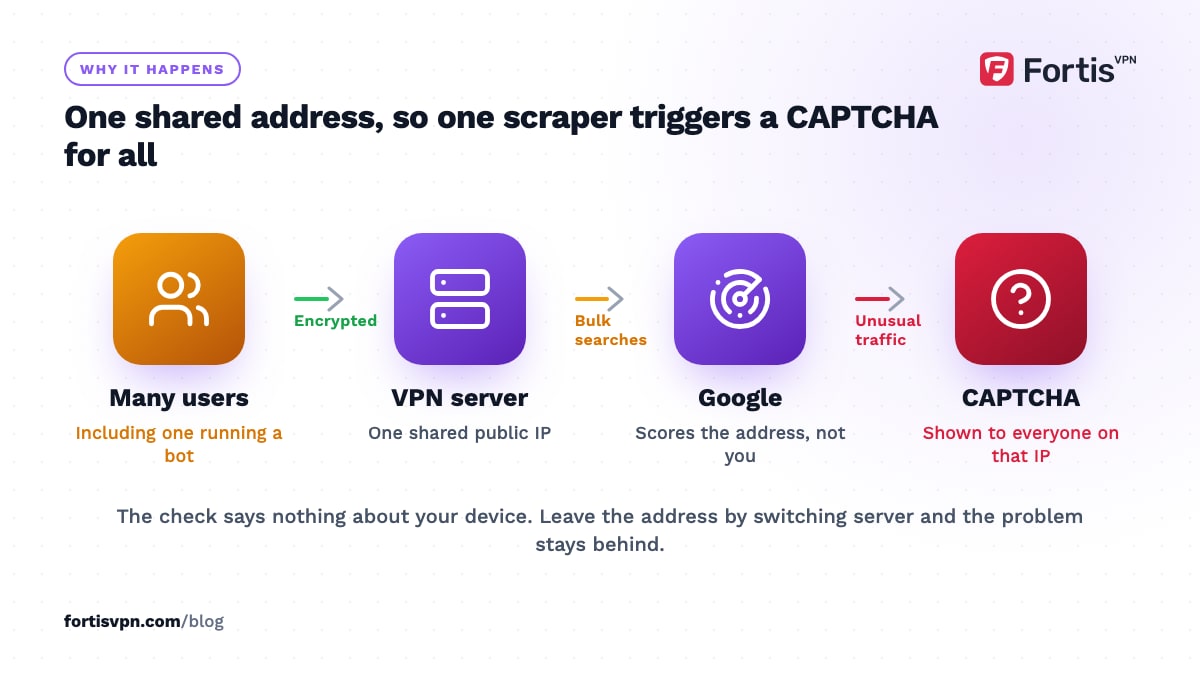
Two things follow from this. First, the CAPTCHA says nothing about your device: you do not have malware because Google asked you to click traffic lights. Second, it is tied to the address, so the moment you leave that address, the problem goes with it. That is why a VPN blocked by a website is almost always a server problem, not an account problem.
Why do some websites block VPNs entirely?
CAPTCHAs are the mild version. Some sites refuse VPN addresses altogether, and they do it for business reasons rather than because they dislike VPNs.
- Banks and payment services treat a login from a data-centre address in another country as a fraud signal, and may block it or ask for extra verification.
- Retailers and ticketing sites block data-centre ranges to stop bots buying stock and scalping tickets. VPN servers live in data centres, so they get caught in the same net.
- Streaming services block known VPN addresses to enforce regional licensing.
- Forums, classifieds and gaming services block addresses that were used for spam or ban evasion, which a shared address may have been.
These sites buy lists of IP ranges tagged as hosting, proxy or VPN, and apply rules to anything on the list. There is no appeal from your side, except to use an address that is not on it. The websites blocked or loading slowly guide covers the per-site fixes.
7 fixes for Google CAPTCHAs on a VPN
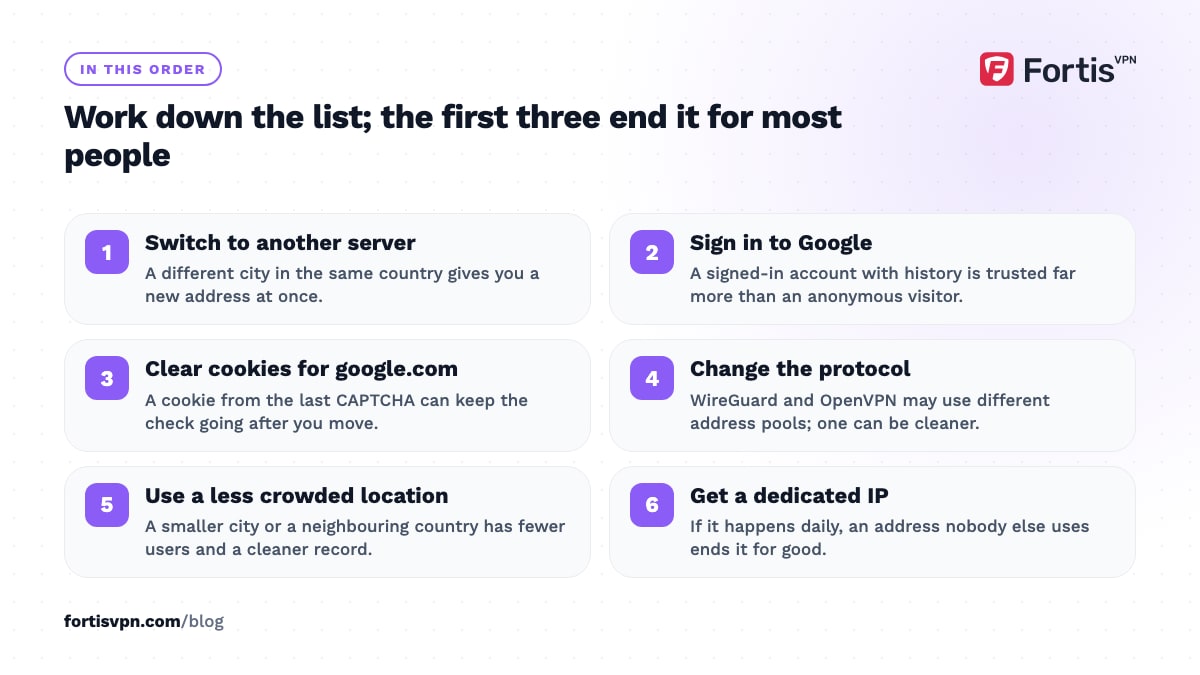
This is how to stop the CAPTCHAs. Try the fixes in order; the first 3 solve the problem for most people within a minute.
- Switch to another server. Pick a different city or server in the same country. You get a new address, and unless it is also rate-limited, the CAPTCHAs stop at once.
- Sign in to your Google account. Google trusts a signed-in account with a history far more than an anonymous visitor on a flagged address, and the check comes up far less often.
- Clear cookies for google.com. A cookie from the previous CAPTCHA can keep the check going even after you change address. Clear site data for Google and reload.
- Change the protocol. Some providers route different protocols through different address pools. Switching from WireGuard to OpenVPN, or the reverse, can land you on a cleaner address.
- Use a less crowded location. The most popular countries have the busiest servers and the worst reputation. A smaller city in the same country, or a neighbouring country, is often cleaner.
- Use split tunnelling for the site that blocks you. If one bank or shop refuses the VPN, let that one app or site go direct while everything else stays protected. The split tunnelling guide explains how.
- Get a dedicated IP. If you hit CAPTCHAs daily, or a site you need blocks every shared address, a dedicated IP ends the problem because nobody else uses it. The next section explains the trade-off.
Two things not to do: do not install browser extensions that promise to solve CAPTCHAs for you, and do not switch the VPN off for Google alone unless you accept that your searches then leave your device unprotected.
Why is Google in a different language on my VPN?
Same cause, different symptom. Google picks the language and region of its results from your IP address, so a server in Germany gets you German results and a German cookie banner, even on google.com. Prices on shopping sites and the local Google Doodle change the same way.
To fix it without changing server, open Google Search settings at google.com/preferences, find Language and region, set Results region to your country and Display language to your language, then save. Google stores the choice in your account if you are signed in, or in a cookie if not, so clearing cookies will reset it. The Google CAPTCHA or wrong location guide is the short checklist version.
When a dedicated IP is the real fix
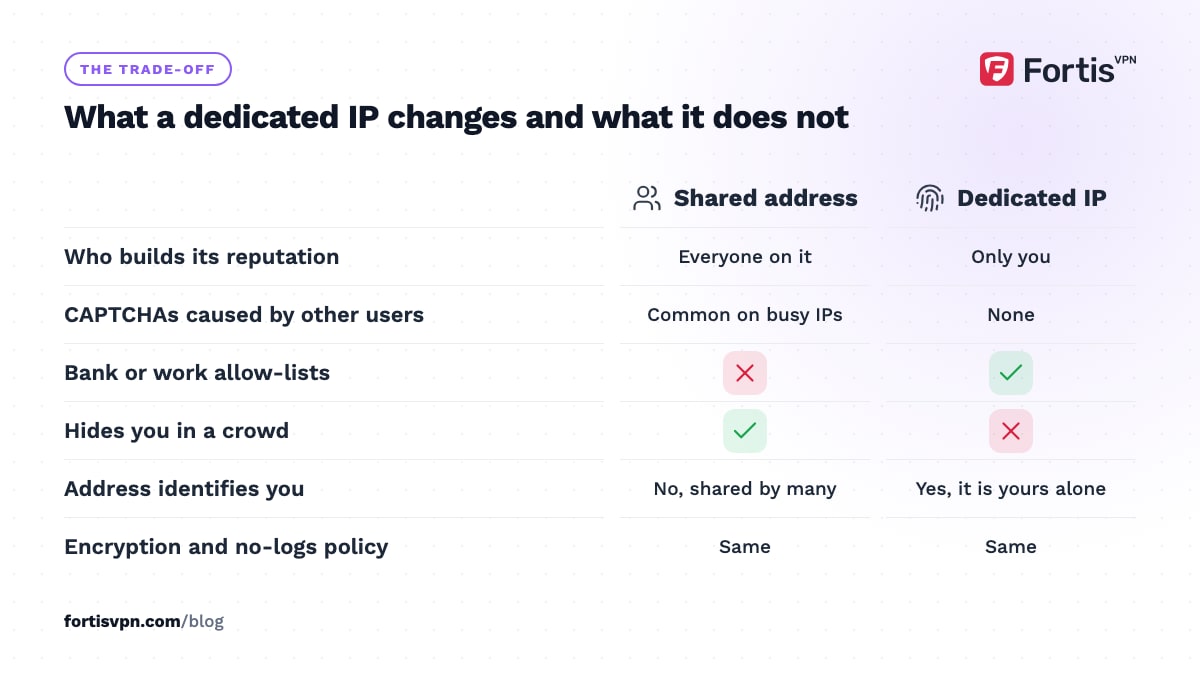
A dedicated IP is an address assigned to you alone. Your traffic still goes through the VPN server and is still encrypted, but it leaves from an address no other customer shares. The address builds a reputation from your use only, so the rate limits and block lists that shared addresses pick up do not apply.
It suits you if you hit CAPTCHAs or blocks every day, if you need a bank, work system or admin panel that allows only known addresses, or if you run something that requires a fixed address.
The cost is privacy, not money. On a shared address your activity blends with everyone else on it; on a dedicated one, everything from that address is you, at least to anyone who learns the address is yours. A no-logs provider still keeps no logs, but the address itself becomes an identifier. If your main reason for a VPN is hiding in a crowd, keep the shared address and switch servers when needed. Dedicated IP vs shared IP goes through this decision in detail, and what is a dedicated IP address explains the mechanics.
Is being blocked a sign your VPN is bad?
No. Every shared VPN address on every provider eventually gets flagged somewhere, because reputation systems score addresses, not companies. A provider with many servers and many addresses gives you more clean ones to switch to, but none avoids it entirely.
What would be a sign of a bad VPN is different: CAPTCHAs on every server, in every country, all the time, which suggests a provider with very few addresses and heavy abuse; or sites showing your real city while the app says connected, which means the tunnel is leaking rather than being blocked. For the second case, check your IP address while connected. If it shows your home location, the problem is not Google.
How FortisVPN handles CAPTCHAs and blocks
FortisVPN has servers in 100+ countries, so switching to a cleaner address is a 2-tap change in the app, and most CAPTCHA problems end there. For people who hit them daily, FortisVPN offers a dedicated IP as an optional add-on: a static address only you use, bought with the plan or added later from your account dashboard. The dedicated IP help page shows how to add it and connect to it. Shared and dedicated connections are covered by the same no-logs policy and the same encryption. If you want to see how a particular site behaves with a shared address before committing, start a 7-day free trial and test it on the servers you would actually use.
Frequently asked questions
Why does Google think I am a robot when I use a VPN?
Because Google rates traffic by IP address, and the VPN address is shared with many other people. If the total traffic from that address looks automated, Google asks every visitor on it to solve a CAPTCHA. It is not a judgement about you or your device. Switch to another server and the check usually disappears immediately.
Why do some websites not work with a VPN?
Sites that block VPNs do so by subscribing to lists of data-centre and VPN address ranges and refusing connections from them. Banks do it to spot fraud, retailers to stop bots, and streaming services to enforce licensing. Try a different server; if the site blocks every shared address, use split tunnelling for that site or a dedicated IP.
Does a dedicated IP stop CAPTCHAs?
Mostly, yes. CAPTCHAs on a VPN come from the shared reputation of an address, and a dedicated address has only your traffic on it. You can still trigger a CAPTCHA by your own behaviour, such as searching very fast or using automation, but the daily unusual traffic checks caused by other users stop once you move to your own address.
Is it safe to solve CAPTCHAs on a VPN?
Yes. A CAPTCHA is Google's own check and solving it sends nothing beyond the puzzle answer and the usual browser signals. It does not reveal your real IP or switch off the VPN. Be careful only with CAPTCHA pages on unfamiliar sites, which can be phishing, and never install an extension that offers to solve CAPTCHAs automatically.
Does changing my VPN protocol stop CAPTCHAs?
Sometimes. The protocol itself has nothing to do with it, but some providers route different protocols through different address pools, so switching from WireGuard to OpenVPN can put you on an address with a cleaner reputation. Treat it as another way to get a different address, the same as switching server, rather than a fix in its own right.
Last updated: 4 October 2026