VPN Keeps Disconnecting? Causes and Fixes That Work
VPN keeps disconnecting? Learn why it drops on WiFi, Android, Windows and TV, and the fixes that stop it: protocol, battery settings, router timeouts and more.
A VPN keeps disconnecting for one of a few reasons: the WiFi signal is unstable, your phone kills the app to save battery, the router times out the connection, or the protocol does not suit the network. The fix is to find which one applies to you. Change the protocol first, then adjust battery and power settings, and turn on the kill switch so a drop never exposes your traffic.
- Drops at a regular interval, every few minutes, usually point to a router or carrier timeout.
- On Android, battery optimisation is the top cause; set the app to Unrestricted and turn on Always-on VPN.
- WireGuard and IKEv2 reconnect fastest when you move between WiFi and mobile data.
- A kill switch does not stop drops, but it stops a drop from leaking your real IP.
Why does my VPN keep disconnecting?
A VPN tunnel is a long-lived connection between your device and one server. Anything that interrupts that connection for more than a few seconds breaks the tunnel, and the app then has to rebuild it. The common interruptions are:
- Unstable WiFi. A weak signal or interference drops packets, and the tunnel times out before the WiFi recovers.
- Switching networks. Moving from WiFi to mobile data, or between 2 access points, changes your IP, and some protocols have to start again.
- Battery optimisation. Android and some laptop power plans suspend background apps, including the VPN, when the screen is off.
- Router or carrier timeouts. Routers forget idle UDP connections after a set number of seconds, and the tunnel dies with them.
- Protocol mismatch. Some networks throttle or reset UDP traffic, so WireGuard and OpenVPN UDP drop while TCP holds.
- Server overload or maintenance. A busy server sheds connections; the fix is a different server, not a setting.
- Network interference. A few ISPs and most restrictive networks actively reset VPN connections.
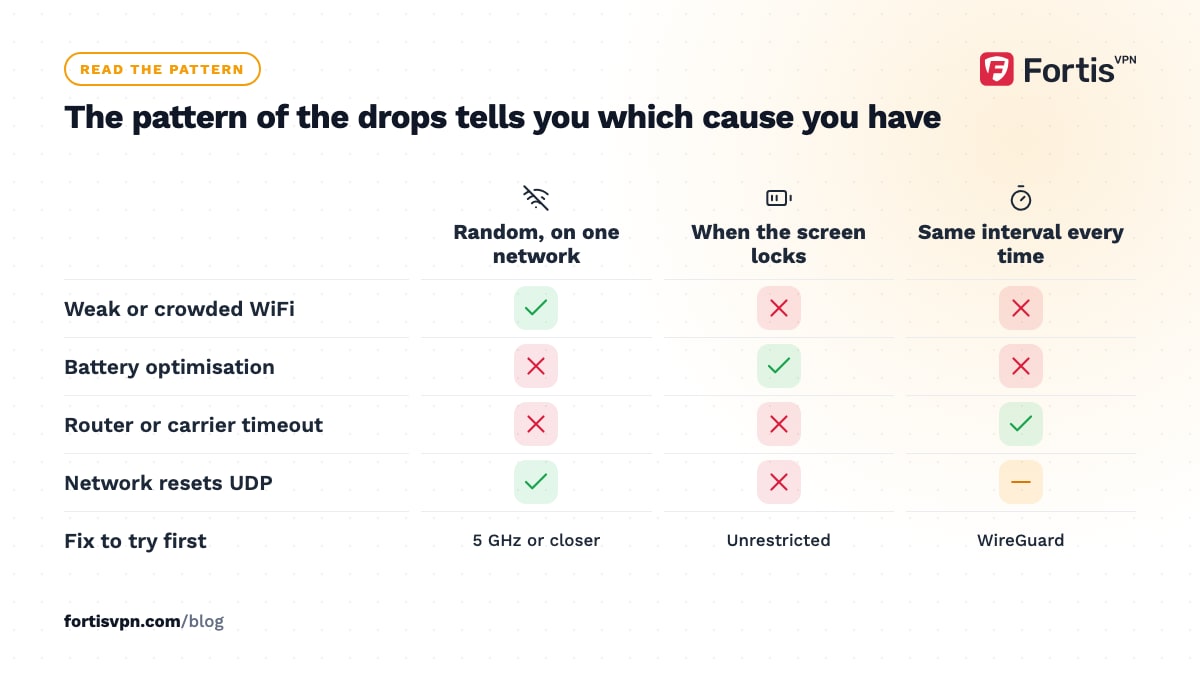
The pattern of the drops tells you which it is. A VPN that disconnects randomly on one network points at WiFi. Drops when the screen locks point at battery settings. Drops at the same interval every time point at a timeout.
Fixes that work on any device
Start with these 4 steps whatever you are using. Each one takes a minute, and together they fix most cases.
- Change the protocol. Open the app's settings and switch from Auto to WireGuard. It handles a change of network without a full restart, so a WiFi hiccup rarely becomes a drop. If drops continue, try OpenVPN TCP, which copes better with networks that interfere with UDP. The VPN protocols guide explains the trade-offs.
- Pick a closer server. A server on another continent means more hops where packets can be lost. Choose the nearest country, or let the app pick for you.
- Update the app and the operating system. Reconnection logic improves with each version.
- Forget and rejoin the WiFi network. This clears a stale lease or a wrong DNS setting the network handed out earlier.
Drops only on one network point to the router section below; drops only when the device sleeps point to the platform sections next.
VPN keeps turning off on Android
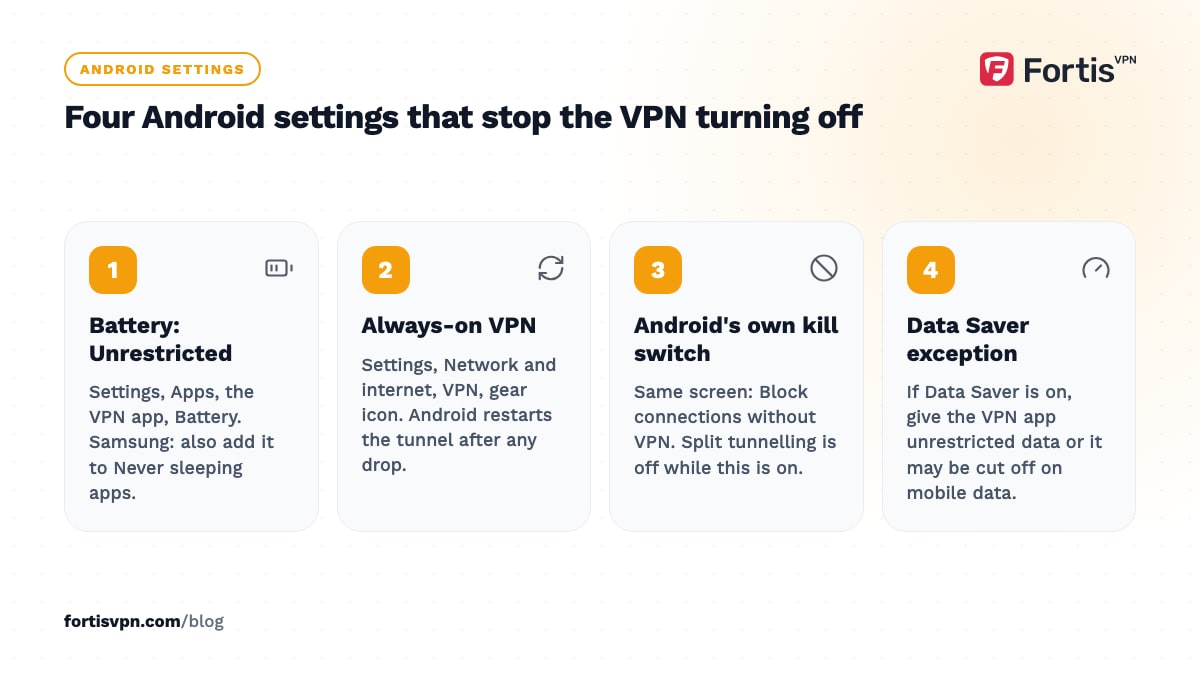
Android kills background apps to save battery, and a VPN app is a background app once you lock the screen. Four settings fix this on most phones; menu names vary by manufacturer.
- Turn off battery optimisation for the VPN. Open Settings, Apps, choose the VPN app, open Battery, and pick Unrestricted. On Samsung phones also open Battery and device care, Background usage limits, and add the VPN to Never sleeping apps.
- Turn on Always-on VPN. Open Settings, Network & internet, VPN, tap the gear icon next to the app, and switch on Always-on VPN. Android then restarts the tunnel after a drop or a reboot without waiting for you.
- Turn on Block connections without VPN. It is on the same screen. This is Android's own kill switch: if the tunnel drops, nothing gets out until it is back. Split tunnelling does not work while this is on, so pick one or the other.
- Check Data Saver. If Data Saver is on, open its settings and give the VPN app unrestricted data access, or it may be cut off on mobile data.
Also uninstall any other VPN or VPN-based ad blocker. Android allows one active VPN at a time, and 2 apps competing for the slot look exactly like random disconnects. The Android VPN setup guide covers the Always-on settings in more detail.
VPN disconnects on Windows
On a laptop, the drops usually come from power management rather than the VPN. Windows is allowed to switch off network adapters to save power, and when it does, the tunnel goes with it.
- Stop Windows powering down the adapter. Open Device Manager, expand Network adapters, double-click your WiFi or Ethernet adapter, open the Power Management tab, and untick "Allow the computer to turn off this device to save power". Do the same for the VPN's own adapter if it has that tab.
- Check the firewall and antivirus. Some security suites inspect the tunnel and reset it periodically. Add the VPN app to the allowed list, or test for 5 minutes with the suite paused.
- Set the app to start with Windows. In the FortisVPN Windows app, the launch-at-startup option sits next to the kill switch in Settings, so the VPN is back before you open a browser after sleep. The kill switch and startup guide shows both switches.
- Prefer Ethernet or 5 GHz WiFi. A crowded 2.4 GHz band in a flat or office drops packets all day, and the VPN notices before you do.
VPN drops on Android TV and Fire TV
TV sticks and boxes have the weakest WiFi radios in the house and sit behind a metal television. That is the main reason a VPN on a TV drops while the same VPN on a phone in the same room stays up.
- Move the router closer, or use a WiFi extender near the TV. If the TV has an Ethernet port or you can add a USB Ethernet adapter, use it.
- Connect to the 5 GHz band if the stick supports it and the router is in the same room; use 2.4 GHz if it is not.
- Turn on auto-connect in the TV app so it rebuilds the tunnel after a drop or after the TV wakes from standby. The auto-connect guide shows where the setting is.
- Use WireGuard on the TV. It needs less of the stick's limited processor than OpenVPN, which cuts drops caused by the device itself falling behind.
Is your router or ISP dropping the VPN?
If the VPN drops at almost exactly the same interval every time, say every 2 minutes or every 30 minutes, the cause is a timeout outside your device.
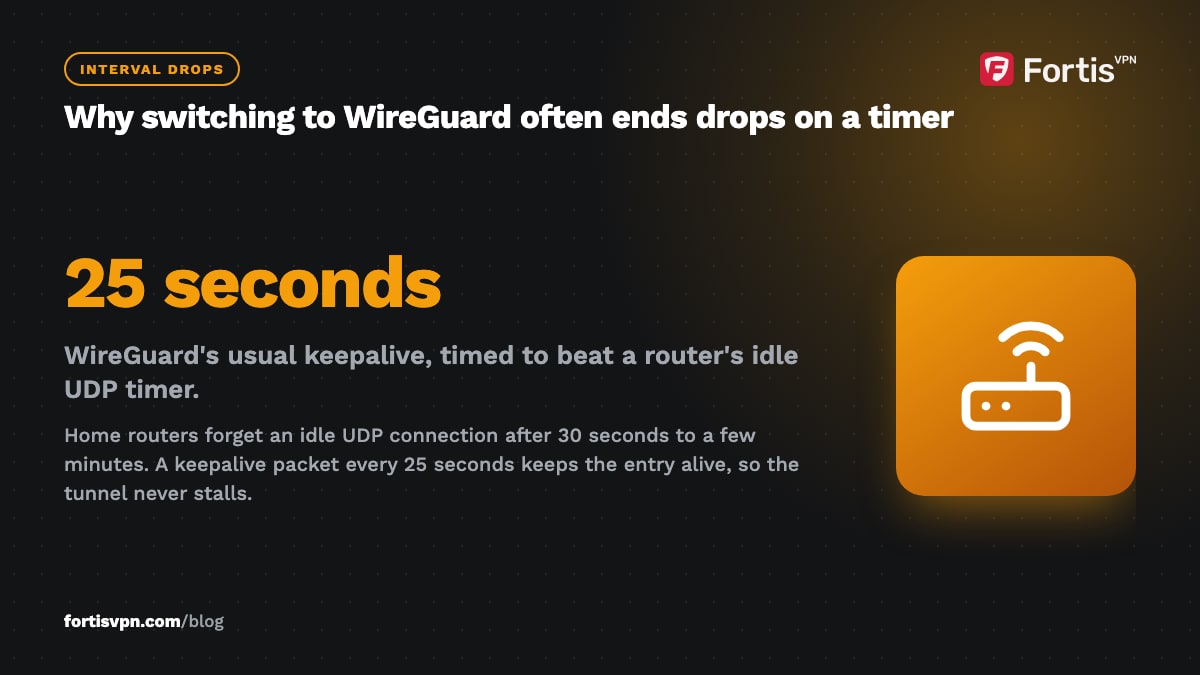
Home routers track each outgoing UDP connection and forget it after a fixed idle period, often somewhere between 30 seconds and a few minutes. If the VPN sends nothing during that window, the reply packets have nowhere to go and the tunnel stalls. WireGuard has a keepalive option for exactly this reason, usually set to 25 seconds so it beats the router's timer, which is why switching to WireGuard often ends interval drops. If it does not, look for a UDP timeout or session timeout setting in the router's advanced page and raise it.
Two other router causes:
- Double NAT. A router plugged into an ISP modem that is also a router means 2 devices tracking the connection. Put the modem in bridge mode, or connect through only one of them.
- Band steering. Mesh systems and dual-band routers move devices between 2.4 GHz and 5 GHz, and each move can briefly cut the connection. Give the device a fixed band if the router allows it.
Mobile carriers use the same kind of address translation, so a VPN on mobile data can drop on the same schedule. Changing protocol is the only fix on a carrier network. If the drops happen on one WiFi network and nowhere else, and TCP on port 443 is the only protocol that holds, the network is actively interfering with VPN traffic. Use TCP 443 or an obfuscated server there and do not bother tuning anything else.
Use the kill switch so a drop never leaks
None of the fixes above makes drops impossible. WiFi will still fail, and routers will still reboot. The kill switch is what makes a drop harmless: when the tunnel goes down, it blocks all traffic until the tunnel is back, so your real IP and your DNS requests never leave the device in the gap.
Without it, every reconnect is a few seconds where your browser, torrent client or streaming app talks to the internet directly. In the FortisVPN Windows app, the kill switch is under Settings; on Android, use the Block connections without VPN toggle described above. The kill switch guide explains what it does and does not protect.
Keeping FortisVPN connected
The FortisVPN apps default to the Auto protocol, which picks what usually works. If your VPN keeps disconnecting, open Settings in the app and set WireGuard explicitly; on a network that resets UDP, set OpenVPN TCP instead. The Windows app has a kill switch and a launch-at-startup option together under Settings. The Android TV and Fire TV apps have auto-connect so the tunnel comes back after standby. The disconnecting troubleshooting page has the same steps as a short checklist. If you have not tried FortisVPN yet, you can start a 7-day free trial and test it on the exact network that drops your current VPN.
Frequently asked questions
Why does my VPN disconnect when my phone sleeps?
When the screen locks, Android and iPhone put apps into a low-power state and may suspend the VPN to save battery. On Android, set the VPN app's battery setting to Unrestricted and turn on Always-on VPN under Settings, Network & internet, VPN. The system then keeps the tunnel open and restarts it the moment it drops.
Why does my VPN disconnect every few minutes?
Drops at a fixed interval almost always come from a router or mobile carrier forgetting the idle UDP connection, not from the VPN app. Switch to WireGuard, whose keepalive is designed to beat those timers, or to OpenVPN TCP. If you control the router, raise its UDP or session timeout and remove double NAT by bridging the modem.
Does a weak WiFi signal disconnect a VPN?
Yes. A VPN tunnel needs a steady stream of packets in both directions, and a weak signal loses enough of them that the tunnel times out even while the WiFi icon still shows bars. Move closer to the router, switch bands, or use Ethernet. WireGuard tolerates packet loss better than OpenVPN, so change protocol too.
Should I use TCP to stop VPN disconnects?
Try it if WireGuard and OpenVPN UDP both drop on the same network, especially at work, school or a hotel. OpenVPN TCP on port 443 survives networks that throttle or reset UDP, at the cost of speed. On a normal home network, TCP will not help and will feel slower, so go back to WireGuard there.
Does the kill switch cause disconnects?
No. The kill switch does not touch the tunnel; it only blocks traffic while the tunnel is down. What it changes is what you notice: without it, a drop is a silent few seconds of unprotected traffic; with it, the internet pauses until the VPN reconnects. If the pauses are frequent, fix the cause of the drops rather than switching it off.
Last updated: 10 October 2026