VPN for IPTV: Why You Need One and How to Set It Up
A VPN for IPTV stops ISP throttling, keeps streams private, lets licensed apps travel. Setup on Fire TV, Android TV, phone and Windows, plus legal facts.
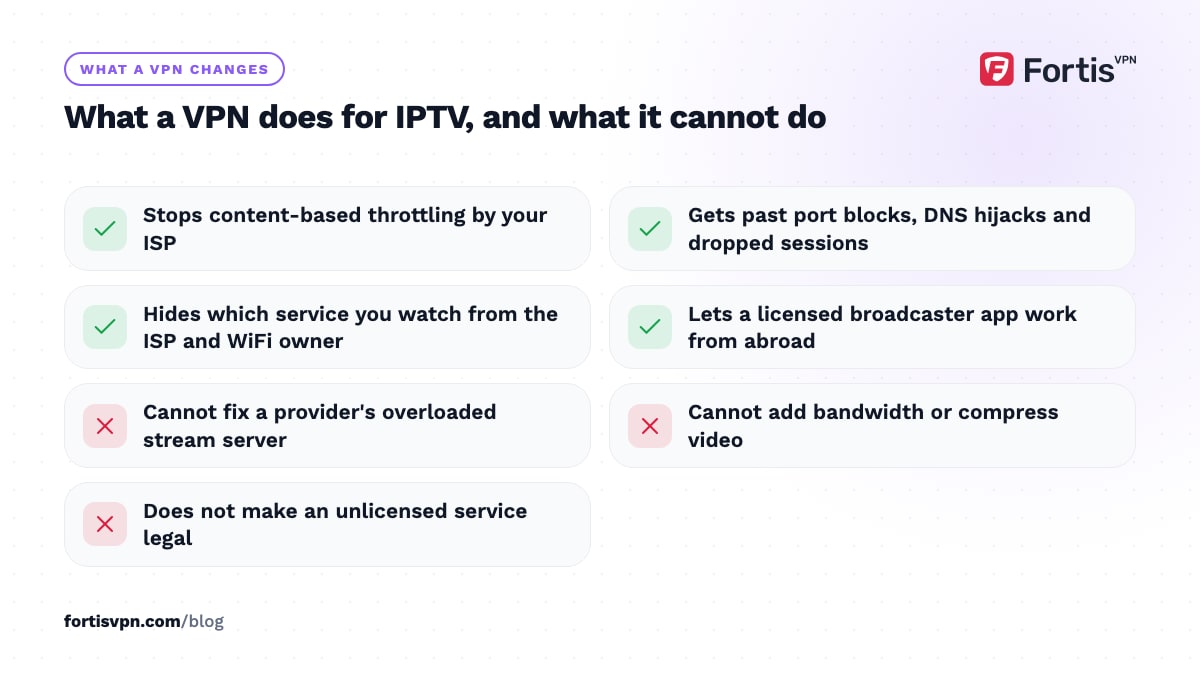
A VPN for IPTV encrypts your streams so your internet provider cannot slow video traffic, cannot interfere with the servers your app talks to, and cannot see which service you use. It also lets a licensed IPTV app work from abroad by placing you back in your home country. It does not turn an unlicensed IPTV subscription into a legal one, and it cannot fix a weak provider.
- IPTV is a delivery method; whether a service is legal depends on who holds the rights.
- A VPN helps with ISP throttling, network interference and privacy on shared connections.
- Install the VPN app on Fire TV, Android TV, Android or Windows; use a router for other boxes.
- Pick the nearest server, WireGuard, and split tunnelling for the IPTV app only.
What is IPTV, and is it legal?
IPTV means television delivered over the internet instead of by aerial, satellite or cable. Technically, BBC iPlayer, Sky Stream, YouTube TV, DAZN and your telecom's TV box are all IPTV. These services are licensed: they pay the rights holders for every channel they carry.
The phrase "IPTV subscription" usually means something else: a cheap monthly service, often sold through social media, offering thousands of channels and every sports package from every country. Those services do not hold the rights to what they stream. In the UK, the US, the EU and most other countries, supplying them is a crime, and watching them can be unlawful too. The Premier League has held High Court orders since 2017 that make the large UK ISPs block pirate stream servers during matches, and UK courts have jailed sellers. Services like that also vanish without notice, with no refund and nobody to complain to.
This article explains why a VPN is useful with IPTV and how to set one up. It does not tell you where to find an unlicensed service, and a VPN does not change what the law says about one. This article is general information, not legal advice.
Why do people use a VPN with IPTV?
- ISP throttling. Some ISPs slow video traffic at peak hours, or slow everything once you pass a usage threshold. Inside a VPN tunnel the ISP cannot tell video from anything else, so content-based throttling stops. Our article on whether a VPN stops ISP throttling explains which kinds it helps with.
- Network interference. Mobile carriers, hotel networks and office networks often block ports, hijack DNS or drop long-lived video connections, which breaks legitimate player apps too. With a VPN, the connection to the player's server runs inside the tunnel, so the local network only sees one encrypted session.
- Privacy on shared networks. On a shared building connection, hotel WiFi or a mobile hotspot, the network owner can see which hosts you connect to. Encrypted traffic to one VPN server reveals nothing about the service.
- Geo-limits on licensed services. A broadcaster app that only streams inside its country works abroad when you connect to a server back home. The usual caveat applies: no service can be guaranteed to work with a VPN.
Does a VPN stop IPTV buffering?
Sometimes. A VPN fixes buffering when the cause is between you and the stream server: ISP throttling of video, a congested route that your ISP picks, or a network that drops long connections. It makes buffering slightly worse when the cause is the provider's own server being overloaded, which is common with cheap services, because the extra hop adds a little latency and nothing more.
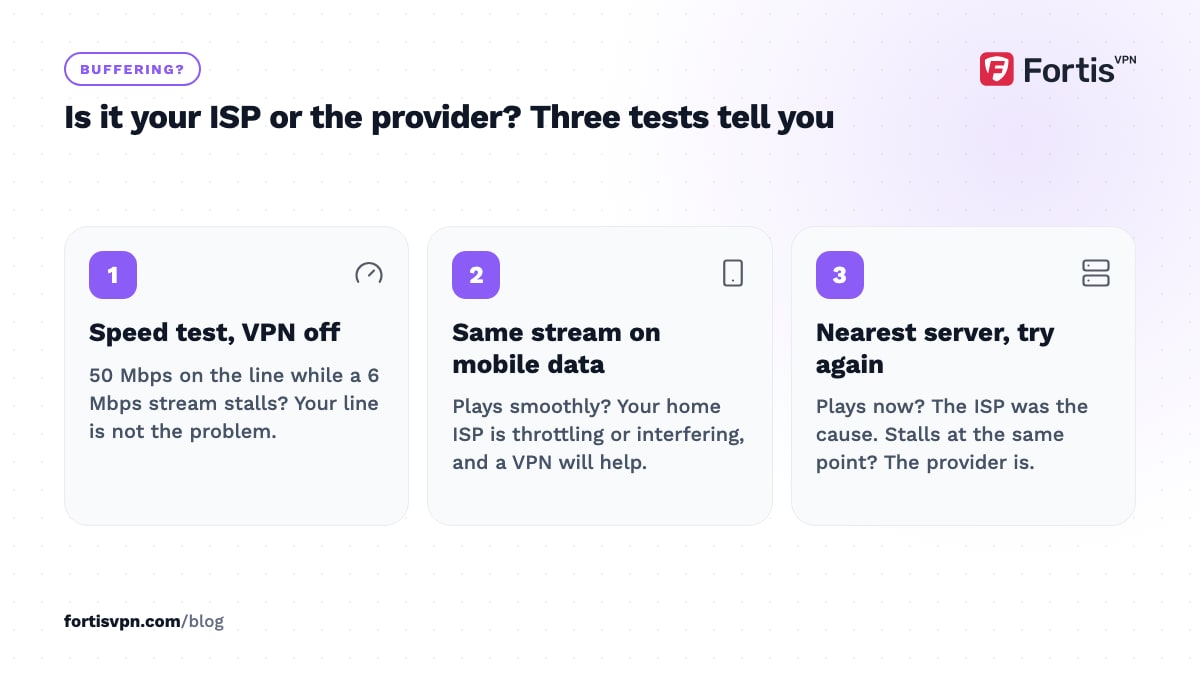
A quick way to tell which you have:
- Run a speed test without the VPN while the stream buffers. If your line is giving you 50 Mbps and a 6 Mbps stream still stalls, your line is not the problem.
- Try the same stream on mobile data. If it plays smoothly, your home ISP is throttling or interfering, and a VPN will help.
- Connect the VPN to the nearest server and try again. If the stream plays, the ISP was the cause. If it still stalls at the same point, the provider is.
A VPN cannot add bandwidth, cannot compress video and cannot make a stream server send data it does not have.
Can my ISP see that I use IPTV?
Without a VPN, yes. Your ISP resolves the DNS name of the stream server, sees the IP address you connect to, and sees a steady flow of a few megabits per second for the length of a match. It does not need to decrypt anything to recognise the pattern.
With a VPN connected, the ISP sees one encrypted connection to a VPN server and the amount of data moving through it. The DNS lookups travel inside the tunnel. It can tell you are using a VPN; it cannot tell which service you watch. The kill switch matters here: if the VPN drops mid-match, a kill switch stops the player from reconnecting directly over the ISP, which is what would reveal the server. See what a VPN kill switch is.
This privacy applies to the ISP and the local network only. The IPTV provider itself still sees the VPN server's IP and your account login, and a no-logs VPN does not change what a court can ask the provider for.
How to set up a VPN for IPTV on each device
The method is the same everywhere: install the VPN app, connect, then open your IPTV player. These are the platforms people actually use for IPTV.
Fire TV Stick
- Install the VPN app. Search the Amazon Appstore for FortisVPN and install it, or follow the Fire TV Stick setup guide.
- Sign in with a code. Open the app, go to fortisvpn.com/tv on your phone and enter the code shown on the TV.
- Connect to the nearest server. Turn on auto-connect so the VPN is up every time the stick wakes.
- Open your IPTV player. If it was already open, force-close it first so it reconnects through the tunnel.
Android TV and Google TV
Install the app from Google Play on the TV, sign in with a code, connect, and turn on auto-connect. The full walkthrough is in how to set up a VPN on Android TV.
Android phone or tablet
Install from Google Play, sign in, connect. Then go to the phone's Settings, Battery, and exempt both the VPN app and the IPTV player from battery optimisation, or Android will kill one of them during a long stream.
Windows
Install the Windows app from the download page, turn on the kill switch and launch-at-startup under Settings, and connect before opening the player or browser.
Set-top boxes, MAG boxes and Smart TVs with no VPN app
Run the VPN on your router instead. Every device behind the router is then inside the tunnel, including boxes that cannot install apps. Our router setup guide covers which routers support it and what it costs in speed.
Which server and protocol are best for IPTV?
For IPTV the goal is low latency and low packet loss, not a particular country.
- Server: the nearest one to you, unless you need a specific country for a licensed app. If it is busy, the next nearest.
- Protocol: WireGuard first. It has the least overhead and recovers from dropped packets fastest, which keeps live streams smooth. OpenVPN UDP is the fallback.
- When the network blocks VPNs: OpenVPN TCP on port 443, which looks like normal HTTPS traffic. It is slower on lossy WiFi, so use it only when nothing else connects.
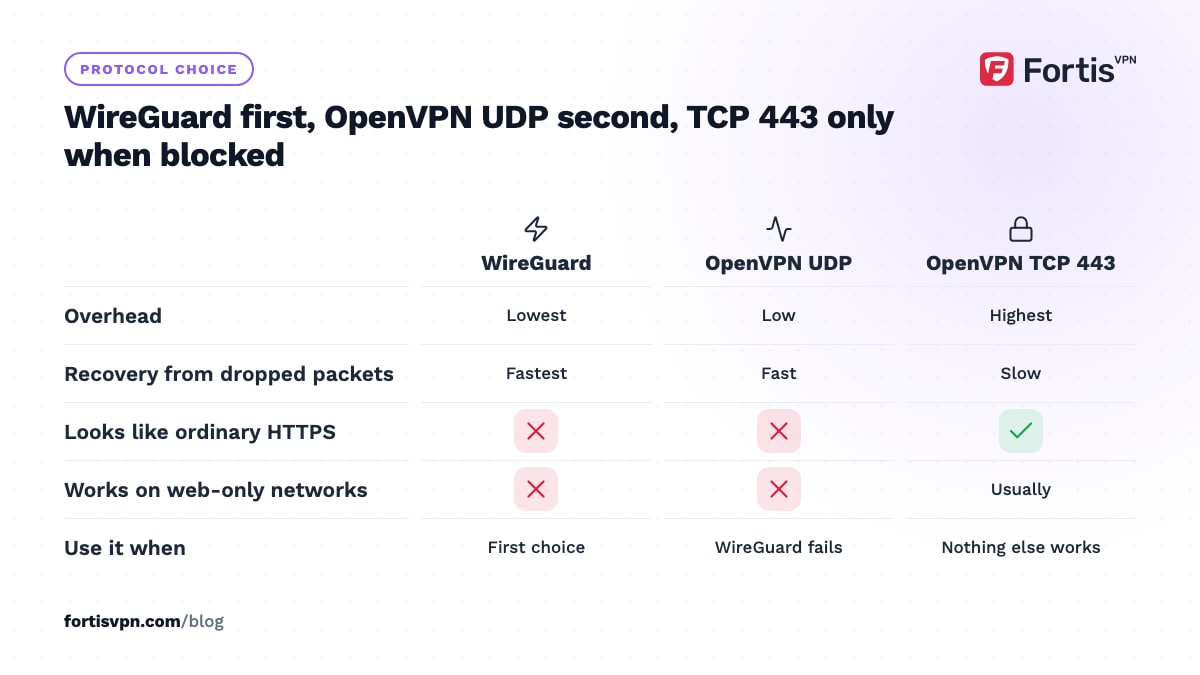
Change the protocol under Settings in each app. If a live stream freezes every few minutes on WiFi, a wired connection to the TV stick or box fixes more cases than any VPN setting.
Use split tunnelling so only the IPTV app uses the VPN
Split tunnelling lets you choose which apps go through the VPN. On a Fire TV or Android TV you can send only the IPTV player through the tunnel, so your bank app, Google Play, local catch-up TV and anything that dislikes a foreign IP address keep using the normal connection.
FortisVPN supports split tunnelling on Windows, Android, Android TV and Fire TV. The steps for the Fire TV app are in split tunnelling on Fire TV, and the general idea is explained in what split tunnelling is. Remember that any app you leave outside the tunnel is visible to your ISP as usual.
Using FortisVPN with IPTV
FortisVPN runs on the devices IPTV players run on: the Fire TV app, Android TV and Google TV, Android phones and tablets, and Windows. The TV apps sign in with a short code instead of a typed password, support auto-connect so the tunnel is up before the player opens, and support split tunnelling so only the player uses it. Protocols are Auto, WireGuard, OpenVPN UDP and OpenVPN TCP on port 443, switchable under Settings. There are no activity logs and no connection logs, and one account connects up to 10 devices, which covers the stick in the lounge, the TV in the bedroom and your phone. Plans come with a 7-day free trial and a 30-day money-back guarantee, so you can start a 7-day free trial and watch a full week of matches before you decide.
Frequently asked questions
Does a VPN make IPTV legal?
No. A VPN hides your traffic from your ISP and the local network; it does not change who holds the rights to a stream. A licensed service stays legal with or without a VPN, and an unlicensed one stays unlawful. Use a VPN for privacy, throttling and travel, not as legal cover. This is general information, not legal advice.
Do I need a VPN for IPTV on a Firestick?
Not to make a player run, but it is the device where a VPN helps most. A Fire TV Stick usually sits on WiFi behind the same ISP all day, so it takes the full effect of any throttling. The VPN app installs from the Amazon Appstore and runs with auto-connect, so once set up you never touch it.
Should I connect the VPN before or after opening the IPTV app?
Before. A player app opens its connection to the stream server when it starts and keeps reusing it, so if the VPN comes up afterwards the stream can carry on outside the tunnel until the app restarts. Connect the VPN, wait for the connected state, then open the player. On the TV apps, auto-connect handles the order for you.
Does IPTV Smarters work with a VPN?
Yes. IPTV Smarters and similar player apps do not care how the network is connected; they open a stream URL and play it. Connect the VPN first, then open the player. If a playlist fails to load after connecting, the provider may be refusing the VPN server's IP address, so try another server or exclude the player with split tunnelling.
Does a VPN slow down IPTV?
A nearby WireGuard server adds a few milliseconds and a few percent of overhead, which a normal home line never notices for a 5 to 8 Mbps stream. A distant server, OpenVPN TCP or a busy server can add enough latency to cause buffering, so if a stream gets worse after connecting, change server or protocol before blaming the VPN.
Last updated: 5 October 2026