Can the WiFi Owner See Your History If You Use a VPN?
Can the WiFi owner see your history? Without a VPN, yes: every site you visit, not the pages. With a VPN they see one encrypted connection and nothing else.
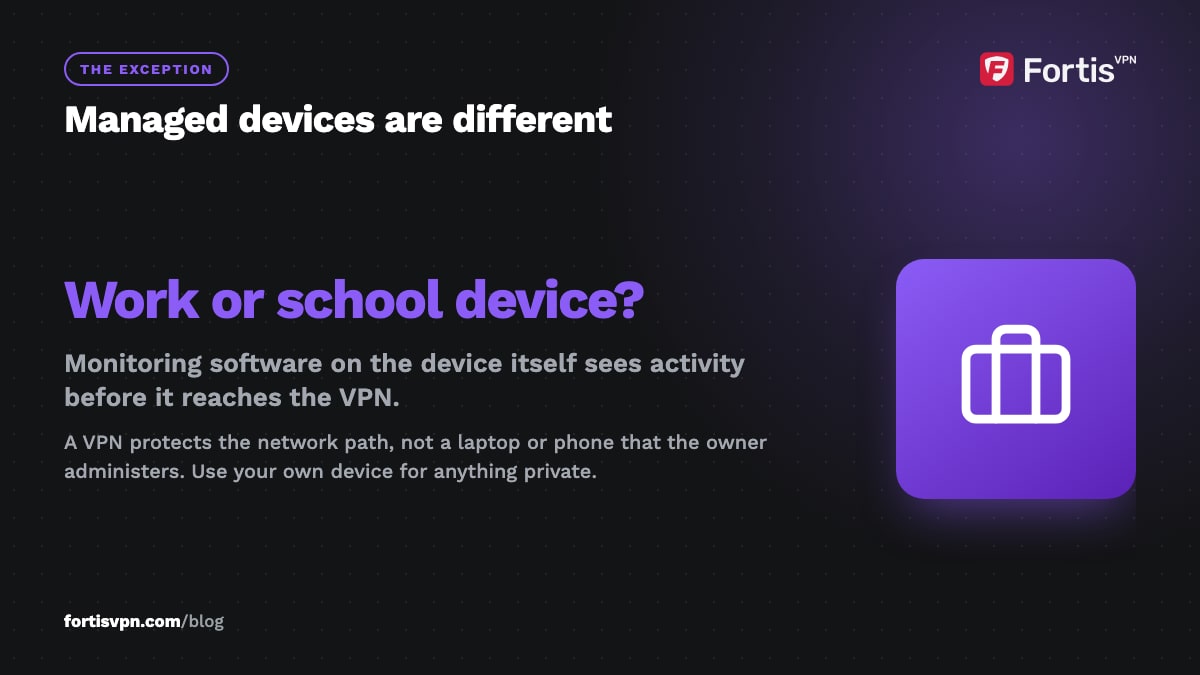
Without a VPN, the WiFi owner can see which websites you visit, when, and for how long, but not what you type or read on them. With a VPN, they see one encrypted connection from your device to a VPN server and nothing about the sites behind it. That holds for parents, landlords, hotels, cafés and schools. The one exception is a device your employer or school manages, where monitoring software sees everything before the VPN does.
- On plain WiFi, the owner sees domain names, timing and data amounts, not page content or passwords.
- Incognito mode changes nothing on the network side; only a VPN does.
- With a VPN on, the owner can tell you use a VPN but not which sites you open.
- Managed work or school devices can log activity on the device itself, regardless of any VPN.
What can the WiFi owner see without a VPN?
Everything you do on a WiFi network passes through the owner's router, and the router can log or forward it. Almost every website now uses HTTPS, which encrypts the page itself, so what leaks is the information around it.
| What | Can the owner see it? | Why |
|---|---|---|
| Website domains (for example reddit.com) | Yes | DNS lookups and the server name (SNI) at the start of each HTTPS connection are sent in the clear |
| Full page addresses and page content | No, on HTTPS sites | Encrypted between your browser and the site |
| Search terms | No | Google, Bing and DuckDuckGo use HTTPS; only the domain is visible |
| Passwords and messages | No, on HTTPS sites and in messaging apps | Encrypted in transit or end to end |
| Which apps you use | Partly | Apps contact recognisable servers, so a stream of traffic to TikTok's servers is obvious |
| When you were online and for how long | Yes | Connection timestamps and data volume per device |
| Your device name and type | Yes | Devices announce a hostname such as "Sam's iPhone" when they join |
| Old http:// sites | Yes, fully | No encryption at all, including anything you type |
So "history" on a shared network means a list of sites and times, not a record of pages. For a parent or employer that is usually enough to draw conclusions. If your browser or phone uses encrypted DNS (DNS over HTTPS), the owner loses the DNS lookups but on most sites still sees the server name on each connection, so the list survives.
What can the WiFi owner see with a VPN?
Once the VPN connects, every lookup and every site request goes inside one encrypted tunnel to the VPN server. The router still carries the traffic, but all it can record is:
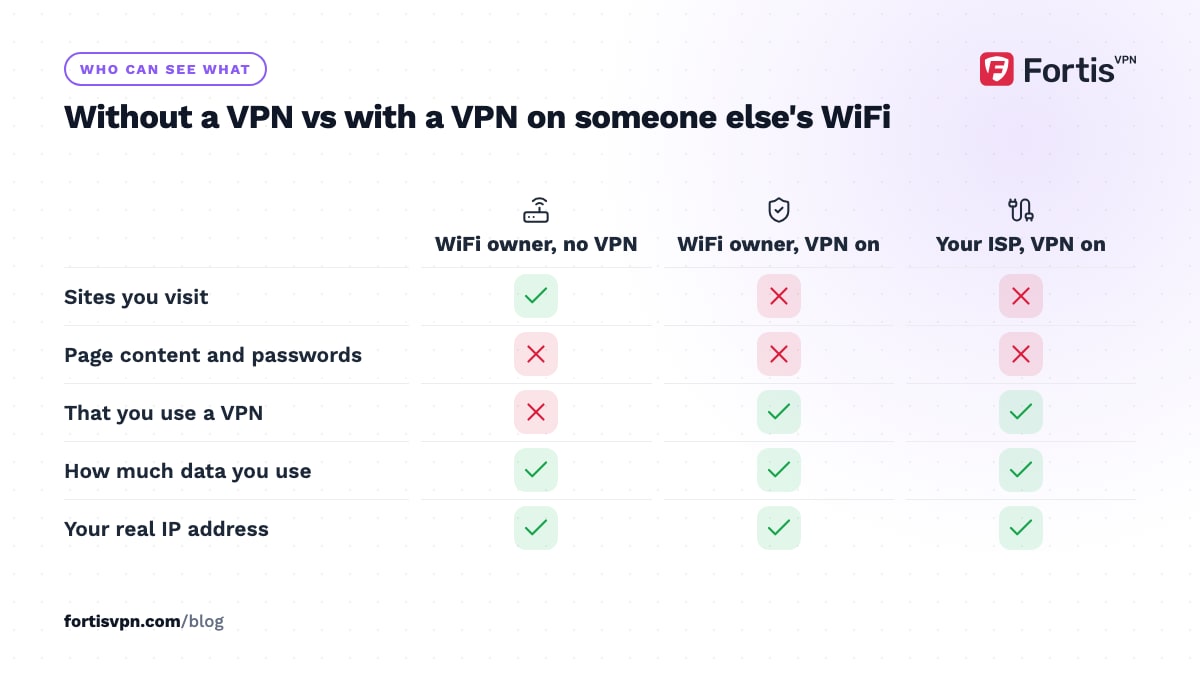
- That your device is connected to one IP address, which a quick lookup shows belongs to a VPN provider.
- How much data went in and out, and when.
- Your device's name on the network, which the VPN does not change.
The owner cannot see domains, searches, videos or downloads. They can see that you are using a VPN, because the traffic pattern and the destination IP give it away. If that itself is a problem, for example on a school network that bans VPNs, switching the protocol to OpenVPN TCP on port 443 makes the connection look like ordinary HTTPS, and an obfuscated server hides the VPN signature further. Our guide to what a VPN hides covers the remaining gaps, such as accounts you are logged in to.
Does incognito mode hide your history from the WiFi owner?
No. Incognito or private browsing stops your own browser from saving history, cookies and form entries on the device. It sends exactly the same DNS lookups and connection requests over the network, so the router sees an identical list of sites. The same is true of private windows in Safari, Firefox and Edge. Chrome's own incognito help page says your activity may still be visible to the people who run your network and to your internet provider. Deleting history afterwards has the same limit: it clears the copy on your device, not the copy the router already logged. The full comparison is in VPN vs incognito mode.
What about your ISP, mobile carrier, school or employer?
The WiFi owner is only one observer. Each of the others sits in a different place on the path and sees a different slice.
Your ISP
Your home ISP is the WiFi owner's ISP too. It sees the same domain list for every device in the house, and in some countries it must keep those records for months or may share them with advertisers. A VPN hides the domains from the ISP in the same way it hides them from the router.
Your mobile carrier
On mobile data there is no router owner, but the carrier plays the same role and sees the same information. A VPN on your phone covers mobile data as well as WiFi.
Your school
A school network often runs a filtering proxy that logs every request by username, and it may block VPN connections outright. On a school-issued laptop or tablet, the management software can also record what you do on the device itself, with or without a VPN. On your own phone on school WiFi, the VPN hides your sites but the school still sees a VPN connection.
Your employer
The same rule applies, with higher stakes. A company-managed laptop can have monitoring agents, a company root certificate that lets the firewall decrypt HTTPS, and a corporate VPN that routes everything through the office. A personal VPN does not stop any of that. Keep private browsing on a personal device, on mobile data or your own VPN.
How router logs and parental-control apps work
Most home routers keep a short log of connected devices and, on some models, the domains each device requested. The log is small and rolls over within days, and many owners never open it. Mesh systems and ISP routers with a parental-control feature go further: they record DNS requests per device, show them in a phone app with timestamps, and let the owner block categories or pause the internet for one device.
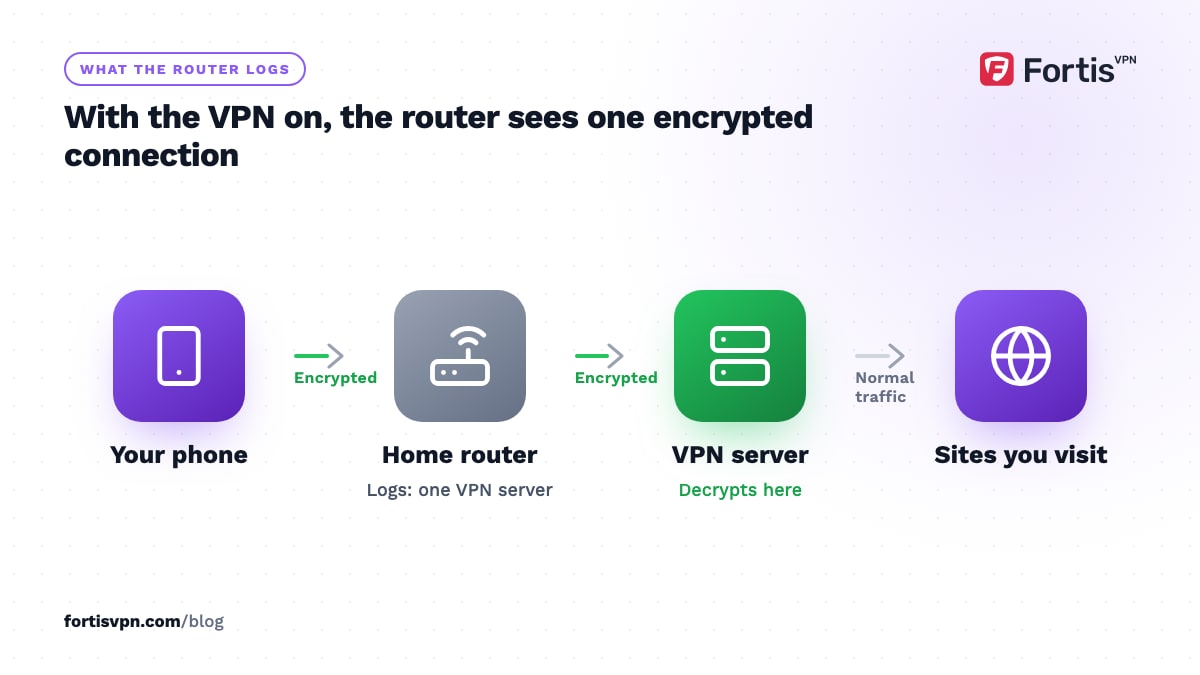
Those features all work by watching DNS and connection details, which is exactly what a VPN removes from view. With the VPN on, the parental-control dashboard shows one entry, the VPN server, plus the usage graph for your device. Some systems flag that as "VPN detected" and can block it, which is the moment to try TCP 443 or an obfuscated server. Separately, apps installed on your own phone or laptop by a parent or employer run on the device and report activity directly, so a VPN does not affect them at all.
How to keep your browsing private on someone else's WiFi
- Connect the VPN before you open a browser. Turn on auto-connect or launch-at-startup so there is no window of plain traffic.
- Turn on the kill switch. If the WiFi drops and reconnects, the kill switch stops your device sending anything until the tunnel is back.
- Check for leaks once. Run a WebRTC leak test while connected; a leak can send some requests outside the tunnel.
- Rename your device. The router shows the hostname you join with, so change "Sam's iPhone" to something neutral in your phone's settings if names matter.
- Use a personal device for personal browsing. No VPN protects you on a laptop someone else administers, and the other ways you can still be identified are listed in can you be tracked with a VPN.
- Remember the other direction. Shared networks are also where other users can snoop on you. Our guide to public WiFi safety explains that side.
Using FortisVPN on shared WiFi
The FortisVPN apps for Windows, Android, Android TV and Fire TV encrypt everything the device sends, so a router sees a single connection to a FortisVPN server and nothing else. FortisVPN keeps no activity or connection logs, so the sites you visit are not recorded on our side either. The Windows app has a kill switch and launch-at-startup under Settings, and every app lets you switch to OpenVPN TCP on port 443 for networks that block VPNs; the Android steps are in the protocol guide. One account covers up to 10 devices at the same time, so your phone, laptop and TV can all use it. Start a 7-day free trial; you pay nothing today and can cancel before day 7.
Frequently asked questions
Can the WiFi owner see what I search on Google?
Not the search terms. Google uses HTTPS, so the words you type are encrypted between your browser and Google. The owner sees that your device connected to google.com, when, and roughly how much data moved. With a VPN on, they do not even see that; they see a connection to the VPN server.
Can they see my history if I delete it?
Deleting history removes the copy stored in your browser. It does nothing to the router's logs, the ISP's records, or a parental-control app's dashboard, because those were recorded on the network as the traffic passed. Only a VPN, switched on before you browse, stops that record being created in the first place.
Can the WiFi owner see what I do on my phone?
They can see which servers your phone talks to, which usually reveals the apps: a stream of traffic to Instagram's servers is Instagram. They cannot see messages, photos, or what you tap inside an app, because app traffic is encrypted. A VPN on the phone hides the server names too, leaving only the VPN connection and the data volume.
Does a VPN hide my history from the router completely?
It hides the content and the destinations. The router still logs that your device exists, that it talked to a VPN server, how much data moved and when. If the VPN disconnects without a kill switch, the next few requests go out in the clear until it reconnects, so keep the kill switch on.
Can my school see my history at home?
Not through your home WiFi, which the school cannot access. It can, however, see what you do on a school-issued device anywhere, because the monitoring software is on the device. If you sign in to a school account in Chrome on your own device, the school's administrator can apply policies to that profile and may be able to see activity in it, so keep school accounts in a separate profile.
Last updated: 15 October 2026