How to Set Up a VPN on Your Router (Whole-Home VPN)
How to set up a VPN on your router so every device at home is covered: check for a VPN client, load a WireGuard or OpenVPN profile, route some devices, test it.
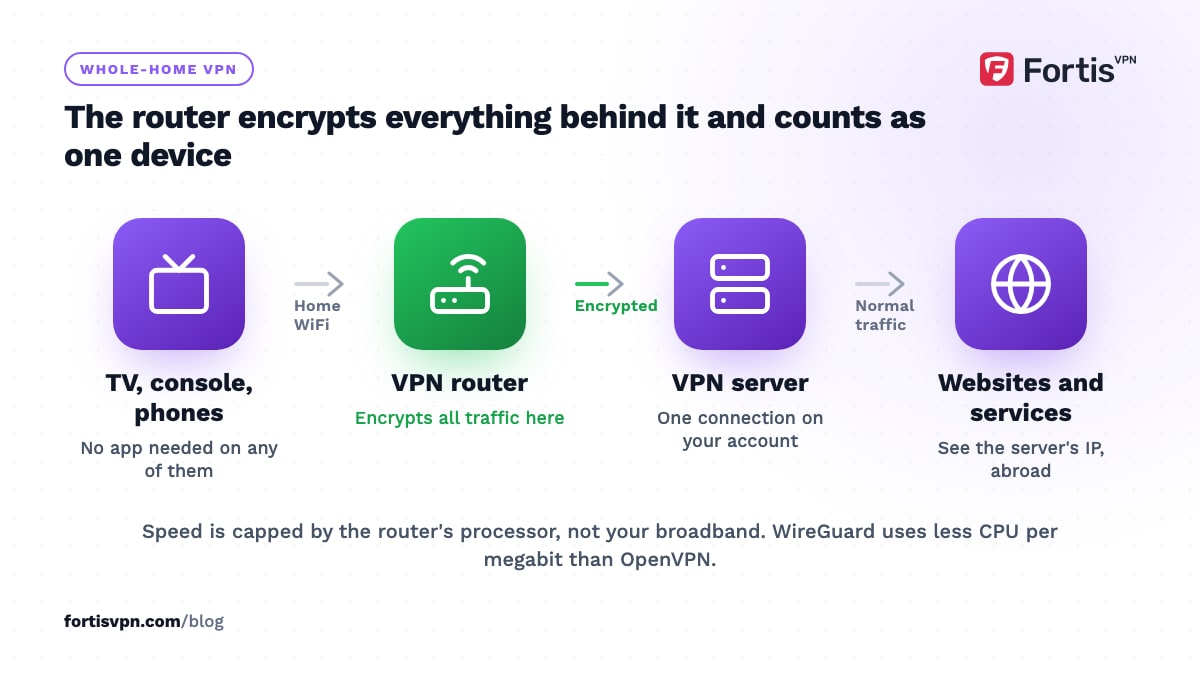
To set up a VPN on your router, you need three things: a router whose firmware includes a VPN client (most ISP-supplied boxes do not), a WireGuard or OpenVPN configuration from your VPN provider, and about fifteen minutes in the router's admin page. Once it is running, every device on your network uses the VPN with no app of its own, including smart TVs and games consoles that cannot run one.
- A router VPN covers devices without an app, but speed is capped by the router's CPU.
- ISP routers rarely have a VPN client; ASUS, TP-Link, GL.iNet, OpenWrt and DD-WRT firmware do.
- WireGuard is faster than OpenVPN on routers; use it wherever the firmware supports it.
- Policy routing sends only the TV or console through the VPN and leaves everything else direct.
Why put a VPN on your router?
Three reasons cover almost everyone who wants a VPN for all devices at home.
- Devices with no VPN app. Samsung and LG smart TVs, PS5, Xbox, Roku, printers and smart-home hubs cannot run a VPN. On the router, they are covered without knowing it.
- Always on, for everyone. Nobody in the house has to remember to connect, and a guest's phone is protected the moment it joins the WiFi.
- One connection on your account. The router counts as a single device however many things sit behind it, which still helps in a busy house even with the 10 simultaneous connections a FortisVPN account allows.
If your main goal is privacy from your ISP, do I need a VPN at home weighs a router VPN against apps on each device.
The downsides you should know first
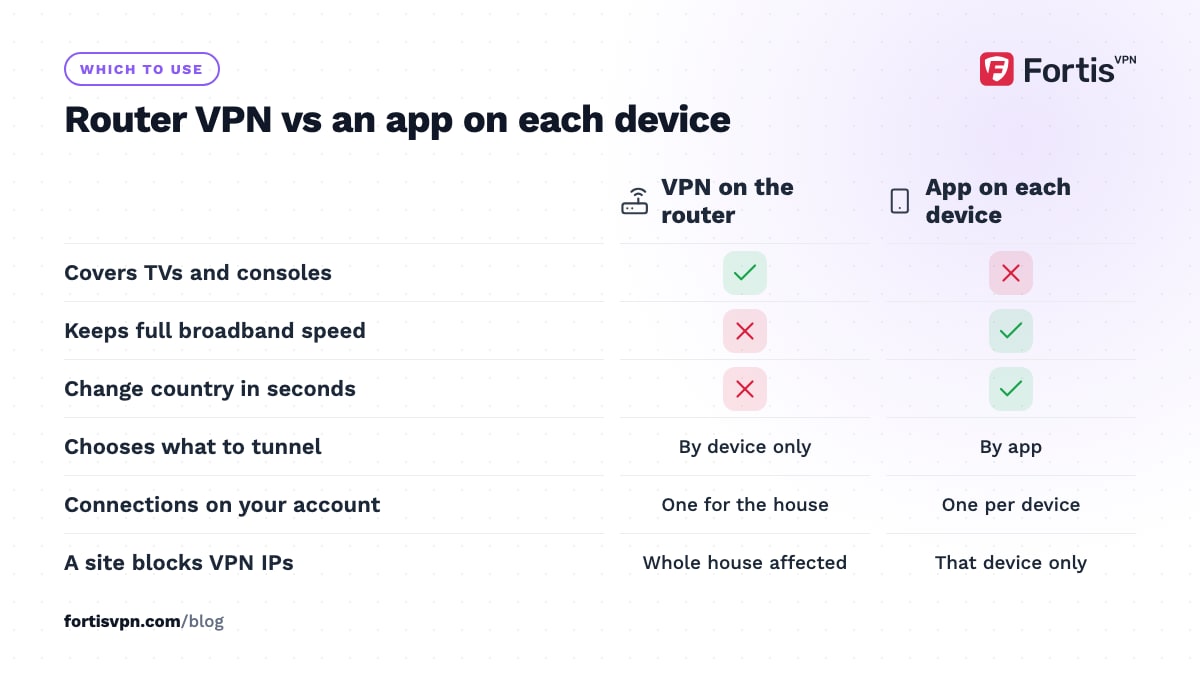
- Speed. Encryption runs on the router's processor, which is far slower than a laptop or phone, so consumer routers often deliver a fraction of the speed the same VPN reaches in an app. Faster chips and WireGuard narrow the gap.
- Everything goes through one country. Your bank, local news and food delivery app all appear to be abroad unless you set up policy routing.
- Changing location is slow. Switching countries means logging in to the router and swapping the profile, not tapping a button on the remote.
- No per-app control. Split tunnelling in the apps chooses by app; a router can only choose by device.
- Blocks hit everyone. If a website refuses VPN IP addresses, it refuses every device in the house.
Does my router support a VPN client?
Log in to the router's admin page (the address is printed on the router, often 192.168.0.1 or 192.168.1.1) and look for a menu called VPN, VPN Client or VPN Fusion. You want a client, not a server; a VPN server lets you connect home from outside, which is a different job. If there is no client option, you need a second router or a travel router between your network and the devices you want covered.
| Firmware | Where to find it | Protocols | Route only some devices |
|---|---|---|---|
| ASUSWRT (stock ASUS) | VPN, VPN Fusion | OpenVPN; WireGuard on firmware newer than 3.0.0.4.388.23000 on supported models | Yes, assign devices to a tunnel in VPN Fusion |
| ASUSWRT-Merlin | VPN, VPN Client | OpenVPN, WireGuard | Yes, VPN Director rules |
| GL.iNet (travel and home routers) | VPN, OpenVPN Client or WireGuard Client | OpenVPN, WireGuard | Yes, VPN Policy by device |
| OpenWrt | Network, Interfaces (after installing packages) | OpenVPN, WireGuard | Yes, policy-based routing package |
| DD-WRT | Services, VPN | OpenVPN; WireGuard on recent builds | Yes, policy-based routing |
| TP-Link (Archer models with VPN Client) | Advanced, VPN Client | OpenVPN; WireGuard on selected models | Yes, choose which devices use the client |
| ISP-supplied routers | Usually absent | None | No |
ASUS publishes a WireGuard client guide for VPN Fusion and TP-Link keeps a VPN client guide with a model list. Check your exact model there before you count on WireGuard.
How to set up a VPN on your router step by step
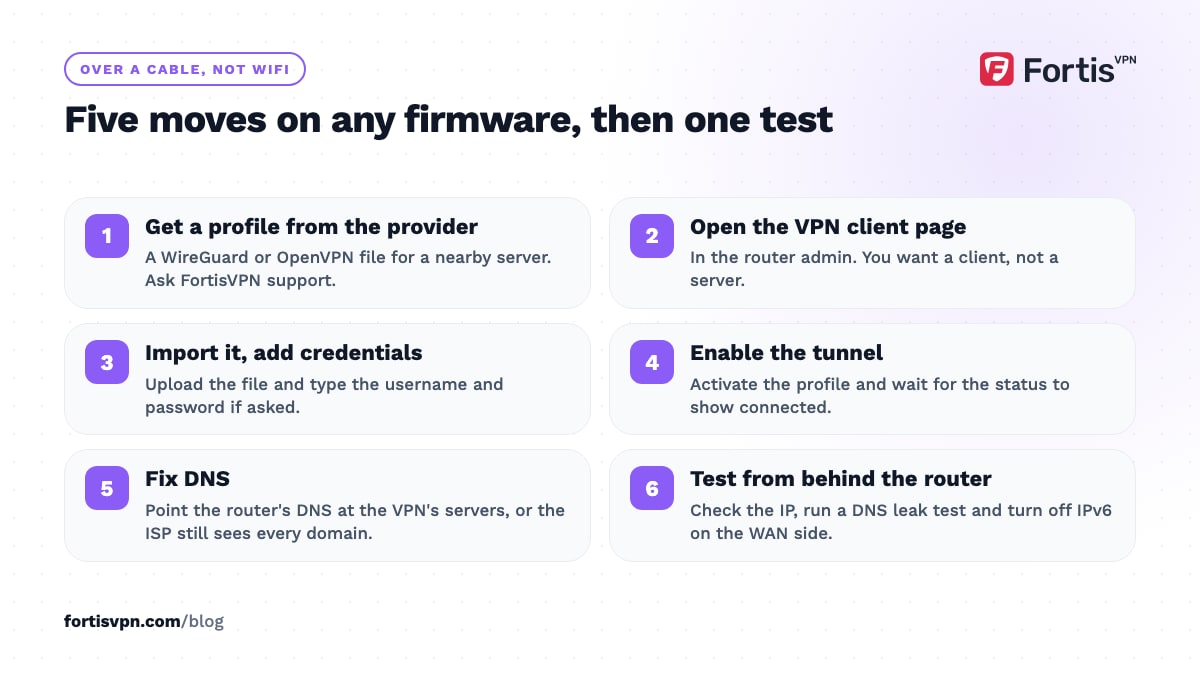
Menus differ, but every firmware follows the same five moves: get a profile from the provider, import it, enter credentials if asked, enable the tunnel, then fix DNS. Do it from a laptop connected by cable, so a mistake does not lock you out over WiFi.
OpenVPN client
- Get an .ovpn file and VPN credentials. Your VPN provider issues these; FortisVPN support can tell you what is available for your router over live chat. Choose a server near you, because distance costs more on a router than in an app.
- Open the VPN client page in the router admin and add a new OpenVPN profile.
- Upload the .ovpn file and type the username and password it asks for. Some firmware also wants the certificate pasted separately; it is inside the .ovpn file between the certificate tags.
- Set DNS. Point the router's WAN or VPN DNS at the servers your provider gives you, or at the address inside the profile. Leaving it on the ISP's DNS means the ISP still sees every domain the house visits.
- Activate the profile and wait for the status to show connected. If it never does, try the TCP 443 version of the profile; some ISPs and buildings block the default UDP port.
WireGuard client
- Get a WireGuard configuration from the provider. It is a short text file with a private key, the server's public key, an address and an endpoint.
- Add a WireGuard client in the router's VPN menu and paste or upload the file. On OpenWrt, install the WireGuard packages first and create a new interface of the WireGuard type; the OpenWrt WireGuard client guide lists the exact commands.
- Keep the allowed IPs at 0.0.0.0/0 so all traffic uses the tunnel, and set a persistent keepalive of around 25 seconds so the tunnel survives NAT timeouts.
- Enable it and check DNS exactly as for OpenVPN.
WireGuard is the better choice on any router that offers it. It uses less CPU per megabit than OpenVPN, so you keep more of your broadband speed. The trade-offs are in WireGuard vs OpenVPN.
How to route only some devices through the VPN
Sending the whole house abroad causes more complaints than it solves. Three ways to narrow it:
- Policy routing in the firmware. ASUS VPN Fusion, Merlin's VPN Director, GL.iNet's VPN Policy, TP-Link's device list and the policy-based routing packages on OpenWrt and DD-WRT let you pick devices by IP or MAC address. Assign the TV and the console to the tunnel and leave the rest direct. Give those devices a fixed IP in the router's DHCP settings first, or the rule may stop matching after a reboot.
- A second router for VPN devices. Plug a VPN-capable router into a LAN port of your main router and connect only the TV and console to its WiFi. Two separate networks, no policy rules, and the main router can be whatever the ISP gave you.
- A travel router behind the TV. A small GL.iNet-style router sits between the TV and the wall, runs the VPN, and moves house with you. It is also the practical answer for consoles and Samsung or LG TVs.
How to test that the router VPN works
- From a device behind the router, open the IP checker. The country and the IP address should match the VPN server, not your ISP. On a TV without a browser, use a phone on the same WiFi with its own VPN app turned off.
- Check DNS. Run a DNS leak test from the same device. If the servers listed belong to your ISP, go back to the DNS step. What is a DNS leak explains what you are looking at.
- Check IPv6. Most router VPN clients carry IPv4 only. If your ISP gives you IPv6, devices can bypass the tunnel over it. Disable IPv6 on the router's WAN side, then run the IPv6 leak test.
- Check speed. Run a speed test with the tunnel on and off. A large drop points to a slow router CPU or a distant server; try WireGuard and a closer server before blaming the provider.
Troubleshooting a router VPN
No internet after enabling the tunnel. Usually DNS. Set the router's DNS to a known server, or to the VPN's own, and reboot. If that fails, check that the profile is for a client, not a server, and that the router's clock is correct; certificate checks fail on a router that thinks it is 1970.
Connected, then drops every few minutes. Add a keepalive (WireGuard) or switch OpenVPN to TCP; a drop on an exact timer is usually a NAT timeout on an upstream modem.
Slow speeds. Pick the nearest server, switch to WireGuard, and turn off extras such as QoS, traffic logging and intrusion detection while the tunnel runs; each one costs CPU.
Double NAT. If a second router sits behind the ISP router, put the ISP box in bridge or modem-only mode, or place the VPN router in its DMZ, otherwise consoles report strict NAT.
Devices with their own VPN app. A phone running a VPN app on a VPN router gets a tunnel inside a tunnel: it works, but slowly. Turn one of them off. If an older IKEv2 or IPsec client refuses to connect behind the router, the VPN passthrough setting is usually why.
Using FortisVPN on a router
FortisVPN's apps cover Windows, Android, Android TV and Google TV, and Fire TV. For those devices the apps are the better experience: kill switch, split tunnelling and one-tap location changes. For a router, support depends on your router accepting a standard WireGuard or OpenVPN client profile, which the firmware above does. Ask on 24/7 live chat or via the contact page for the configuration details for your router; the server list shows which protocols each location supports. One account covers 10 devices at the same time, and the router counts as one. Every plan has a 7-day free trial and a 30-day money-back guarantee, so you can start a 7-day free trial and confirm your router performs before committing.
Frequently asked questions
Does a VPN on the router slow down WiFi?
It slows internet traffic that goes through the tunnel, because the router has to encrypt it, and consumer routers have weak processors. Local WiFi between your own devices is unaffected. Expect a noticeable drop on cheap routers and a small one on routers designed with VPN use in mind, especially with WireGuard.
Can I use a VPN on my ISP router?
Almost never. ISP routers lock down advanced features and rarely include a VPN client. Check the admin page for a VPN client menu. If there is none, buy a VPN-capable router and connect it to a LAN port of the ISP router, then set the ISP router to bridge mode if it offers it.
Can I switch VPN location quickly on a router?
Not as quickly as in an app. You log in to the router and activate a different profile, which takes a minute or two. Some firmware lets you store several profiles and switch with one click. If you change countries often, use the app on a stick or laptop for that and keep the router on your usual location.
Does a router VPN count as one device?
Yes. The VPN provider sees one connection from the router regardless of how many devices sit behind it. With FortisVPN that leaves nine more simultaneous connections for apps on phones, laptops and TVs away from home, since one account allows 10 at the same time.
Which is better, a VPN on the router or on each device?
Apps on each device give you more speed, a kill switch, split tunnelling and fast location changes. The router is better for devices that cannot run an app and for set-and-forget coverage. Most households end up with both: the router for the TV and console, apps for everything else.
Last updated: 11 October 2026