How to Use a VPN With Chromecast and Roku
Chromecast with Google TV runs VPN apps, but older Chromecasts and Roku do not. How to use a VPN with Chromecast and Roku via an app, router or laptop.
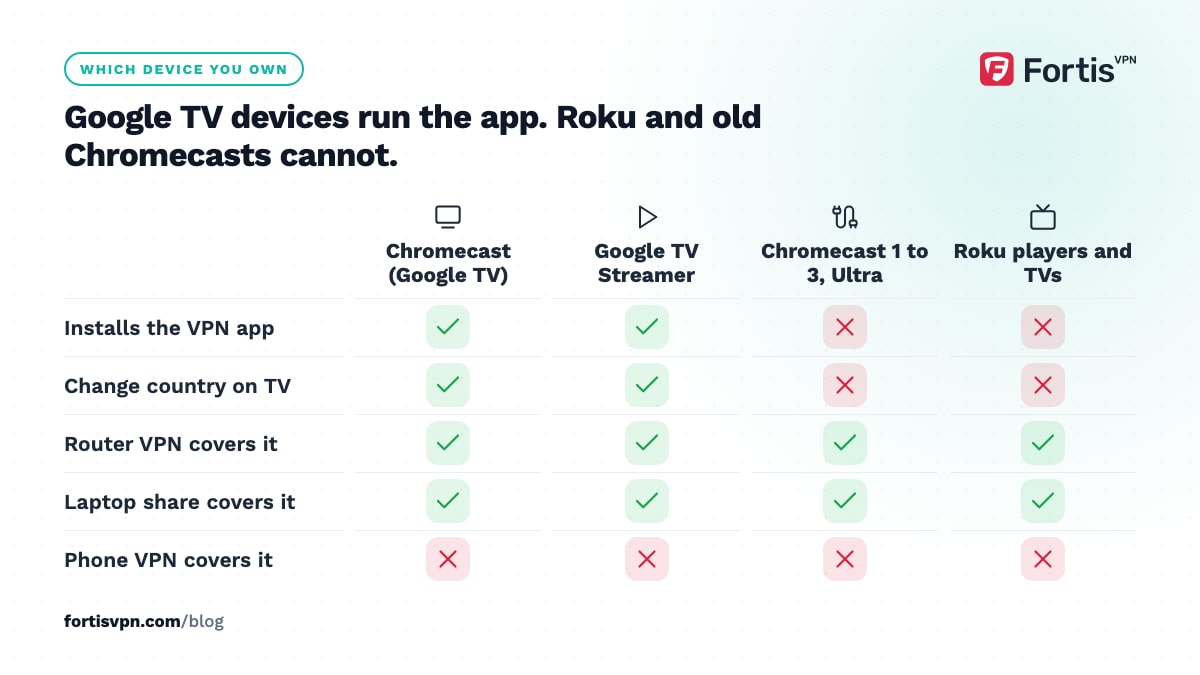
How you use a VPN with Chromecast and Roku depends on which device you own. Chromecast with Google TV, and the Google TV Streamer that replaced it, run VPN apps from Google Play, so you install the app on the device itself. Older Chromecast dongles and every Roku player cannot run VPN apps at all, so the VPN has to run on your router or on a Windows laptop that shares its connection.
- Chromecast with Google TV and Google TV Streamer: install the FortisVPN app from Google Play on the device.
- Older Chromecast dongles and all Roku players: no VPN apps, so use a router or a shared laptop connection.
- A VPN on your phone does not protect what the Chromecast or Roku streams.
- Smart DNS can change the region on a Roku, but it does not hide your IP address.
Which Chromecast do you have?
Google stopped making Chromecasts in 2024, but both kinds it sold are still in living rooms, and only one can run a VPN app. The quick test: if your Chromecast came with a remote and shows a home screen full of apps, it runs Google TV and can install a VPN. If it only does something when you cast from a phone or laptop, it cannot.
| Device | Runs apps? | How to use a VPN |
|---|---|---|
| Chromecast (1st to 3rd generation) and Chromecast Ultra | No, casting only | VPN on the router, or share a VPN from a Windows laptop |
| Chromecast with Google TV (HD and 4K) | Yes, Google TV with Google Play | Install the VPN app on the device |
| Google TV Streamer (2024 onwards) | Yes, Google TV with Google Play | Install the VPN app on the device |
How to set up a VPN on Chromecast with Google TV
Chromecast with Google TV runs the same software as Android TV, so the TV version of a VPN app installs in a couple of minutes. These steps use the FortisVPN app; other TV apps follow the same pattern.
- Open Google Play on the Chromecast. Select Apps at the top of the home screen, then Search for apps.
- Search for Fortis VPN. Type it, or hold the microphone button on the remote and say the name. Select the app, then Install, then Open.
- Sign in with a code instead of typing. Select Use my phone and a six-digit code appears. On your phone, go to fortisvpn.com/tv, sign in and type the code. The Chromecast signs in by itself.
- Allow the VPN connection. The first time, Google TV shows a Connection request window. Select OK.
- Pick a location and connect. Choose the country whose content you want, or Fastest available for speed, then select Connect.
- Turn on Auto-connect on start. In Menu, then Settings, switch it on so the VPN is up before any streaming app opens.
The walkthrough with a picture of each TV screen is in how to set up a VPN on Android TV and Google TV.
Does a VPN on your phone cover your Chromecast?
No. When you cast from an app such as YouTube or Netflix, your phone only sends the Chromecast a link. The Chromecast then fetches the stream itself over your home connection, with your real IP address. The VPN on your phone never sees that traffic, so it cannot hide it or change its region.
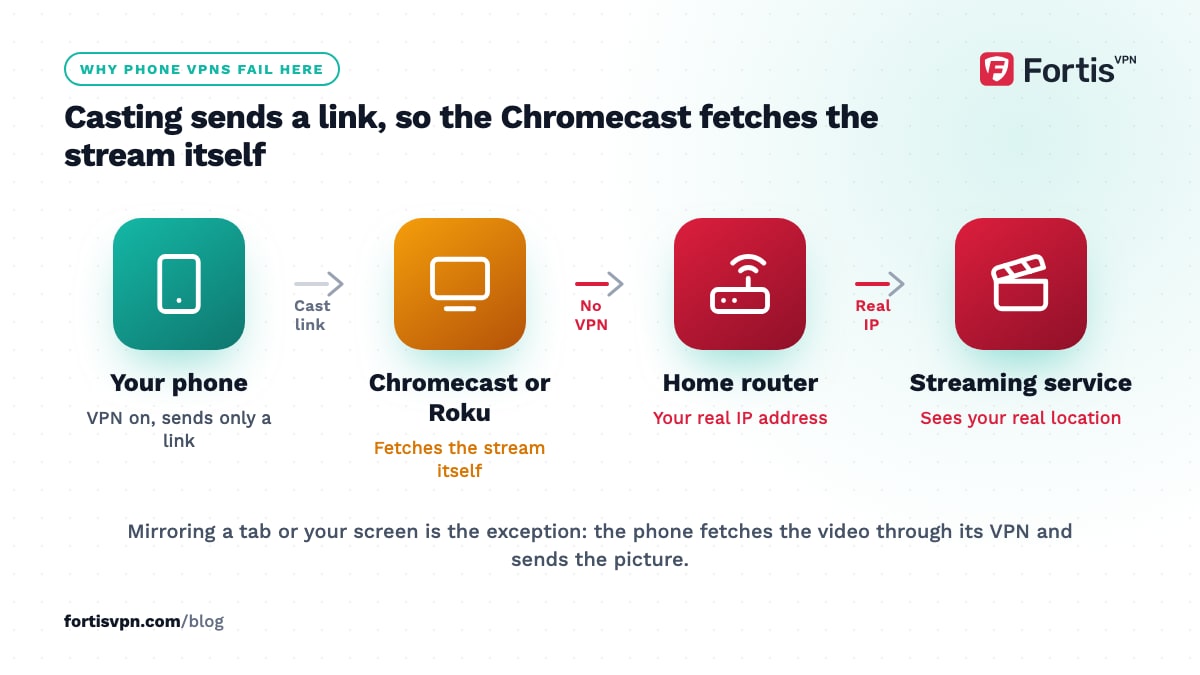
The exception is mirroring. Casting a Chrome tab or mirroring your phone screen encodes the video on that device, which fetched it through its own VPN. Mirroring costs picture quality and battery, and some apps block it, so treat it as a fallback.
A phone VPN also often breaks casting altogether. Casting apps find the Chromecast with a broadcast on the local network, and a VPN tunnel can swallow that broadcast, so the app reports that no cast device was found. Three fixes, in order:
- Disconnect the VPN, start the cast, then reconnect. The Chromecast keeps playing because it is fetching the stream itself.
- Use split tunnelling to keep the casting app off the VPN. The app sees the local network again, but it no longer uses the VPN region either.
- Check the network: a guest network, AP isolation, or phone and Chromecast on different WiFi bands can block discovery with no VPN involved.
Can you install a VPN on Roku?
No. As of October 2026, Roku OS has no VPN apps in its channel store, and Roku treats VPN use as unsupported. That applies to every Roku player, Roku Streaming Stick and Roku TV. To use a VPN with a Roku, the VPN must run on something that sits between the Roku and the internet.
| Method | What you need | Hides your IP | Changes region | Effort |
|---|---|---|---|---|
| VPN on your router | A router that accepts an OpenVPN or WireGuard client | Yes, for every device on it | Yes | Medium, one-off |
| Share a VPN from a Windows laptop | A Windows PC with WiFi, kept on while you watch | Yes, for the Roku | Yes | Low, but repeated each session |
| Smart DNS | A Smart DNS service and the DNS set on the router | No | Yes, for supported services | Low |
The router is the clean answer if you want the Roku covered all the time. The laptop hotspot is the quick answer for one evening. Smart DNS is the lightest option but gives you no privacy, and streaming services block it as readily as VPN servers; the comparison in Smart DNS vs VPN goes deeper.
Setting up a VPN on your router for Roku or an older Chromecast
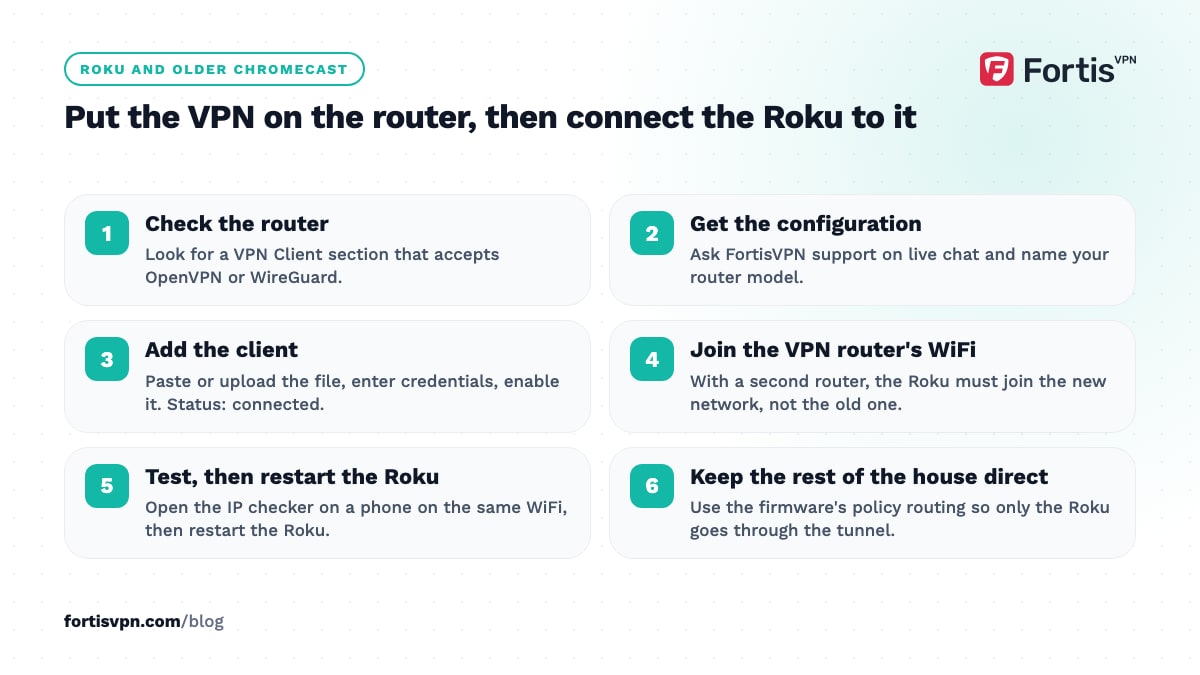
The router method works for any device that cannot run a VPN app. Routers differ, so these are the stages rather than exact menu names.
- Check your router can run a VPN client. Look in the admin page for a VPN Client section that accepts OpenVPN or WireGuard. Many ISP-supplied routers cannot; a second router or a travel router plugged into the first is the usual fix.
- Get the configuration from your VPN. With FortisVPN, ask support through live chat and say which router you have; they send the configuration details for the server you want.
- Add the client on the router. Paste or upload the configuration, enter your credentials if asked, and enable it. The router's status page should show it as connected.
- Connect the Roku or Chromecast to that router's WiFi. With a second router, this is the step people miss: the device must join the VPN router's network, not the original one.
- Test from a phone on the same WiFi. Open the IP checker; it should show the VPN server's country. Then restart the Roku so its apps pick up the new location.
Expect lower speeds than an app on a phone, because the router's small processor does the encryption. Full details, including routing only some devices through the VPN, are in how to set up a VPN on your router. To share a laptop's VPN for one evening instead, follow how to share a VPN over a hotspot.
Does a VPN change your Roku region?
Not on its own. A Roku has two separate ideas of where you are. Streaming apps such as Netflix check your IP address, so a router VPN changes what those apps show. The Roku account has a country that is fixed when the account is created, and that country decides which channels the channel store offers. A VPN does not touch it.
Roku offers no setting to change an account's country. The route its community moderators describe is a new account created on an internet connection in the new country, then a factory reset (Settings, System, Advanced system settings, Factory reset) and linking the player to the new account during setup. Roku's terms say you should live in the account's country, so treat this as general information, and The Roku Channel itself is known for detecting VPNs.
Streaming app still shows your home region
If you are connected through the router or the Google TV app but the catalogue has not changed, work through these in order.
- Restart the app or the device. Streaming apps cache their location check. Force-close the app on Google TV, or power-cycle the Roku.
- Check DNS. On a router VPN, make sure the router hands out the VPN's DNS servers, not your ISP's. An IP in one country and DNS in another is a common trigger for a proxy error.
- Turn off IPv6 on the router. Many router VPN clients carry only IPv4, so IPv6 traffic slips out with your real address.
- Try another server in the same country. If the service still detects a VPN, switch to another server in that country or ask support for one that currently works.
- On Google TV, check split tunnelling. An app excluded from the VPN shows your real region by design.
More fixes for the "you seem to be using a VPN or proxy" message are in streaming service detects VPN.
Doing this with FortisVPN
On a Chromecast with Google TV or a Google TV Streamer, install the FortisVPN app for Google TV from Google Play, sign in with the six-digit code at fortisvpn.com/tv, and turn on Auto-connect on start. Split tunnelling in the TV app lets you keep a local catch-up app on your normal connection while everything else uses the VPN. For a Roku or an older Chromecast, ask support through 24/7 live chat for router configuration details, since the apps cover Windows, Android, Android TV, Google TV and Fire TV but not Roku. One account covers 10 devices at once, so the TV, the router and your phone all fit. Every plan starts with a 7-day free trial, card required, and you pay nothing if you cancel before day 7.
Frequently asked questions
Can I use Smart DNS on Roku?
Yes, and it is the lightest way to change the region a Roku's streaming apps see. You set the Smart DNS addresses on your router, since a Roku has no DNS setting of its own, then restart the Roku. Your IP address stays visible, and streaming services block Smart DNS addresses as often as VPN servers.
Will a VPN slow down my Chromecast or Roku?
A little, and how much depends on where the VPN runs. The app on Chromecast with Google TV can use WireGuard, which usually keeps enough speed for 4K. A router VPN is limited by the router's processor, so older or cheaper routers can drop below what 4K needs. Pick the nearest server in the country you want.
Can I cast from my laptop with a VPN on?
Casting a Chrome tab works with the VPN on, because the laptop fetches the page through the VPN and sends the picture to the Chromecast over your local network. Casting from inside a site such as YouTube hands the link to the Chromecast, which fetches the video with your real IP address. If Chrome cannot find the Chromecast, disconnect, start the cast, then reconnect.
Is there a free VPN for Roku?
No VPN of any kind installs on a Roku, free or paid, so a "free VPN for Roku" would still have to run on a router or a laptop. Free VPN apps rarely offer router configuration files, and those that do cap speed below what streaming needs. A paid service with a free trial and a money-back period is the realistic route.
Last updated: 2 October 2026