What Is VPN Passthrough on a Router (and Do You Need It)?
VPN passthrough is a router setting that lets older VPN protocols (PPTP, L2TP, IPsec) cross NAT. What it does, when to enable it and when it does not matter.
VPN passthrough is a router setting that lets VPN connections started by devices on your network pass through the router's NAT without being broken. It is not a VPN. It does not encrypt anything and does not connect your router to a VPN. It exists because three older protocols, PPTP, L2TP and IPsec, were designed before home routers shared one public IP among many devices. If your VPN app uses WireGuard or OpenVPN, the setting does not affect you.
- Passthrough only lets VPN packets cross NAT; the app on your device still does all the encryption.
- WireGuard and OpenVPN use ordinary UDP or TCP and work with passthrough on or off.
- Leave it enabled. Most routers ship with it on, and it does not open any inbound port.
- Turning it off can stop IKEv2/IPsec and L2TP clients behind the router from connecting.
Why do routers need a VPN passthrough setting?
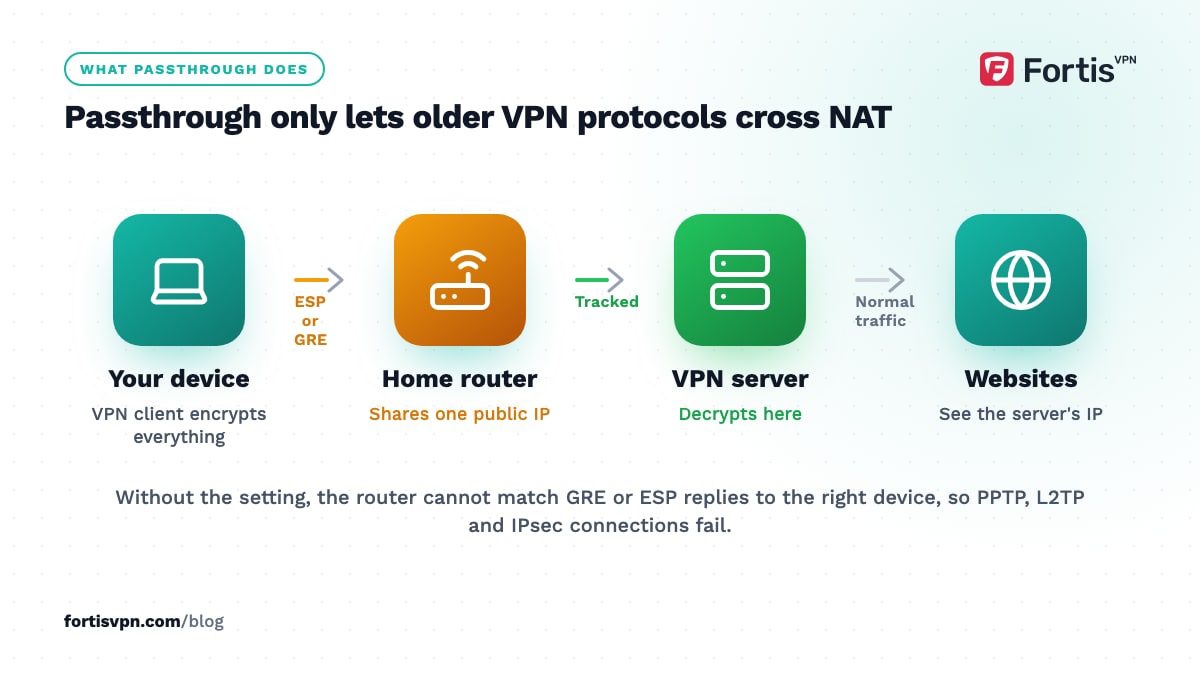
Your router gives every device at home a private address and shares one public IP address with the internet. This is NAT, network address translation. To know which device a reply belongs to, the router tracks the port number on each connection. Ordinary web traffic, email and most apps use TCP or UDP, both of which carry port numbers, so NAT handles them without thinking.
Older VPN protocols do not fit this model:
- PPTP carries its data in GRE, IP protocol 47, which has no port numbers at all.
- IPsec carries its encrypted packets in ESP, IP protocol 50, which also has no port numbers, and its handshake on UDP port 500 assumes the addresses in the packet will not be rewritten on the way.
- L2TP runs on UDP port 1701 but is almost always wrapped in IPsec, so it inherits the same problem.
Without special handling, the router cannot tell which inside device an incoming GRE or ESP packet belongs to, or it rewrites a packet in a way the VPN rejects. VPN passthrough is the router's set of workarounds: it tracks PPTP sessions by their call ID, and it recognises IPsec's NAT traversal (NAT-T), which wraps ESP inside UDP on port 4500 so the router can treat it like any other UDP flow.
What do the PPTP, L2TP and IPsec passthrough options mean?
Most routers show three switches, sometimes grouped under one "VPN passthrough" heading. Each one covers a different protocol.
| Setting | What it lets through | Who still needs it in 2026 |
|---|---|---|
| PPTP passthrough | TCP port 1723 for control plus GRE (protocol 47) for data, matched to the right device by call ID | Almost nobody; PPTP is insecure and modern systems have dropped it |
| L2TP passthrough | UDP port 1701, usually inside an IPsec wrapper | Some older work VPNs and a few router-to-router links |
| IPsec passthrough | IKE on UDP 500, NAT-T on UDP 4500 and ESP (protocol 50) | Anyone using an IKEv2/IPsec or L2TP/IPsec client, including the built-in VPN clients on phones and laptops |
Of the three, IPsec passthrough is the only one that matters to a typical household today, because IKEv2/IPsec is built into Windows, iPhone, iPad and Mac, and many company VPNs use it.
Does WireGuard or OpenVPN need VPN passthrough?
No. WireGuard runs over UDP with a normal port number, and OpenVPN runs over UDP or TCP with a normal port number. From the router's point of view they look like any other outbound connection, and NAT handles them without any setting. That is why consumer VPN apps built on these protocols work out of the box behind almost every router in the world.
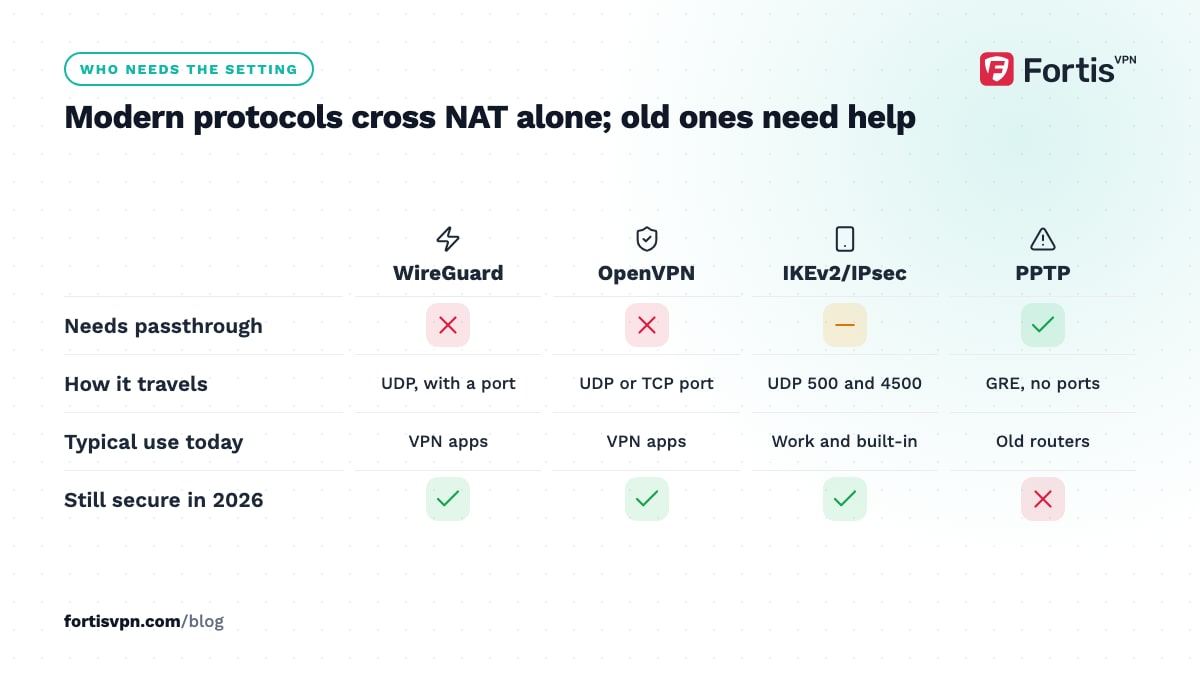
IKEv2 sits in between. It is designed for NAT traversal, so most routers pass it with no setting. A minority of routers, especially older or ISP-supplied ones, mishandle UDP 4500 or ESP unless IPsec passthrough is on. If an IKEv2 connection fails at home but works on mobile data, that setting is the first thing to check.
For a plain-language comparison of all these protocols, read VPN protocols explained, and for the reasons WireGuard avoids the problem entirely, see how WireGuard works.
Should you enable VPN passthrough?
Yes, or more precisely, leave it on, which is how most routers arrive. TP-Link, for example, states that most of its routers enable VPN passthrough by default, and the same is true of most consumer routers. Turning it on costs nothing and turning it off gains nothing unless you are deliberately trying to stop people on your network from using IPsec VPNs.
It is not a security hole. Passthrough does not open an inbound port, does not expose any device to the internet and does not accept connections from outside. It only lets connections that a device inside your network started come back through NAT correctly. The encryption still happens on the device, end to end with the VPN server.
It also does not slow anything down. The router does the same NAT bookkeeping it does for every other connection; there is no inspection or extra processing of the encrypted payload.
The only reasons to switch it off are an organisational policy that bans VPN use on that network, or troubleshooting a specific conflict, and both are rare.
VPN passthrough vs a VPN on the router
People often confuse these two because both appear in router menus, sometimes on the same page.
| Criterion | VPN passthrough | VPN client on the router |
|---|---|---|
| What it is | A NAT compatibility setting | The router itself connects to a VPN server |
| Who encrypts | The VPN app on each device | The router, for every device behind it |
| Devices covered | Only devices running a VPN client | Everything on the network, including devices with no VPN app |
| Speed | No effect | Limited by the router's processor; cheap routers slow down a lot |
| Setup | A tick box, usually already on | Needs a router that supports WireGuard or OpenVPN, plus configuration |
| Per-device control | Full; each device connects or not | Shared; all devices use the same server unless the firmware supports policy routing |
If what you want is to protect a games console, a smart TV with no VPN app or every device at once, the router-client option is the one to look at. Our guide to setting up a VPN on your router covers which routers can do it and how.
Troubleshooting a VPN that will not connect behind a router
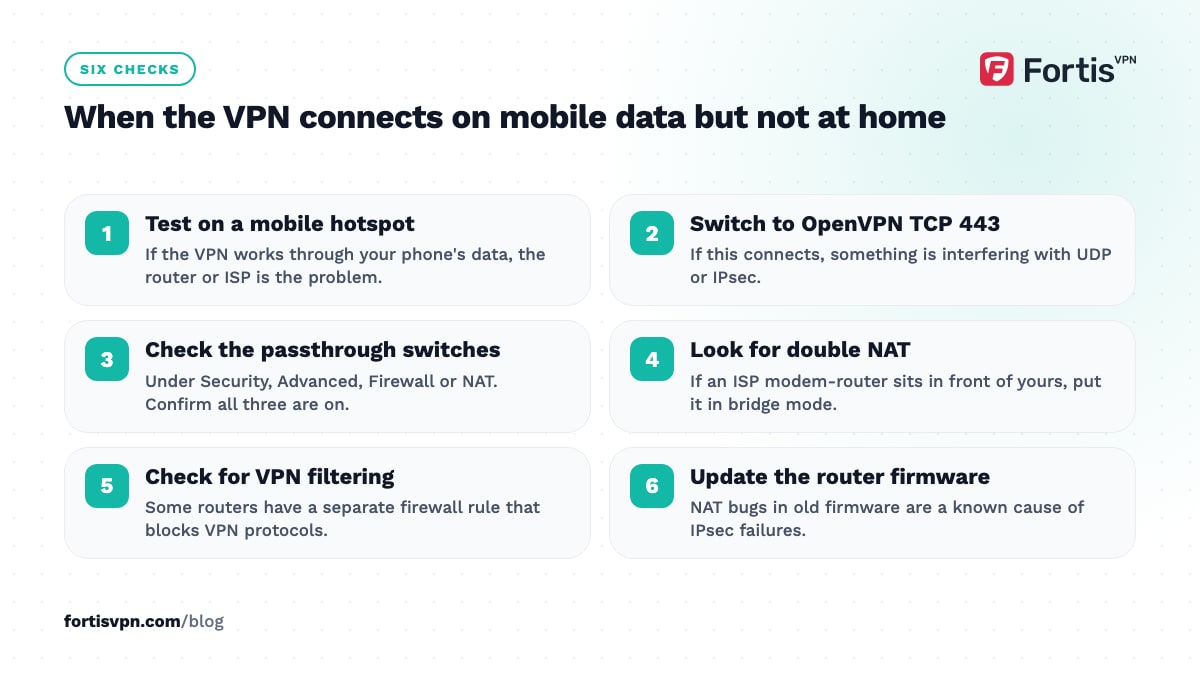
- Rule out the router first. Connect the same device through your phone's mobile hotspot. If the VPN works there, the router or ISP is the problem.
- Switch protocol. In the VPN app, pick OpenVPN TCP on port 443. If that connects, something on the router or ISP side is interfering with UDP or IPsec.
- Check VPN passthrough. Log in to the router, find the setting under Security, Advanced, Firewall or NAT, and confirm all three options are on.
- Look for double NAT. If an ISP modem-router sits in front of your own router, both do NAT. Put the ISP device in bridge mode, or at least enable passthrough on both.
- Check for carrier-grade NAT. Some ISPs and almost all mobile carriers put you behind a second NAT you do not control. WireGuard and OpenVPN cope with this; IPsec sometimes does not.
- Disable VPN or IPsec filtering. A few routers have a separate firewall rule that blocks VPN protocols. Check the firewall page, not only the passthrough page.
- Update the router firmware. NAT bugs in older firmware are a known cause of IPsec failures.
If none of that helps, work through our cannot-connect troubleshooting guide, which covers the app-side causes.
How this applies to FortisVPN
The FortisVPN apps for Windows, Android, Android TV and Fire TV connect with WireGuard or OpenVPN, so VPN passthrough has no effect on them, on or off. If the app will not connect at home, the fix is almost always a protocol change rather than a router setting: open Settings, choose OpenVPN TCP, and connect again, as shown in the protocol guide for Windows. IKEv2 is listed on the server list for the platforms that support it; if you set up an IKEv2 connection manually and it fails only at home, turn on IPsec passthrough. To check how the apps behave on your router, start a 7-day free trial; you pay nothing today and can cancel before day 7.
Frequently asked questions
Is VPN passthrough a security risk?
No. It does not open ports, does not accept inbound connections and does not weaken the encryption, which happens on your device. It only tells the router how to track VPN sessions that a device inside your network started. If someone could attack you through passthrough, they could do the same through any ordinary outbound connection, which is not how home networks are compromised.
Does VPN passthrough slow down my internet?
No. The router does the same address translation it does for every other connection, with no inspection of the encrypted data. Any slowdown you notice while using a VPN comes from the VPN itself: the distance to the server, the protocol, or server load. Turning passthrough off will not make anything faster, and may stop IPsec connections working.
Do I need VPN passthrough for a VPN app on my phone?
Not for the usual apps. Consumer VPN apps use WireGuard or OpenVPN, which cross NAT without help. You only need it if your phone uses the built-in IKEv2/IPsec or L2TP client, typically for a work VPN, and even then most routers pass that traffic by default. On mobile data the setting does not apply, because your carrier's network is not your router.
What is the difference between VPN passthrough and a VPN server on the router?
A VPN server on the router lets you connect into your home network from outside, for example to reach a NAS while travelling. VPN passthrough does the opposite: it lets devices inside your home connect out to a VPN server elsewhere. The server option opens a port and needs careful setup; passthrough opens nothing and needs none.
Why can't I find the VPN passthrough setting on my router?
Many newer routers and mesh systems hide it or removed it, because they handle NAT traversal automatically and nobody needs PPTP any more. Look under Advanced, Security, Firewall, NAT or ALG settings, and search the manual for "passthrough" or "IPsec". If it is not there, assume it is on. If your IKEv2 VPN still fails, the ISP modem in front of the router is the more likely culprit.
Last updated: 16 October 2026