Do I Need a VPN at Home? When It Helps and When It Doesn't
Do I need a VPN at home? Your WiFi is already encrypted, but your ISP still sees every site. Here is when a home VPN is worth it and when you can skip it.
You do not need a VPN at home for the same reason you need one on public WiFi, because your home network is already encrypted and nobody is sitting on it with you. You might still want one: your ISP sees every site you visit, streaming libraries follow your IP, and some ISPs throttle or sell what they see. Whether you really need a VPN on home WiFi depends on which of those bother you.
- WPA2 and WPA3 protect the radio link only; your ISP still sees every site name.
- A home VPN is worth it for ISP privacy, throttling, other countries' streaming, and shared buildings.
- It does not replace a firewall or antivirus, or hide you inside accounts you are logged into.
- Apps on each device are the easier start; a router setup covers everything but costs speed.
What does a VPN do at home that your WiFi does not?
Home WiFi uses WPA2 or WPA3 encryption. That scrambles the radio signal between your devices and the router, so a neighbour cannot read it from the street. It does nothing past the router. From there your traffic travels to your ISP in whatever form the website sent it.
Most sites use HTTPS, so the ISP cannot read page content or passwords. It can still see every site name you visit, through DNS lookups and the server name in each connection, plus when and how much. Over months that is a detailed picture of your household.
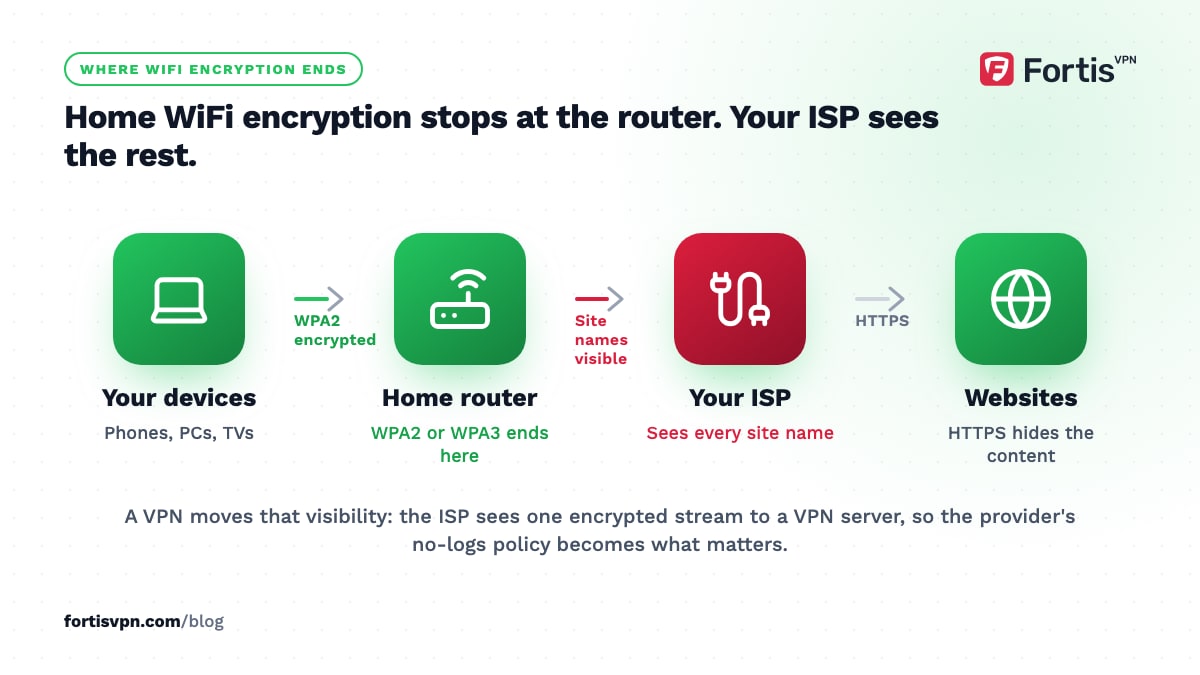
A VPN moves that visibility. Your ISP sees one encrypted stream to a VPN server and nothing else. The VPN provider sees what the ISP used to, which is why a no-logs policy matters more than any other feature. On top of that, a VPN changes the address websites see, which is what makes streaming and regional pricing behave differently. The details of what moves and what stays are in what a VPN hides.
What a VPN does not do at home
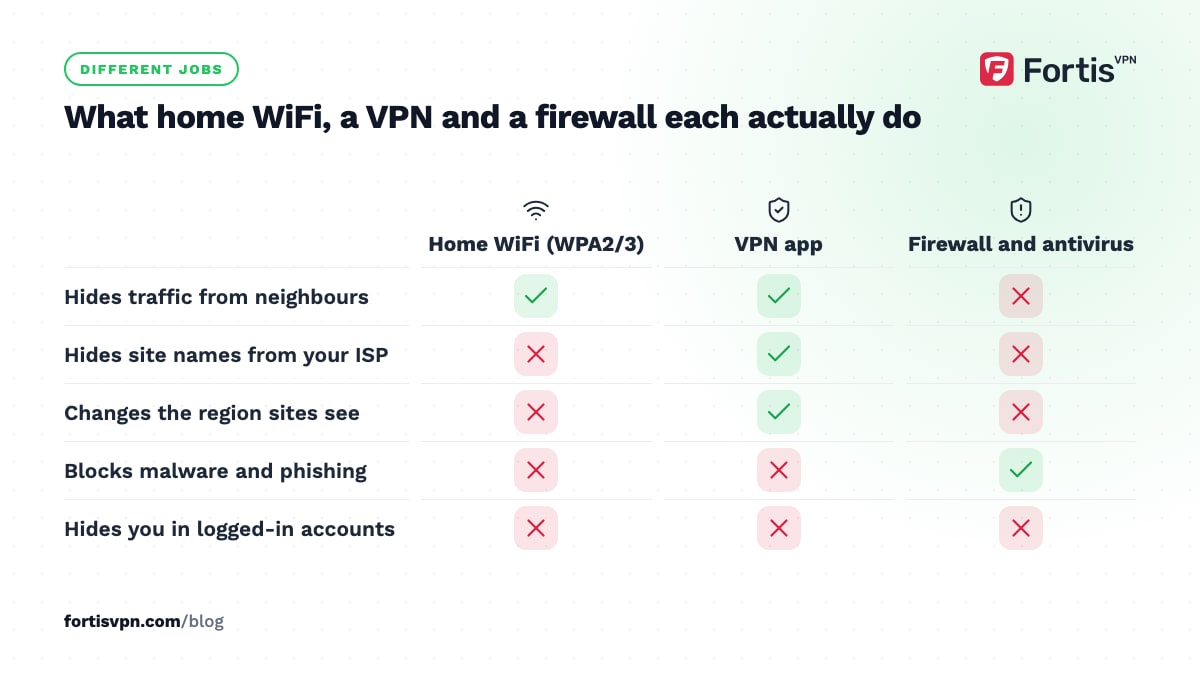
- It does not replace a firewall or antivirus. Malware, phishing and bad downloads pass through a VPN untouched. Your router's firewall and your device's built-in protection do a different job.
- It does not protect devices that are not running it. A smart plug or an older TV without the app still talks to the internet through your ISP unless the VPN runs on the router.
- It does not stop tracking inside accounts. Google, Facebook and your shopping sites know who you are from the login and cookies, whatever your address says.
- It does not hide you from the smart TV's maker. TVs report what you watch to the manufacturer regardless of the IP they send it from.
- It does not fix a bad connection. A VPN adds a hop. If your broadband is slow, it stays slow.
7 situations where a home VPN is worth it
- Your ISP sells or retains browsing data. In the US, since the 2017 repeal of the FCC's broadband privacy rules and as of October 2026, no federal rule requires your opt-in consent before an ISP uses or shares browsing data. In the UK, ISPs can be required to keep internet connection records for up to 12 months. Australia requires telecoms to retain metadata for 2 years. If you live somewhere like that and would rather not be in the record, a VPN at home is the fix.
- Your ISP throttles video or downloads. If streams get slower at busy hours while a speed test looks fine, the ISP may be slowing specific traffic. A VPN hides what the traffic is. See does a VPN stop ISP throttling.
- You want another country's streaming library, or you are an expat who wants the one from home.
- You work from home on a laptop your employer does not manage, and want client data off the ISP's radar.
- You game competitively and someone could learn your real IP from a voice chat or lobby. A VPN takes the DDoS to the VPN server instead of your router.
- Your home WiFi is shared. A student house, a building-wide network, or a landlord's router means the person who runs it can see what the ISP would see. Treat it as public WiFi.
- You live under heavy censorship. Where sites and apps are blocked at the ISP, a VPN is the tool that reaches them, subject to local law.
3 situations where you can skip it
If you are asking whether you should use a VPN at home mainly out of worry, these are the cases where it adds little.
- Your only concern is hackers on your WiFi. A strong WPA2 or WPA3 passphrase already handles that. Spend the effort on router firmware updates and a long passphrase instead.
- You only use a handful of services you are logged into anyway. If your week is email, banking and one streaming app in your own country, the VPN hides little that those companies do not already know about you.
- Your ISP is bound by strong privacy law and you trust it. In the EU, for instance, courts have repeatedly ruled against blanket data retention and ISPs fall under the GDPR. The VPN then buys you less at home, though it still earns its keep on your phone outside. See do I need a VPN on my phone.
Should the VPN go on the router or on each device?
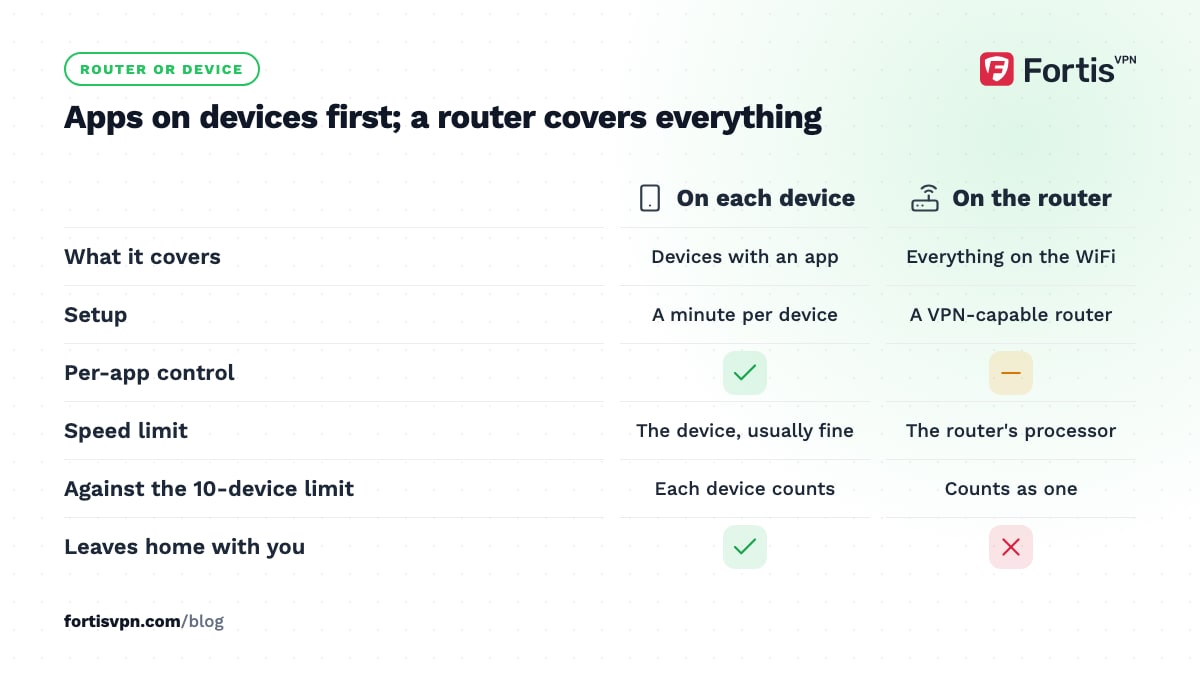
Both work at home; they suit different households.
| Question | VPN on each device | VPN on the router |
|---|---|---|
| What it covers | Devices with an app: PCs, phones, Android TV, Fire TV | Everything on the WiFi, including consoles and smart-home gear |
| Setup | Install and sign in, a minute per device | Router must support a VPN client; some need different firmware |
| Control | Per app, with split tunnelling and quick on and off | All or nothing, unless the router supports per-device rules |
| Speed | Limited by the device, usually fine | Limited by the router's processor; cheap routers slow down sharply |
| Device limit | Each device counts (10 at once with FortisVPN) | The router counts as one device |
| Leaves home with you | Yes | No |
For most homes, apps on the devices you care about are the better start. Move to the router only when you have gear with no app, or more devices than your plan allows. The full setup is in how to set up a VPN on your router.
Does a VPN cost speed at home?
A little, and less than on a phone. On a fixed line with a nearby server and WireGuard, the loss is usually small enough that streaming and calls do not notice. Latency rises by the round trip to the server, so a server in your own country or a neighbouring one keeps that to a few milliseconds.
Where people see a real drop: a far-away server, OpenVPN on an old laptop, a router doing the encryption with a weak processor, or a very fast line where the VPN server's own capacity becomes the ceiling. If your ISP throttles video at busy hours, a VPN can make streams faster, not slower, by hiding them from the throttle.
If you want the VPN on all the time at home, the trade-offs around banking apps, local services and smart-home gear are covered in should you leave your VPN on all the time.
Using FortisVPN at home
One FortisVPN account connects up to 10 devices at the same time, which covers a typical household's PCs, phones and TVs without a router setup. The Windows and Android apps protect browsing on each device, and the Android TV, Google TV and Fire TV apps handle the living room, signing in with a short code at fortisvpn.com/tv instead of typing a password with the remote. Split tunnelling on Windows, Android and the TV apps lets you keep your banking app or a local service outside the tunnel while everything else stays protected. Auto-connect on the TV apps means the VPN is up before the streaming app opens. If you later want whole-home coverage, a router setup counts as one of the 10. Every plan starts with a 7-day free trial and carries a 30-day money-back guarantee.
Frequently asked questions
Is it worth having a VPN at home?
It is worth it if you want your ISP out of your browsing history, if your ISP throttles or sells data, if you stream content from another country, or if your home network is shared with people you do not fully trust. If none of those apply and you only visit a few logged-in services, it adds little at home.
Do I need a VPN if I have a firewall?
They do different jobs. A firewall decides which connections are allowed in and out of your network; it blocks unsolicited traffic. A VPN encrypts the traffic you do send and hides your address from the sites you reach. A firewall does nothing about your ISP seeing where you go, and a VPN does nothing to block an intrusion attempt.
Should I leave my VPN on at home?
If you installed it for privacy from your ISP, yes, because the value comes from being on all the time. Use split tunnelling to keep apps that misbehave behind a VPN, such as some banking apps and local delivery services, outside the tunnel. If you only use it for a specific streaming library, turning it on when needed is fine.
Does a VPN protect my smart TV?
Partly. A VPN app on an Android TV, Google TV or Fire TV hides the TV's traffic from your ISP and changes the region streaming apps see. It does not stop the TV manufacturer collecting viewing data through its own software, and it does not cover TVs with no app unless the VPN runs on your router.
Do I need a VPN on my home computer for online banking?
Not for security. Your bank's site uses HTTPS, which already encrypts everything between your browser and the bank, and your home WiFi is encrypted too. A VPN adds privacy from your ISP, nothing more, and connecting from a server abroad can trigger the bank's fraud checks. If you use one, connect to a server in your own country.
Last updated: 9 October 2026