VPN for Travel: Keep Banking and Streaming Working Abroad
A VPN for travel keeps banking apps, streaming and email sign-ins working abroad and protects you on hotel WiFi. What it fixes, what it cannot, and a checklist.

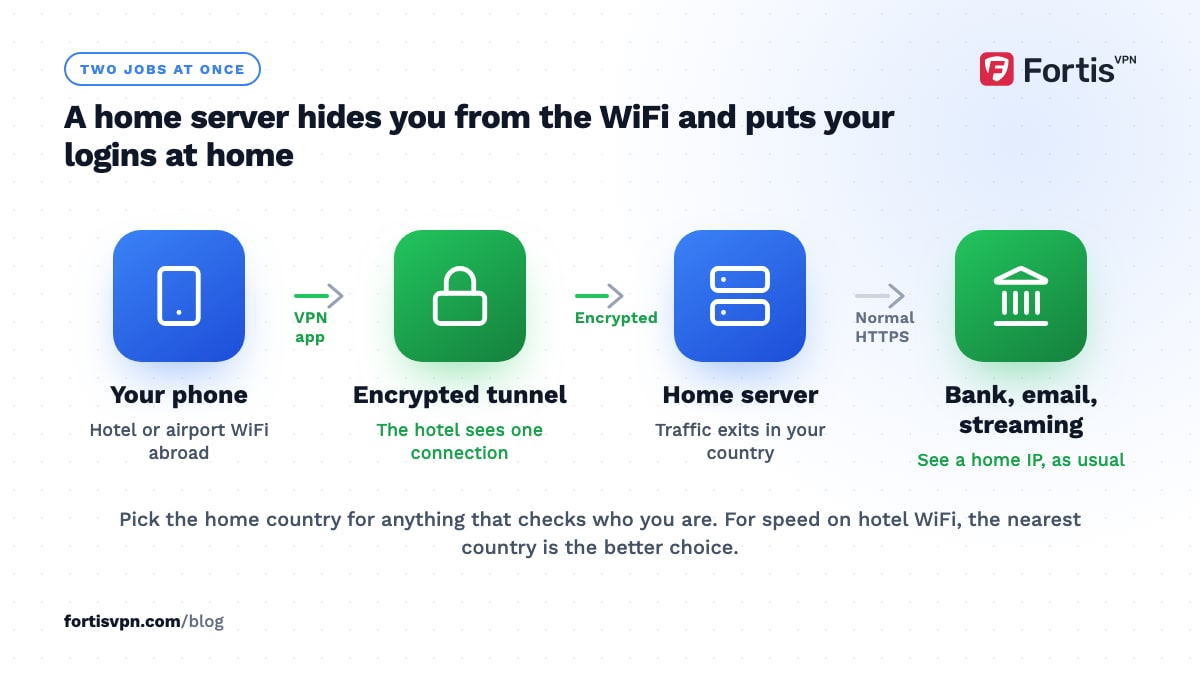
A VPN for travel does two jobs. It makes your phone and laptop appear to be at home, so banking apps, streaming services and email security checks behave as usual, and it encrypts everything you do on hotel and airport WiFi. Install it before you leave, connect to a server in your home country, and most of the small frustrations of being abroad go away.
- Connect to your home country for banking, streaming and sign-ins; connect to the nearest server for speed.
- A VPN cannot fix roaming charges, SMS codes or apps that check GPS.
- Set up and test every device before departure; some countries block VPN downloads.
- Check the VPN rules of your destination, especially in the Gulf, China, Turkey and Egypt.
Do you need a VPN when travelling abroad?
You need one if you will sign in to your bank, watch your home streaming services, or use any WiFi you do not control. That covers nearly every trip. You can skip it if you only use mobile data on your own phone, never sign in to anything sensitive, and do not mind which country's version of a site you see.
The need is strongest for long stays. Expats and remote workers hit the same walls every day: a bank that wants a home IP, a streaming library that changed overnight, and a work login that treats every new country as a threat. A travel VPN turns those from daily problems into a toggle.
7 things a VPN fixes when you travel
- Banking and payment apps that refuse a foreign IP. Many banks tighten checks when a login arrives from an unexpected country. Connecting to a home server removes that trigger, as explained in our guide to banking with a VPN.
- Security alerts and forced re-verification. Google, Microsoft and Apple flag sign-ins from new locations. From a home IP you see fewer "was this you?" prompts and fewer locked accounts.
- Streaming your home library. Catalogues follow your IP. A home server brings back your own Netflix, iPlayer or Prime Video titles. See streaming while travelling for the details, and note that no service is guaranteed.
- Hotel, airport and café WiFi. These networks are shared with strangers and sometimes run by people you cannot vet. The VPN encrypts your traffic so the network sees only a tunnel.
- Apps that are blocked where you are. Messaging and calling apps are restricted in several countries. A VPN can restore them, subject to local law, which we cover below.
- Prices that change with your location. Flights, hotels and software sometimes show different prices by country. It is worth a comparison, but it is not reliable and often makes no difference.
- Search results in the wrong language. Google, maps and shopping sites switch to the local language and local results. A home server brings back your usual versions.
What a travel VPN will not fix
A VPN changes where your internet traffic appears to come from. It does nothing to anything that is not internet traffic.
- Roaming charges. Your carrier still bills you for data, VPN or not. A VPN does not compress video or reduce usage.
- SMS verification codes. Codes arrive through the phone network. If your SIM does not roam, the VPN cannot help; set up an authenticator app before you leave.
- Apps that read GPS. Some banking, dating and sports apps check the phone's location services as well as the IP. If the two disagree, they may refuse to work.
- Card payments in person. Chip and contactless terminals talk to your bank directly. Tell your bank you are travelling if it still asks for notices.
- Local law. A VPN does not make a restricted app legal to use. Know the rules before you connect.
Which server should you connect to when travelling?
Pick the server by goal, not by habit. The two rules are: home country for anything that checks who you are, nearest country for anything that only needs speed.
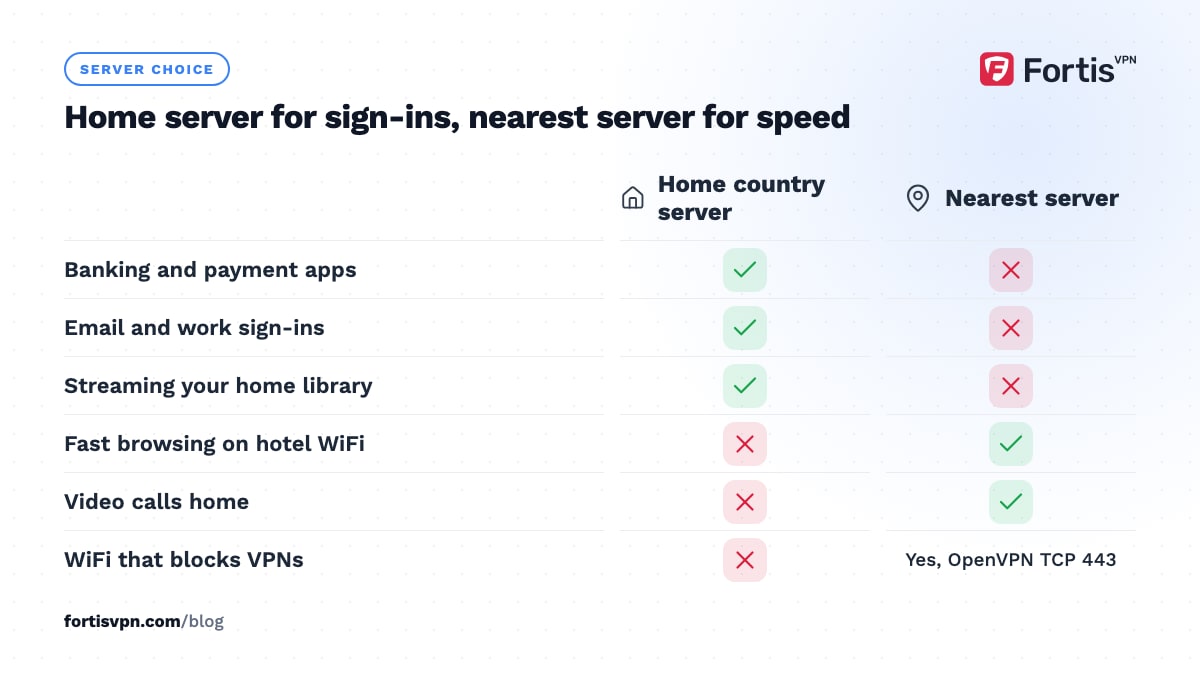
| Goal | Server to choose | Protocol |
|---|---|---|
| Banking, email, work sign-ins | Your home country, the same city each time | Auto or WireGuard |
| Streaming your home library | Your home country | WireGuard |
| Safety on hotel WiFi, fast browsing | Nearest country to where you are | WireGuard |
| WiFi that blocks VPNs | Nearest country | OpenVPN TCP (port 443) |
| Video calls home | Nearest country, not home | WireGuard |
Switching location mid-session is what trips fraud systems, so decide before you open the banking app and stay put until you close it.
Set-up checklist before you leave
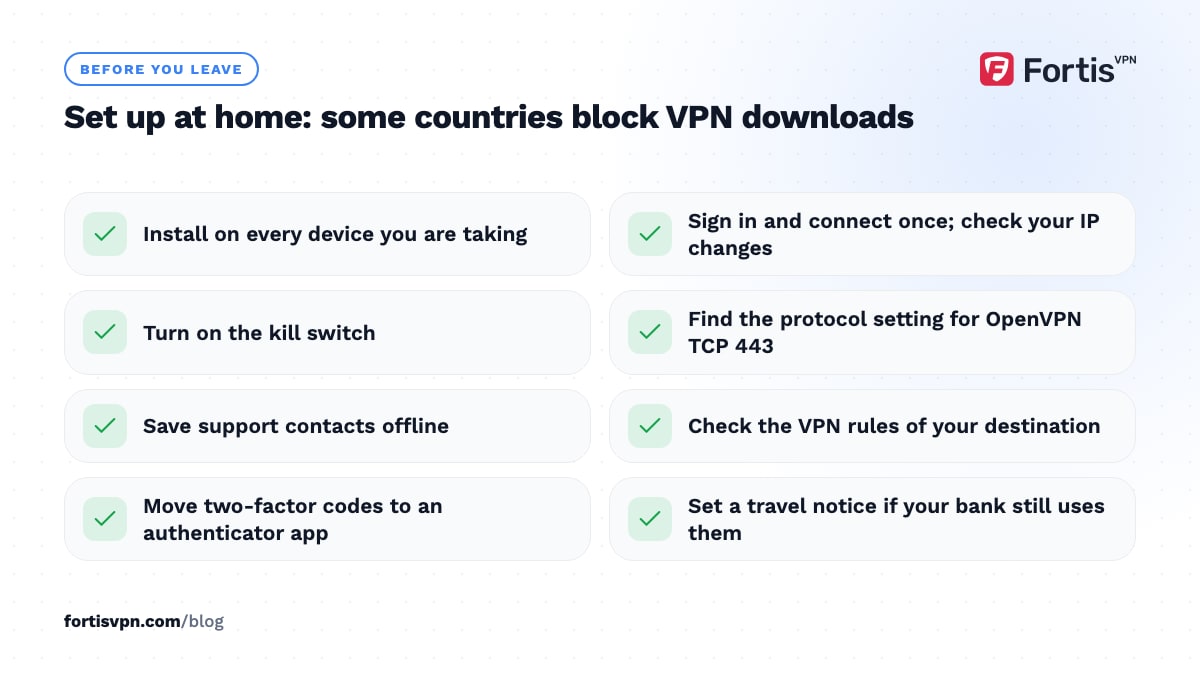
- Install on every device you are taking. Phone, laptop, tablet and, for long stays, the TV stick. Some countries block VPN websites and downloads, so do it at home.
- Sign in and connect once on each. Check that your IP address shows the server's country.
- Turn on the kill switch. If the VPN drops on hotel WiFi, your traffic stops rather than leaking.
- Learn where the protocol setting is. You will want OpenVPN TCP on port 443 the first time a hotel network blocks the VPN.
- Save support contacts offline. Screenshot the contact page or note the email address.
- Check your destination's rules. Our VPN laws by country guide lists the places where use is restricted.
- Sort out two-factor codes. Move to an authenticator app or confirm your SIM roams, because the VPN cannot deliver SMS.
- Set a travel notice with your bank if it offers one. Some banks have dropped notices and rely on their apps instead; check yours.
Using a VPN on hotel and airport WiFi
Hotel and airport networks use a login page, called a captive portal, that you must accept before any traffic flows. The VPN cannot connect until you have passed it, and a kill switch may stop the page from loading.
The order is: join the WiFi, open a browser, accept the portal, then connect the VPN and check your IP. If the kill switch stops the portal from appearing, turn it off for a minute, accept, then turn it back on. Our guide to VPNs on hotel WiFi walks through it, and is public WiFi safe? explains what the risk is in the first place.
Once connected, leave the VPN on for the whole stay. Hotel networks are the one place where the VPN is doing security work, not convenience work.
Country-specific notes for 2026
Rules change, so treat these as pointers and read the linked guides before you go.
- United Arab Emirates and the Gulf. Using a VPN is not illegal in itself, but using one to commit an offence, or to hide one, carries heavy fines. Internet calling apps are restricted on local networks.
- China. Most foreign apps are blocked and most VPNs are unreliable. Install before you land and keep a roaming SIM as backup. Read does a VPN work in China? first.
- Turkey and Egypt. VPN use is common and legal for ordinary purposes, but providers' websites and some protocols are blocked from time to time. OpenVPN TCP on port 443 is the usual fallback.
- Russia, Iran and a few others. VPN access is heavily restricted and the law changes year to year. Do not assume anything from a 2024 blog post still applies.
This section is general information, not legal advice.
Travel routers for families and groups
A travel router is a pocket-sized box that joins the hotel WiFi once and shares it with all your devices, with the VPN running on the router itself. Every phone, tablet and games console behind it is protected and appears at home, and the whole group uses one device slot.
It is worth it for a family with more devices than the plan allows, or a long stay with a TV, console and work laptop. For most travellers, a 10-device allowance covers everything without extra hardware. Most travel routers accept the same OpenVPN or WireGuard configuration as a home router, so the setup steps are the same.
Travelling with FortisVPN
One FortisVPN account covers 10 devices at the same time, so a family's phones, laptops and a Fire TV Stick in the holiday rental all fit. The Windows app has a kill switch, and the Windows and Android apps have split tunnelling, so you can send a maps app around the VPN while everything else stays protected. For long stays, the Android TV and Fire TV apps sign in with a short code at fortisvpn.com/tv rather than a password typed with a remote.
One timing tip: the 7-day free trial is most useful if it overlaps your trip. Start the trial a day or two before you leave, set up each device at home, and you will know whether it does what you need before the first charge.
Frequently asked questions
Will my bank block me if I use a VPN abroad?
Some banks block known VPN address ranges, and most treat a sudden change of country as a fraud signal. Connecting to a server in your home country, using the same one each time and opening the bank's own app rather than a browser reduces the chance of a block. If it still refuses, disconnect on a network you trust and try again.
Does a VPN work with a foreign SIM card?
Yes. The VPN runs on top of whatever connection the phone has, so a local SIM, a travel eSIM and roaming all work the same way. The SIM decides your cost and speed; the VPN decides which country your traffic appears to come from. One exception is countries that filter VPN traffic on local networks, where a roaming SIM may behave better.
Can I use a VPN on a plane?
Usually, yes. In-flight WiFi is a captive-portal network like a hotel's, so pay or sign in first, then connect the VPN. Some airlines' systems block VPN protocols or are too slow for them to stay connected; OpenVPN TCP on port 443 has the best chance. Expect high latency, since the link goes through a satellite.
Should I connect to my home country or the country I am in?
Home for anything that checks your identity or location: banking, streaming, work logins and shopping accounts. The country you are in, or the nearest server to it, for speed, video calls and general browsing on hotel WiFi. Changing between the two is fine, but do it before you open the sensitive app, not during.
Does a VPN hide from my employer that I am working abroad?
Not reliably, and trying to is a bad idea. A home-country server hides your IP, but a company-managed laptop can report its location through device management, time zone and other signals, and misleading your employer may breach your contract or tax rules. Use the VPN for security and talk to HR about where you are working from.
Last updated: 14 October 2026