How to Watch Amazon Prime Video Abroad With a VPN
Prime Video abroad shows a smaller catalogue. How to get your home library back with a VPN, fix the location error, and why not to change account country.
To watch Prime Video abroad with your usual library, connect to a VPN server in your home country, then force-close and reopen the Prime Video app. Without a VPN, your account still signs in almost anywhere, but Amazon swaps your home catalogue for a small "watch while abroad" selection plus whatever is licensed locally. A VPN changes where Prime Video thinks you are; it cannot add titles your account was never entitled to.
- Prime Video works abroad, but only a limited set of titles and your purchases stay available.
- A home-country VPN server brings back the catalogue tied to your Amazon account.
- Changing your Amazon account country is a different thing and usually a bad idea for a trip.
- Downloads made before you leave play anywhere, with no VPN needed.
Does Prime Video work abroad?
Yes, with limits. As of October 2026, Amazon's help page on travelling says Prime members can stream a selected set of Prime Video titles outside their home country, and titles you have bought or rented keep playing. Most licensed films, series and live sport disappear from the app until you are back home.
The selection abroad leans on Amazon Originals. On Fire TV, the Movies and TV Shows menus switch to "Watch While Abroad" rows that show exactly what is left. Live events are the biggest loss: a sports pass bought on Prime Video in one country often will not stream from another.
EU residents get a better deal. Under EU portability rules, a subscriber from an EU country who is temporarily in another EU country should see the same catalogue as at home, because Amazon treats you as still being in your country of residence. The general approach for other services is in VPN for streaming while travelling.
How does Prime Video decide what you can watch?
Two things decide your catalogue: where your account lives and where your connection comes from.
- Account country. Every Amazon account has a country and region setting, usually the store you signed up in. It fixes which Prime Video catalogue you are entitled to and which currency you pay in.
- Your current location. Prime Video reads the IP address of your connection, and the location of the DNS servers your device uses, to decide where you physically are.
When both point at the same country, you see the full catalogue. When they differ, you get the travel catalogue. A VPN fixes the second check by giving you an IP address in your home country. It does nothing to the first. A UK account connected to a US server does not get US Prime titles, because Prime membership is sold per store.
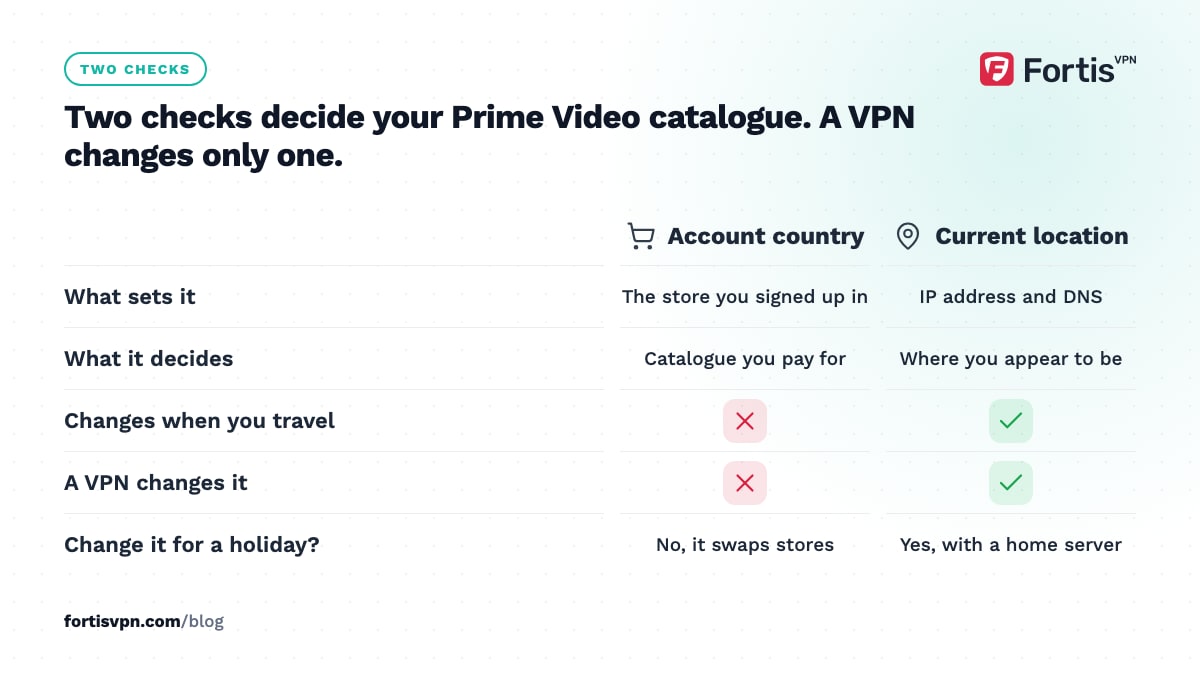
This is the main difference from Netflix, where the library follows your IP address alone and the account country only matters for billing. If you are used to changing your Netflix region, expect Prime Video to be stricter.
How to watch Prime Video abroad with a VPN, step by step
- Install the VPN before you travel. Set up the app on each device you will use (phone, laptop, Fire TV Stick) and sign in while you are still on home WiFi, so nothing needs a code or password at a hotel desk.
- Connect to a server in your home country. Pick the country where your Amazon account is registered, not the country you are visiting.
- Check your IP. Open the IP checker and confirm it shows your home country. If it shows the hotel's country, reconnect.
- Restart Prime Video. Force-close the app on phones and TVs, or clear cookies in a browser, then open it again. Prime Video caches its last location decision and will not re-check until it restarts.
- Browse as normal. Your home catalogue should be back. If a title still refuses to play, work through the fixes in the next section.
If Prime Video still detects a VPN, switch to another server in your home country or ask support for one that currently works. No VPN can promise that a given server is clear of Amazon's block lists on a given day.
Prime Video "isn't available in your location": how to fix it
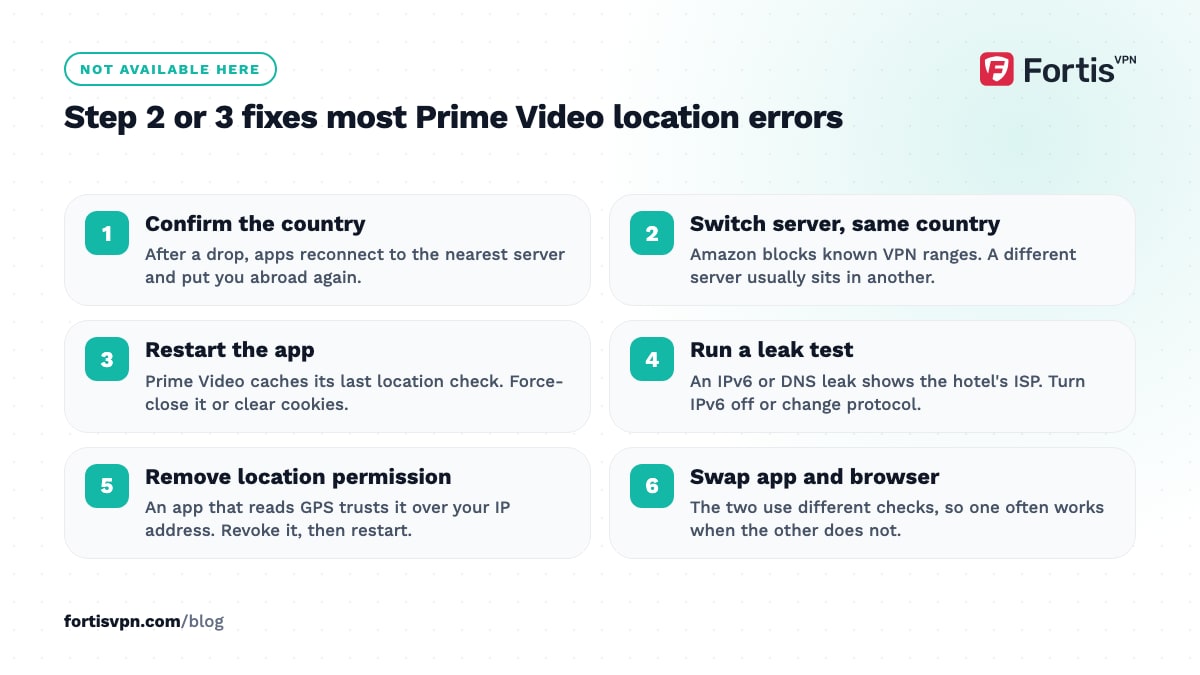
The message "This video isn't available in your location" (the wording varies by device) means Prime Video believes you are outside the country where the title is licensed. Work down this list; most people are fixed by step 2 or 3.
- Confirm the VPN is connected to the right country. Many apps reconnect to the nearest server after a drop, which puts you back in the country you are visiting.
- Switch to another server in the same country. Amazon blocks IP ranges it has identified as VPNs. A different server usually sits in a different range.
- Restart the app or clear cookies. Prime Video remembers its last location check. On Fire TV go to Settings, Applications, Manage Installed Applications, Prime Video, Clear cache.
- Run a leak test. If the IPv6 leak test shows a real address, or DNS points at the hotel's ISP, Prime Video sees the mismatch. Turn off IPv6 or change protocol; see what a DNS leak is.
- Remove location permission from the app. On phones, check whether Prime Video has location permission. If it does, remove it and restart the app, because an app that reads GPS trusts it over your IP address.
- Try a browser instead of the app, or the app instead of a browser. The two use different checks and one often works when the other does not.
- Check the account country. If someone changed the Amazon account to another country, no server will bring the old catalogue back.
The troubleshooting page for a streaming service that detects your VPN covers the same steps for other services.
Should you change your Amazon account country instead?
Amazon lets you move an account to another store. As of October 2026 the setting sits under Your Account, then Your Content and Devices, then the Preferences tab, under Country/Region Settings; the labels vary a little by store. You need a real address in the new country and usually a payment method that works there.
For a holiday or a work trip, do not touch it. Changing the store does not give you both catalogues; it swaps one for the other. Your Prime membership is sold per store, so a UK Prime membership does not become US Prime when you change the setting. Digital purchases and rentals are tied to the store where you bought them and can disappear from your library after a change. Kindle books, Audible and your order history are tied to the store as well.
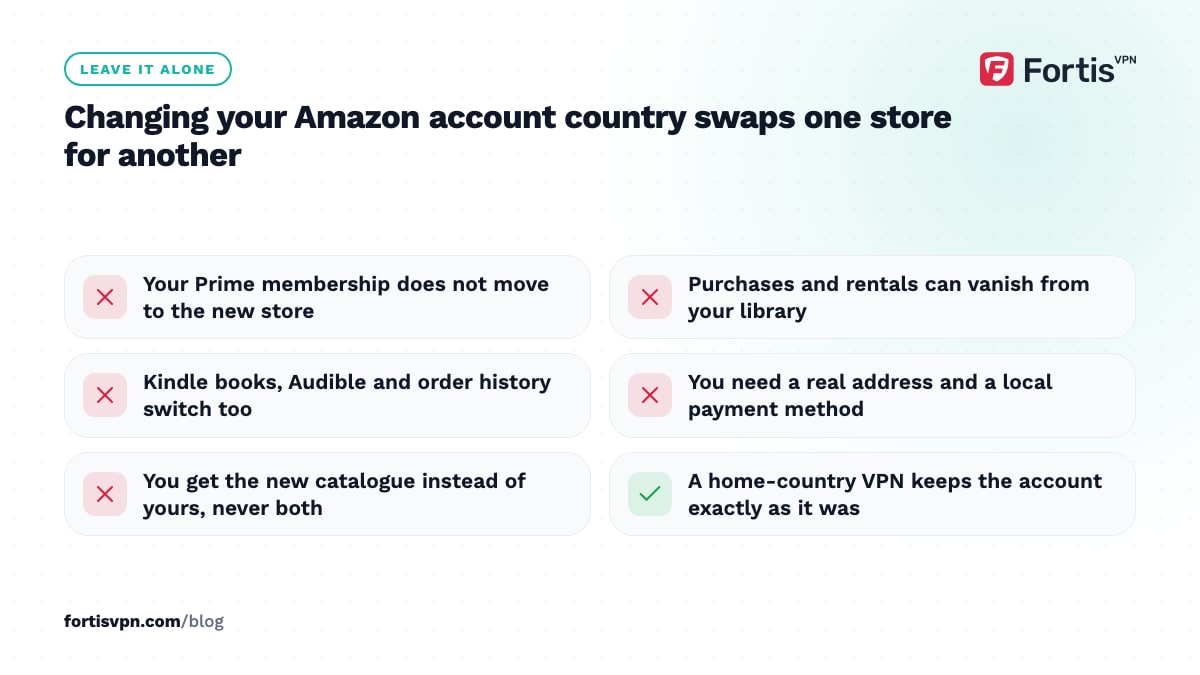
Change the account country only when you genuinely move. For everything else, a VPN set to your home country keeps your account exactly as it was and gives you the catalogue you already pay for.
Prime Video on Fire TV with a VPN
Fire TV is Amazon's own device, and it is the easiest place to run a VPN for Prime Video because the VPN app installs from the Amazon Appstore like any other. The FortisVPN Fire TV app signs in with a short code at fortisvpn.com/tv, so you never type a password with the remote.
- Install FortisVPN from the Appstore on the Fire TV Stick. The full walkthrough is in how to set up a VPN on Fire TV Stick.
- Connect to a server in your home country. Turn on auto-connect so the VPN is up every time the stick wakes.
- Open Prime Video. If the Watch While Abroad rows are still showing, go to Settings, Applications, Manage Installed Applications, Prime Video, Force stop, then open it again.
Leave the Fire TV's own country setting alone. Amazon has a separate option for using a Fire TV in a different country, but that changes the store and the Appstore, with the same side effects as changing your account country. Use split tunnelling if you want only Prime Video and your other streaming apps to go through the VPN while everything else uses the hotel network directly.
Download Prime Video titles before you travel
Downloads are the one method that needs no VPN and no network at all. The Prime Video app on Android, iPhone, iPad and Fire tablets lets you download most Prime titles over WiFi before you leave.
- You typically have 30 days to start watching a download and 48 hours to finish once you press play. The windows vary by title and are shown on the title's detail page.
- Downloads can be held on a limited number of devices at once, so clear old ones if a new download refuses.
- Not every title can be downloaded, but anything you did download plays anywhere, because the licence check happened when you saved it.
- Expired downloads are removed from the device automatically.
For a two-week trip, downloading a series is often less hassle than running a VPN on a hotel network that may block it; see does a VPN work on hotel WiFi.
Watching Prime Video abroad with FortisVPN
FortisVPN has servers in 100+ countries, so a home-country server exists whether your account is in the UK, Germany, India or the US. Pick the country, connect, and restart Prime Video. The Fire TV app, the Android TV app, the Android app and the Windows app cover the devices people take on trips, and one account connects up to 10 devices at the same time, so the phone, the laptop and the Fire TV Stick in your bag are all included. The protocol is set to Auto by default; if the hotel network blocks the connection, switch to OpenVPN TCP under Settings, which looks like ordinary HTTPS traffic. You can start a 7-day free trial before a trip; you pay nothing today and are not charged if you cancel before day 7. If a server stops working with Prime Video, support can point you to one that currently does.
Frequently asked questions
Does Amazon block VPNs on Prime Video?
Amazon blocks IP ranges it has identified as belonging to VPN or proxy services, and it compares your IP address with your DNS location. It does not block every VPN server, and the list changes. If a title refuses to play, switch to another server in your home country; a different range often passes.
Why can't I watch some Prime Video titles while travelling?
Amazon licenses most films and series country by country, so a title included with Prime in the UK may be unlicensed, or sold separately, in Spain. When Prime Video sees a foreign IP address it hides titles that are not cleared for that country. Amazon Originals usually stay, because Amazon owns those rights worldwide.
Does the Amazon account country matter?
Yes. Your account country sets which catalogue you are entitled to, and your IP address sets where you appear to be. Both have to match for the full library. A VPN only changes the IP part, so it brings back your own catalogue but cannot give you another country's Prime membership.
Can I watch Prime Video abroad without a VPN?
Yes, in a reduced form. Your purchases, rentals and a selection of Prime titles stream in most countries. EU residents travelling inside the EU keep their full catalogue under EU portability rules. For everything else, download titles before you leave or use a VPN set to your home country.
Will Prime Video ban my account for using a VPN?
Amazon's usual response to a VPN it detects is to block the title or show the travel catalogue, not to close the account. Nobody outside Amazon can promise what its policy will be, so use a VPN to reach the catalogue you already pay for rather than to sign up for a cheaper store elsewhere.
Last updated: 7 October 2026