Is It Safe to Use a VPN for Online Banking?
Is it safe to use a VPN for online banking? Yes, and often wise on public WiFi. Why banks sometimes block VPN logins and how to avoid a locked account.
Yes, it is safe to use a VPN for online banking. Your bank's website and app already encrypt your session with HTTPS, and a VPN adds a second layer that hides the connection from whoever runs the WiFi you are on. The risk is not that the VPN exposes anything. The risk is that your bank's fraud system sees an unfamiliar location and locks you out, and a few habits prevent that.
- A VPN protects banking on public WiFi and hides your IP from the network, not from your bank.
- Banks flag data-centre IP ranges and sudden country changes; a consistent home-country server avoids most blocks.
- A VPN does nothing against phishing, malware or a stolen password.
- A dedicated IP gives you one address nobody else uses, which fraud systems learn to trust.
Why use a VPN for online banking at all?
HTTPS already encrypts what you type into your bank's site. What it does not hide is where you are connecting from, which sites you contact, or the fact that you are banking at all. On a network you control, that is a small gap. On a shared network, it is the whole attack surface.
On public WiFi, a VPN closes four specific holes:
- Fake hotspots. An "evil twin" network with the same name as the café's can sit between you and the internet. Inside a VPN tunnel it sees only encrypted traffic to one server.
- DNS tampering. A hostile network can answer your bank's address lookup with a lookalike site. The VPN routes DNS through its own servers.
- Session snooping. Anyone on the network can see which domains you contact and when. The VPN hides that.
- IP-based tracking. Ad and analytics scripts on banking pages see the VPN's address, not yours.
At home, the benefit is smaller: your ISP no longer sees that you bank, and when, and a connection-level tracker blocker strips third-party scripts. The same logic applies to shopping online with a VPN. Read is public WiFi safe? for the full picture of what a shared network can see.
Why do banks block or flag VPN users?
Banks run fraud models on every login, and a VPN can trip three of their signals at once.
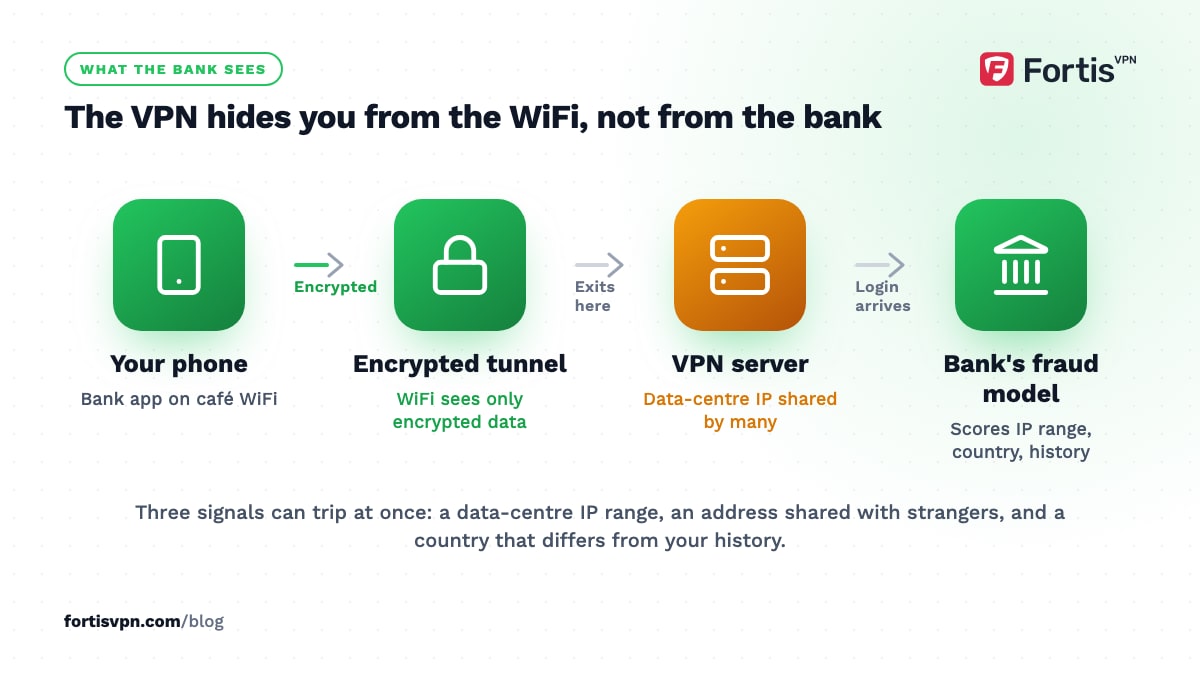
- Data-centre IP ranges. VPN servers live in data centres. Fraud systems keep lists of those ranges because criminals use them too, so some banks refuse the login outright or ask for extra verification.
- Shared addresses. One VPN IP is used by many people at the same time. If one of them did something suspicious, the address carries that reputation to you.
- Atypical travel. A login from London at 9am and one from Singapore at 9:30am cannot both be you. Security vendors call this "impossible travel" or atypical travel, and switching VPN locations between sessions looks exactly like it.
The response varies by bank. Some do nothing. Some send a one-time code. Some lock the account until you call. A few block known VPN ranges entirely, which shows up as a login page that never loads or an app that spins forever. None of this means the VPN is unsafe; it means the bank cannot tell you apart from a fraudster yet.
How to bank with a VPN without getting locked out
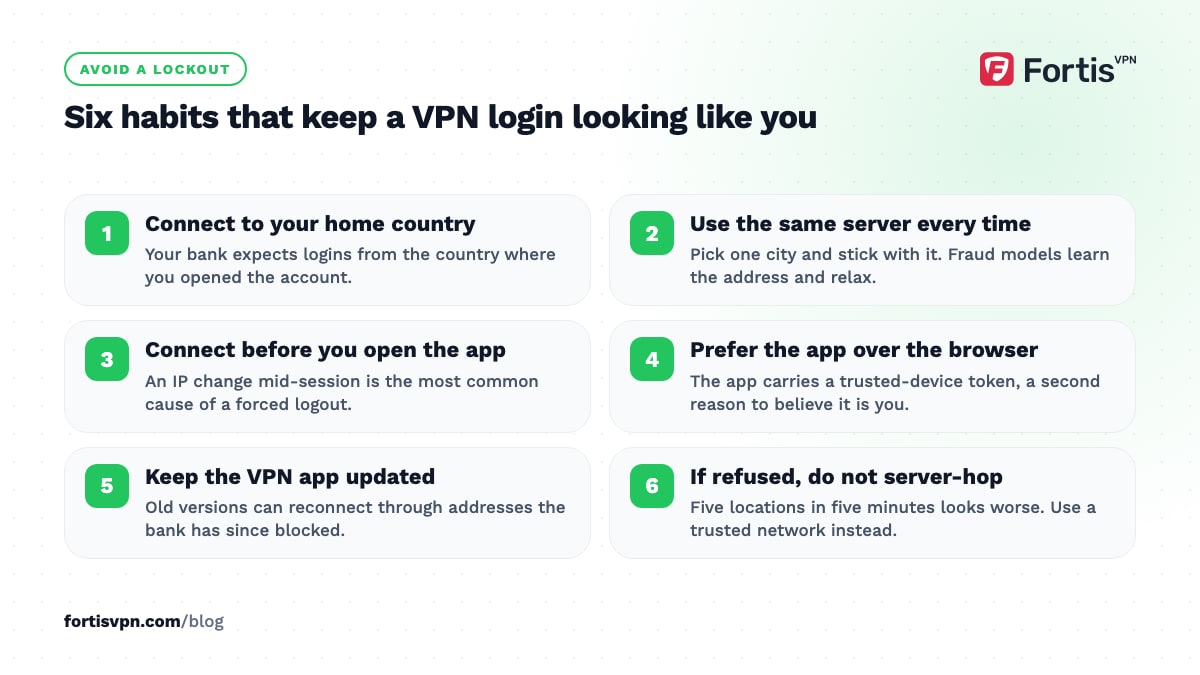
- Connect to your home country. Your bank expects logins from the country where you opened the account. A home server keeps the location consistent with your history.
- Use the same server every time. Pick one city and stick with it. Fraud models learn that address and stop flagging it.
- Connect before you open the app, not during. A change of IP in the middle of a session is the single most common cause of a forced logout.
- Prefer the bank's app over the browser. Apps bind to your device and often carry a trusted-device token, which gives the fraud system a second reason to believe it is you.
- Keep the VPN app updated. Server lists change, and old versions can reconnect through addresses that have since been blocked.
- If the bank refuses, do not server-hop. Trying five locations in five minutes makes the pattern worse. Disconnect on a network you trust and log in directly.
- Exempt the banking app if needed. With split tunnelling you can send the bank's app around the VPN while everything else stays protected. Use this only on a trusted network, because the exempted app has no VPN protection.
Using a VPN for banking while abroad
Abroad, the VPN helps rather than hurts. Without it, your bank sees a login from a foreign country on a foreign network. With it, the login arrives from a home IP, which is the pattern the bank already knows.
Three things still need to work: your two-factor method, your registered phone number and your card. Move to an authenticator app before you leave, confirm your SIM will roam so SMS codes arrive, and check whether your bank wants a travel notice. Some banks have dropped notices and rely on their apps to confirm unusual activity; others still ask for one.
Hotel WiFi is where this matters most. Connect to the VPN first, open the bank app second, and never do either on a network that still shows the hotel's login page. Our VPN for travel guide covers the rest of the trip.
Does a VPN protect you from phishing or malware?
No. A VPN encrypts the path between your device and the VPN server. It does not inspect what travels along that path, and it cannot tell a real bank from a fake one.
- A phishing email that sends you to a lookalike login page works the same with a VPN on.
- Malware already on your phone or laptop can read your screen and keystrokes inside the tunnel.
- A stolen password lets a thief in from their own connection, VPN or not.
What stops those is the ordinary list: type the bank's address yourself or use its app, keep your operating system updated, run the built-in antivirus, and turn on two-factor authentication. A VPN's tracker and ad blocker removes some malicious ad scripts, which helps at the edges, but it is not a filter for fraud. Our guide to whether a VPN is safe draws the line in more detail.
What a dedicated IP changes for banking
A dedicated IP is a VPN address that only you use. It does not change the encryption, but it changes how your bank's fraud model sees you.
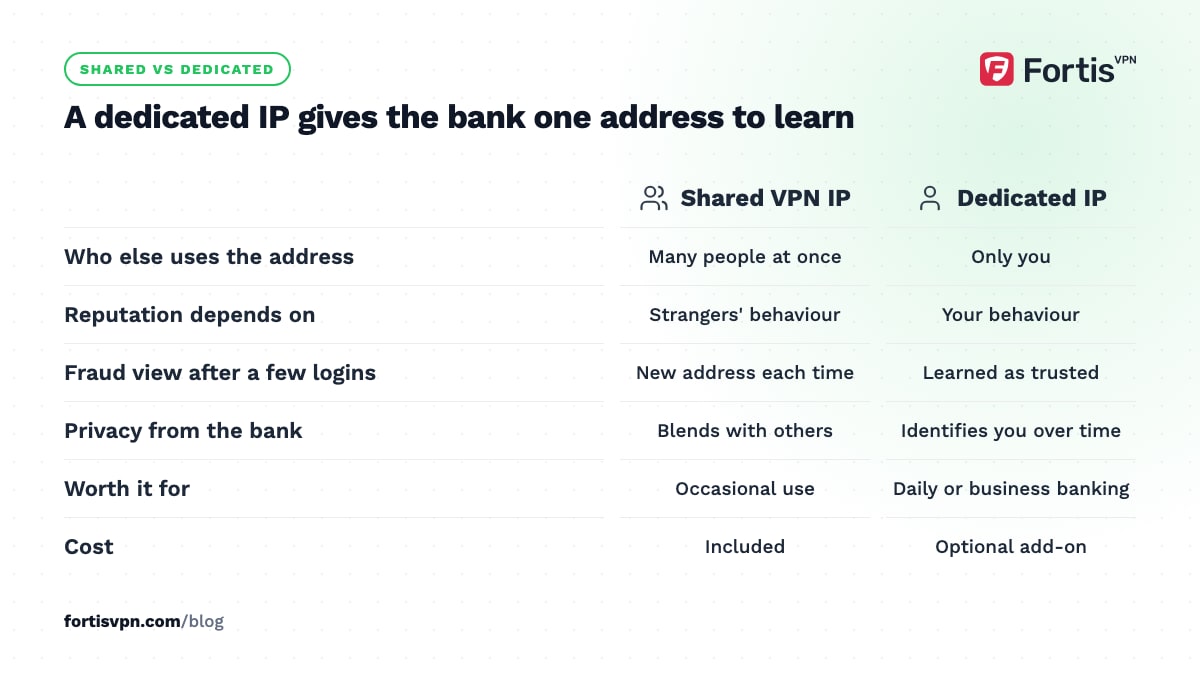
| Factor | Shared VPN IP | Dedicated IP |
|---|---|---|
| Who else uses the address | Many people at once | Only you |
| IP reputation | Depends on strangers' behaviour | Depends on your behaviour |
| Fraud-system view after a few logins | New address whenever the server changes | Same address, learned as trusted |
| Privacy from the bank | Your activity blends with others' | The address identifies your account over time |
| Cost | Included | Optional add-on |
For people who bank daily through a VPN, or run a business account that locks on every new IP, a dedicated IP removes most of the friction. For occasional use it is unnecessary. The full trade-offs are in what is a dedicated IP address?
Banking with FortisVPN
FortisVPN gives you the pieces above without extra setup. Connect to a server in your home country from the 100+ available, and keep that location as your default so every login looks the same. The kill switch on Windows stops traffic if the tunnel drops, so a banking session never falls back to open hotel WiFi. Split tunnelling on Windows and Android lets you route one stubborn banking app outside the VPN while the rest of the device stays protected.
If your bank keeps challenging shared addresses, the optional dedicated IP add-on gives you a static address of your own; the dedicated IP help page explains how to add it from your account dashboard. Every plan has a 7-day free trial and a 30-day money-back guarantee, so you can test it against your own bank first.
Frequently asked questions
Can my bank see that I am using a VPN?
Often, yes. Banks can match your IP against lists of known VPN and data-centre ranges, and many do. What they cannot see is your real location or your home IP. Seeing a VPN is not itself a problem for most banks; it is the combination of a VPN address and an unfamiliar pattern that triggers a block.
Why did my bank block my login with a VPN?
The most likely reasons are a server in a different country from your account, an IP range the bank blocks outright, or a location change in the middle of a session. Reconnect to a home-country server, open the app fresh, and try once. If it fails again, log in without the VPN on a trusted network and check for a security message.
Should I turn off my VPN for banking apps?
Not by default. On public WiFi, the VPN is the main thing protecting the session, so keep it on and choose a home-country server. Turn it off only if the bank refuses the connection, and only on a network you trust. If that happens often, exempt the app with split tunnelling or use a dedicated IP rather than going unprotected.
Is it safe to use banking apps on public WiFi with a VPN?
Yes, with the VPN connected before you open the app. The tunnel hides the session from the network operator and anyone else on it, and the kill switch stops traffic if the tunnel drops. Without a VPN, the app's own encryption still protects your password, but the network can see that you bank, and when, and can try to redirect you.
Does a VPN hide my transactions from my bank?
No, and nothing could. You are logged in to your own account, so the bank sees every transfer, balance check and payment regardless of your IP. The VPN hides your connection from third parties on the network and from your ISP, not from the service you are signed in to. It is a privacy tool, not a way to hide from your bank.
Last updated: 7 October 2026