How to Share a VPN Connection Over a Mobile Hotspot
Phone hotspots do not share a VPN with connected devices, but a Windows laptop can. Step-by-step hotspot sharing, the router alternative, and fixes.
You can share a VPN connection over a hotspot from a Windows laptop, but not from a phone. Android and iPhone hotspots send tethered devices straight to the mobile network and skip the phone's VPN entirely. On Windows, you turn on Mobile hotspot, then share the VPN adapter with it, and every device that joins gets the VPN's IP address. A router with the VPN built in is the cleaner long-term answer.
- A phone's hotspot bypasses the phone's VPN on both Android and iPhone; no setting changes that.
- Windows can share a VPN over its hotspot through the VPN adapter's Sharing tab.
- Tethered devices show the laptop's VPN IP and are limited by the laptop's WiFi speed.
- With 10 devices per account, installing the app on each device is usually easier.
Does your phone's hotspot use the VPN?
No. When a VPN app runs on Android or iPhone, it creates a virtual network interface and the system routes the phone's own apps through it. Tethering works at a lower level: the hotspot takes packets from connected devices and forwards them to the mobile data interface directly, without passing through the VPN interface. The phone is protected; the laptop or TV connected to it is not.
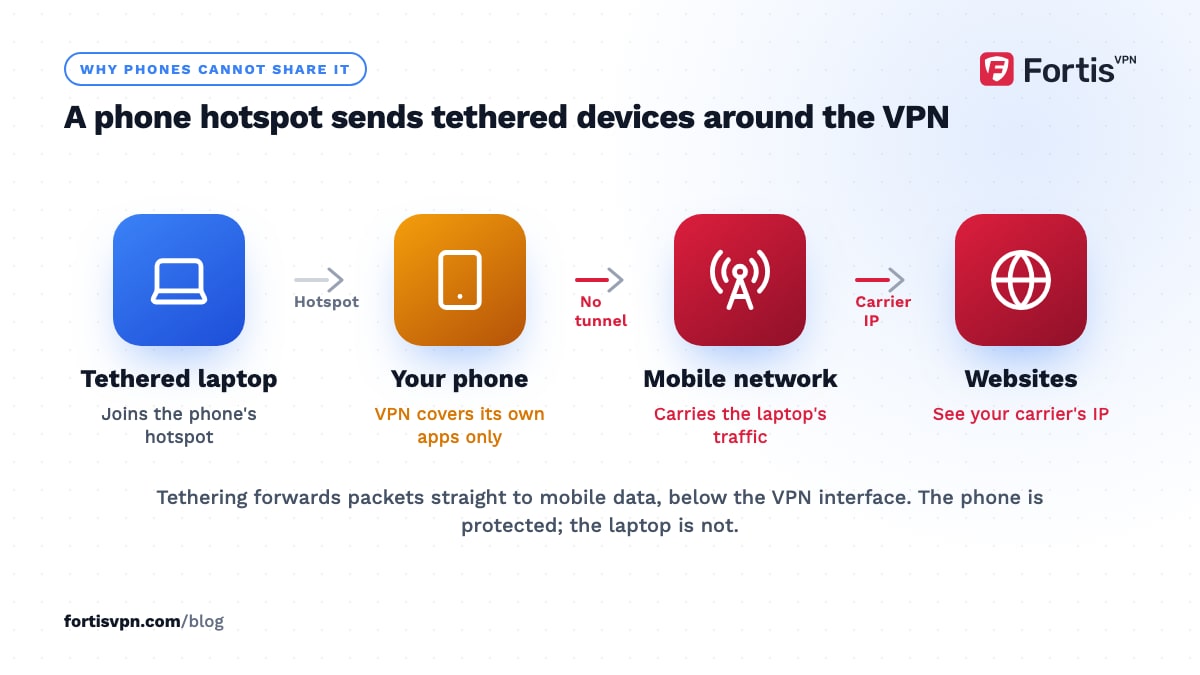
You can confirm this in a minute. Connect the VPN on the phone, join its hotspot from a laptop, and open the IP checker on both. The phone shows the VPN server's address; the laptop shows your mobile carrier's.
There is no toggle to share a VPN connection from Android or iPhone on an unmodified phone. Apps that route hotspot traffic through the VPN exist for Android, but they need root access, which most manufacturers treat as voiding the warranty and which many banking apps refuse to run alongside, so this guide does not cover them. The practical answers are below: share from a laptop, put the VPN on a router, or install the VPN app on each device.
How to share a VPN from a Windows laptop
Windows 10 and 11 have a built-in Mobile hotspot, and the Internet Connection Sharing feature can point it at the VPN adapter instead of the WiFi adapter. The steps below use the FortisVPN Windows app, but any VPN that creates a network adapter works the same way.
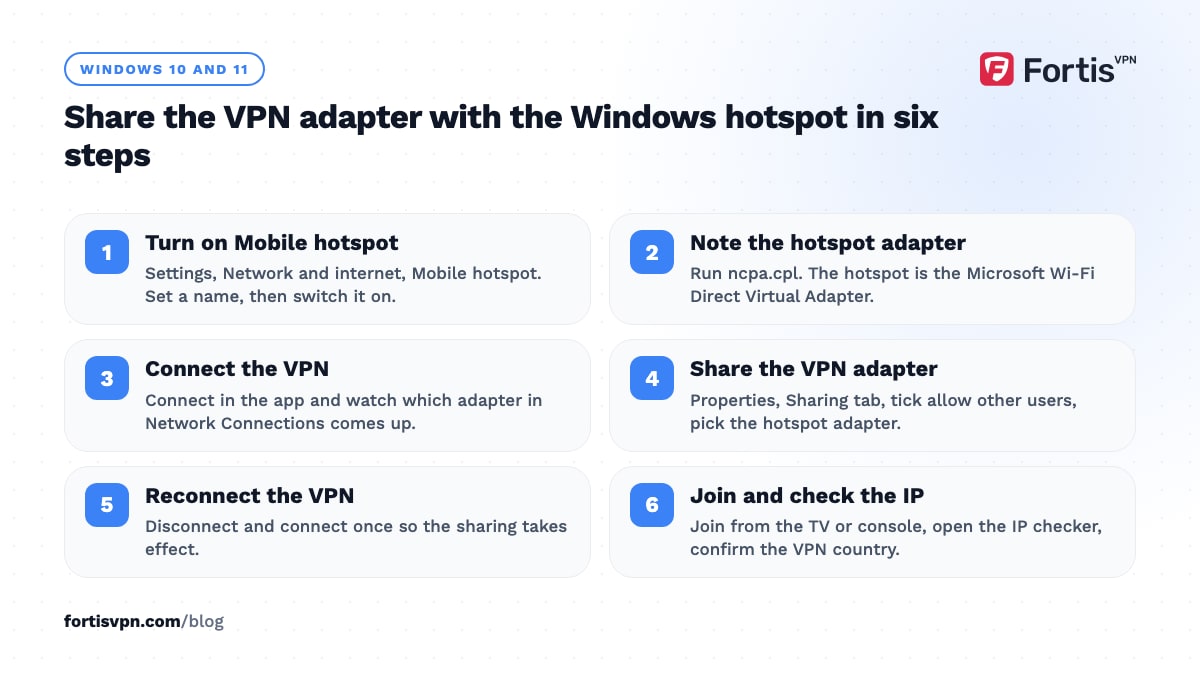
- Turn on the hotspot first. Open Settings, Network & internet, Mobile hotspot. Set "Share my internet connection from" to your WiFi or Ethernet connection, set a network name and password under Edit, and switch Mobile hotspot on.
- Find the hotspot's adapter name. Press the Windows key, type ncpa.cpl and press Enter to open Network Connections. The hotspot appears as a new adapter named something like Local Area Connection* 12, described as Microsoft Wi-Fi Direct Virtual Adapter. Note the name.
- Connect the VPN. Open the VPN app and connect. Back in Network Connections, a new adapter shows as connected; its name depends on the protocol, so look for the one whose status changes when you connect and disconnect.
- Share the VPN adapter. Right-click that VPN adapter, choose Properties, open the Sharing tab, tick "Allow other network users to connect through this computer's Internet connection", and in the Home networking connection list pick the hotspot adapter from step 2. Click OK.
- Reconnect the VPN. Disconnect and connect once so the sharing takes effect.
- Join from the other device. Connect your phone, TV or console to the hotspot name you set, open the IP checker on it, and confirm it shows the VPN server's country.
Three things to know. If you change the VPN protocol, the adapter changes too, so repeat step 4 for the new one; if hotspot devices get no internet on WireGuard, switch the app to OpenVPN UDP and share that adapter instead. Windows turns the hotspot off after about 5 minutes with no devices connected unless you switch off Power saving on the Mobile hotspot page. And the laptop must stay awake; closing the lid ends the hotspot. The Windows 11 VPN setup guide covers installing the app if you have not yet.
Sharing a VPN from a Mac
macOS has Internet Sharing under System Settings, General, Sharing, and it can share a WiFi or Ethernet connection with other devices. It does not reliably share a VPN: the "Share your connection from" list shows the Mac's physical interfaces and the system's built-in VPN types, but the tunnel interfaces that modern VPN apps create usually do not appear. The workarounds involve manual firewall rules that break between macOS versions, so they are not a good use of an afternoon.
There is no FortisVPN app for Mac yet as of October 2026. If you need a shared VPN from a Mac, use a router, as described next, or share from a Windows laptop.
Put the VPN on a router or travel router instead
A router running the VPN protects every device that connects to it, with no laptop left open and no adapter tricks. It is the right tool if you want a TV, console or printer behind the VPN permanently, or if you travel and want one setup for every hotel room.
Two forms work. A home router with VPN client support runs the tunnel for the whole house, and many let you choose which devices use the VPN. A pocket-sized travel router does the same thing for a hotel room: it joins the hotel WiFi, connects the VPN, and broadcasts its own network that all your devices join. The hotel sees one device; your devices see a VPN. The router VPN setup guide walks through both.
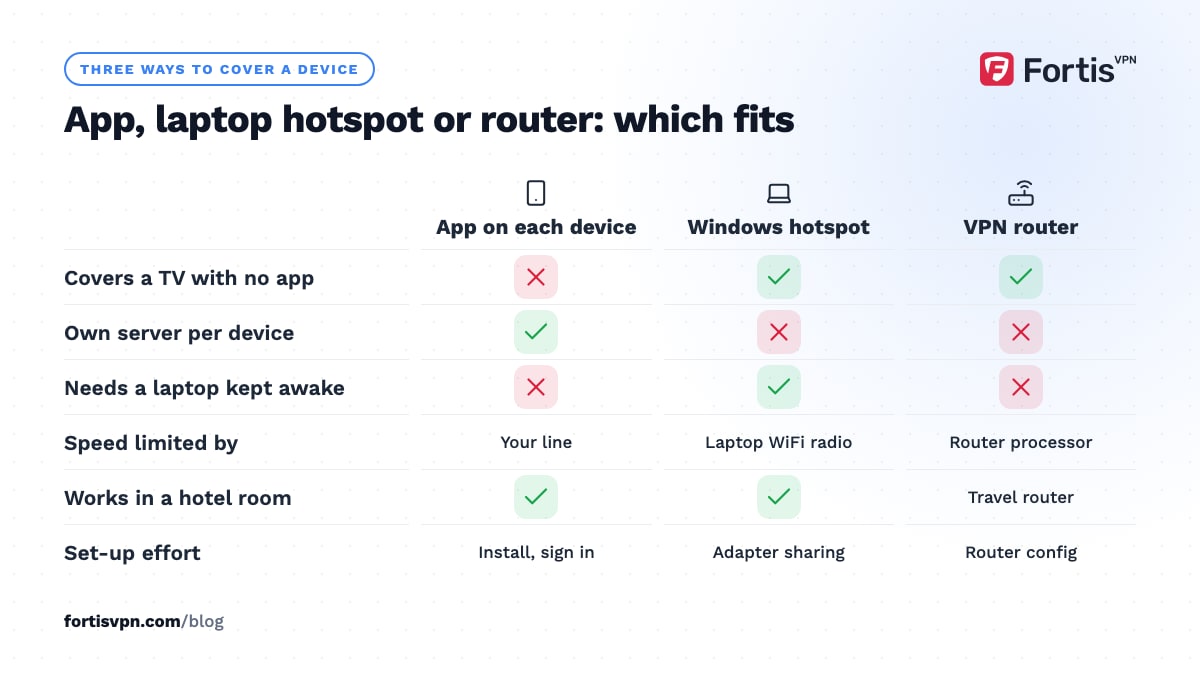
The trade-off is speed. A consumer router's processor is far slower than a laptop's, so a cheap router may cap the VPN at a fraction of your line speed. Check the router's rated VPN throughput before buying one for streaming.
When is sharing a VPN over a hotspot worth it?
Sharing makes sense for devices that cannot run a VPN app: a smart TV from Samsung or LG, a PlayStation or Xbox, a printer, or an older streaming box. It also helps in a hotel that allows one device per room on its WiFi, where the laptop joins the hotel network and everything else joins the laptop.
For most other cases it is more work than it is worth. A FortisVPN account connects 10 devices at the same time, with apps for Windows, Android, Android TV, Google TV and Fire TV, so a phone, a laptop and a TV stick each run the VPN themselves, with their own kill switch and their own server choice. A device behind a shared hotspot has none of that: it gets whatever server the laptop picked, and if the laptop's tunnel drops, whether the hotspot's traffic is blocked too depends on how the app implements its kill switch. Install the app where you can; share only where you cannot.
For the devices with no app, see the guides for Samsung and LG smart TVs and PS5 and Xbox, which cover those devices in detail.
Troubleshooting a shared VPN hotspot
- Devices connect to the hotspot but have no internet. The sharing is pointed at the wrong adapter, or the VPN adapter changed after a protocol switch. Open the VPN adapter's Sharing tab again and re-select the hotspot adapter. Then disconnect and reconnect the VPN.
- Devices have internet but show your real IP. Sharing is set on the WiFi adapter, not the VPN adapter. Untick sharing on the WiFi adapter and set it on the VPN adapter only.
- Pages do not load but the IP is right. DNS is not being passed through. On the client device, set DNS manually to a public resolver; the request still travels through the laptop's tunnel. Or restart the Internet Connection Sharing service on the laptop.
- The hotspot keeps turning off. Turn off Power saving on the Mobile hotspot page and stop the laptop from sleeping on battery.
- Speed is poor. The laptop's WiFi card is doing double duty, receiving from the router and transmitting to the hotspot on the same radio. Plug the laptop into Ethernet so the WiFi radio only serves the hotspot.
- The hotspot drops when the VPN reconnects. The kill switch on the laptop blocked everything during the drop. That is working as intended; reduce drops by using WireGuard and a nearby server. The kill switch guide explains the behaviour.
Sharing FortisVPN from your laptop
The FortisVPN Windows app works with the Windows hotspot method above: connect in the app, share its adapter with the hotspot, and every device that joins leaves from the FortisVPN server's address. Keep the kill switch on in the app's Settings so the laptop never falls back to the plain connection during a drop, and use WireGuard for speed unless the hotspot devices get no internet, in which case switch the protocol to OpenVPN UDP and share the new adapter. Before you go to this trouble, check whether your devices have an app: the Windows app, Android, Android TV, Google TV and Fire TV are all covered, and one plan runs 10 at once. You can start a 7-day free trial and try the hotspot setup on your own laptop before paying anything.
Frequently asked questions
Does my VPN protect devices connected to my hotspot?
From a phone, no. Android and iPhone route hotspot traffic straight to mobile data, so tethered devices use your carrier's address and are not encrypted by the phone's VPN. From a Windows laptop, yes, once you share the VPN adapter with the hotspot. Check by opening an IP lookup on the connected device: it should show the VPN server's country.
Can I share a VPN from my phone to my TV?
Not through the phone's hotspot on a standard Android or iPhone. Install the VPN app on the TV instead: Android TV, Google TV and Fire TV all have apps. For a Samsung, LG or other TV with no app, share the VPN from a Windows laptop's hotspot or run the VPN on your router, which covers the TV without any setup on it.
Can I use a VPN on hotspot data?
Yes. If your laptop is connected to your phone's hotspot, run the VPN app on the laptop and it encrypts the laptop's traffic over the mobile connection like any other network. The phone's VPN does not cover the laptop, but the laptop's own VPN does. Mobile data counts against your plan the same with or without the VPN.
Why does my hotspot stop working when the VPN is on?
Usually because the kill switch blocks all traffic that does not go through the tunnel, and the hotspot's traffic goes out through the WiFi adapter unless you shared the VPN adapter. Either share the VPN adapter with the hotspot as described above, or turn off the kill switch while sharing. A protocol change can also break sharing by creating a new adapter.
Is a travel router better than hotspot sharing?
For more than an occasional trip, yes. A travel router runs the VPN itself, stays on without a laptop, and gives every device in the room the same network. Hotspot sharing is free and works tonight, but it ties up the laptop and cuts its WiFi speed. If you travel monthly and carry a TV stick or console, a travel router pays for itself in convenience.
Last updated: 3 October 2026