Smart DNS vs VPN for Streaming: Which Should You Use?
Smart DNS vs VPN: Smart DNS reroutes location checks with no encryption or new IP. Where each wins on speed, devices and privacy, and which to pick in 2026.
Smart DNS and a VPN both help you reach a streaming library from another country. Smart DNS reroutes only a streaming service's location checks, with no encryption and no change to your IP address, so it is fast and runs on devices without apps. A VPN encrypts everything and gives you a new IP address, so it protects your privacy too. Use a VPN on any device that has an app; Smart DNS is for devices without one.
- Smart DNS changes where a streaming service thinks you are; it hides nothing and encrypts nothing.
- A VPN changes your IP address and encrypts all traffic, with a small speed cost.
- Smart DNS suits Smart TVs and consoles with no VPN app; a VPN suits everything else.
- Streaming services detect and block both, so neither is guaranteed to work.
What is Smart DNS and how does it work?
When you open a streaming app, your device first asks a DNS server for the address of the service's servers. Some of those servers exist only to decide where you are. A Smart DNS service gives you a DNS server address to type into your device's network settings. That DNS server answers most queries normally, but for the streaming service's location-check domains it points you at a proxy in the target country.
The streaming service sees the location request arrive from the proxy, decides you are in that country, and then streams the actual video straight to you over your normal connection. Nothing is encrypted, and your real IP address stays in use for the video itself and for every other site.
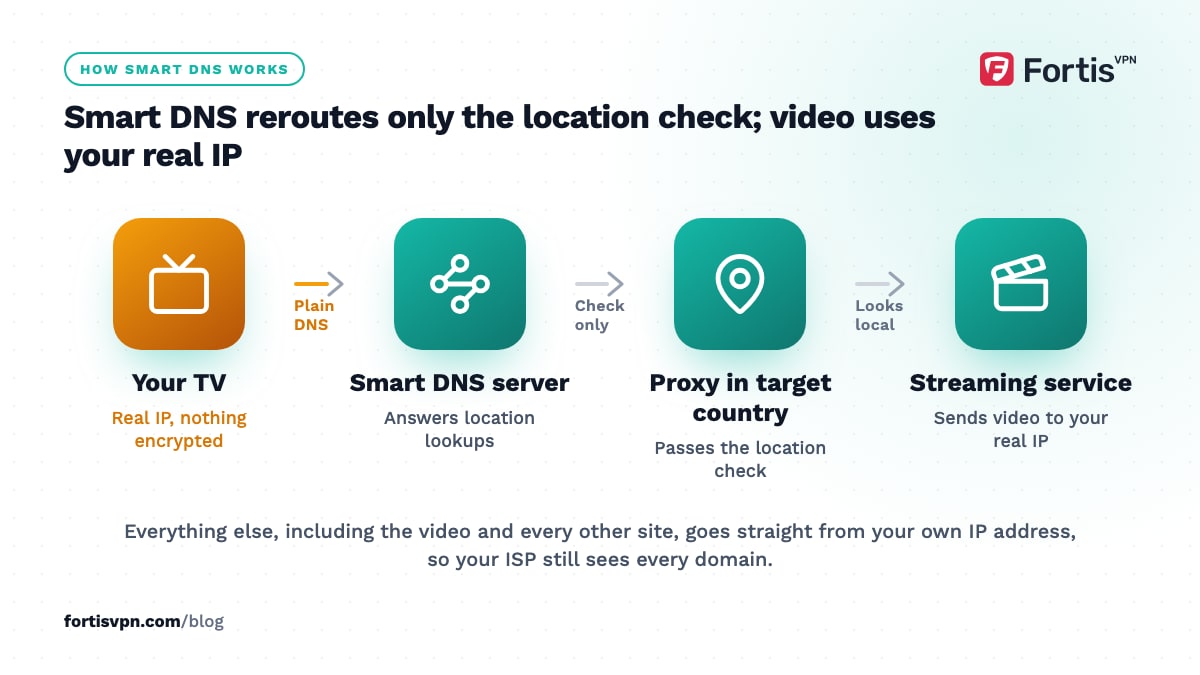
That design is why Smart DNS is quick to set up on a Smart TV, games console or router: you change one setting and no app is needed. It is also why Smart DNS does nothing for privacy, and why it stops working the moment a streaming service compares your DNS location with the IP address the video is going to.
What does a VPN do differently?
A VPN app builds an encrypted tunnel from your device to a server in the country you choose. Every byte your device sends goes through that tunnel, and every website or app sees the VPN server's IP address instead of yours. A streaming service sees a request from, say, a UK IP address with UK DNS, which is a consistent picture.
The cost is a little speed: encryption, plus the detour through the VPN server. With WireGuard on a nearby server the loss is small, and HD and 4K streams fit with room to spare on most home lines. The gain is that the same tunnel also hides your activity from your ISP and from whoever runs the WiFi, and gets through networks that block streaming services or VPNs when you use the right protocol. The basics are in what a VPN is and how it works.
Smart DNS vs VPN: side-by-side comparison
| Criterion | Smart DNS | VPN |
|---|---|---|
| Encrypts your traffic | No | Yes, all of it |
| Changes your IP address | No | Yes |
| Speed | No measurable loss | Small loss, depends on protocol and server distance |
| Device support | Anything with a DNS setting: Smart TVs, consoles, routers | Devices with an app, or everything behind a VPN router |
| Privacy from ISP and WiFi owner | None | Full |
| Works on networks that block streaming or VPNs | Rarely | Usually, with OpenVPN TCP 443 or an obfuscated server |
| Public WiFi protection | None | Yes |
| Setup | Type a DNS address into network settings and register your home IP | Install the app, sign in, connect |
| Breaks when | Your home IP changes, or the service compares DNS with IP | The service blocks the server's IP range |
| Streaming reliability in 2026 | Detected and blocked by major services | Detected and blocked too; switching servers usually helps |
Use the table for the quick answer. The sections below explain the two rows that surprise people most: IP address and privacy.
Does Smart DNS hide your IP address?
No. This is the single most misunderstood point. With Smart DNS your device still connects to every website and every video server from your own IP address. The streaming service only sees a different location during its check, and the rest of the internet sees exactly who and where you are.
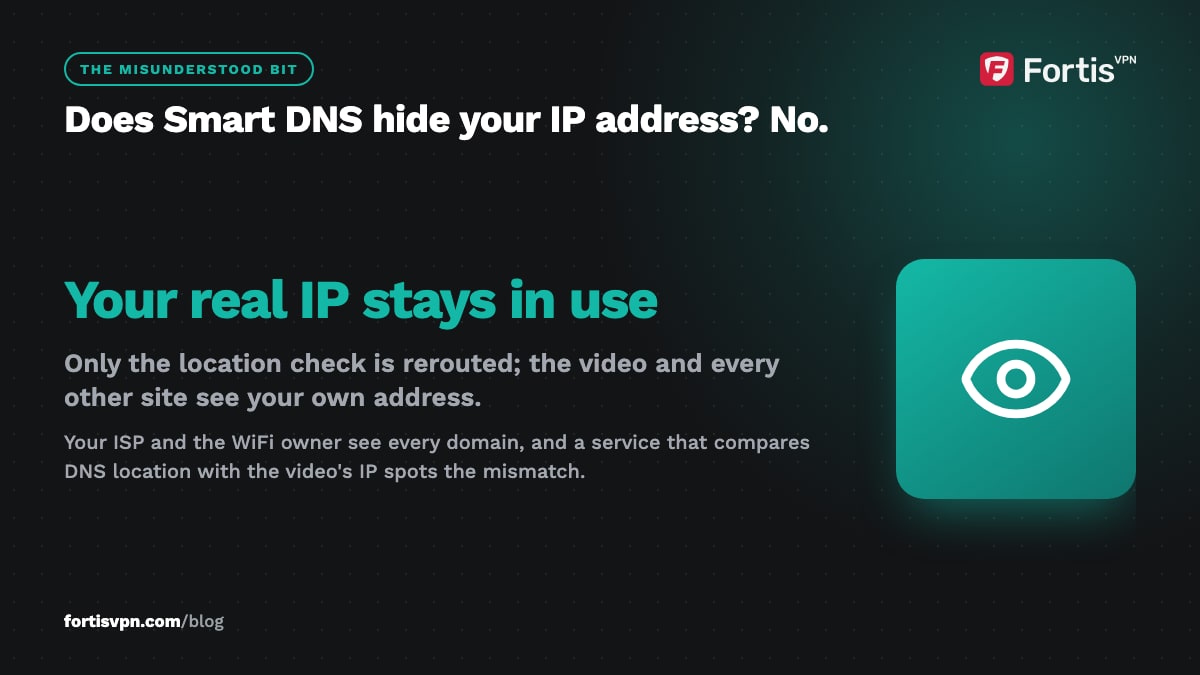
That has three consequences. Your ISP sees every domain you visit, because DNS queries to the Smart DNS server are not encrypted either. The WiFi owner at a hotel or office sees the same. And any service that records the IP address the video is delivered to, which the major streaming services do, can notice that the location check and the video request disagree.
If you want your IP address hidden, or you are on a network you do not trust, Smart DNS is the wrong tool. The same logic applies to proxies, which Smart DNS is really a special case of.
When is Smart DNS the better choice?
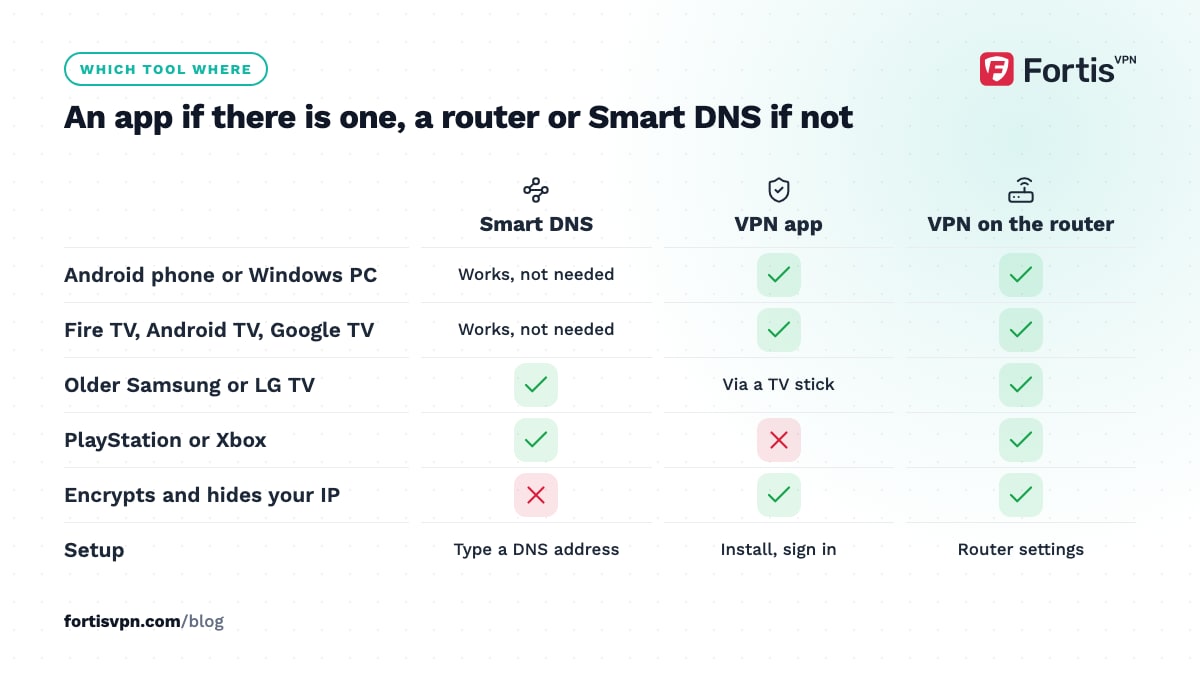
- Devices with no VPN app and no router option. An older Samsung or LG Smart TV, a PlayStation or Xbox, or a rented box where you can change DNS but install nothing.
- Maximum speed on a slow line. If your connection barely manages HD, the few percent a VPN takes may matter. On most lines it does not.
- No privacy need at all. Home network, trusted ISP, nothing to hide from either.
- A static or rarely changing home IP address. Smart DNS services tie the setting to your IP address; if your ISP changes it often, you will be re-registering constantly.
For a Samsung or LG TV there is a middle path: run the VPN on the router, or plug in a Fire TV Stick or a Google TV dongle and use the VPN app there. Our guide to VPNs on Samsung and LG Smart TVs walks through both.
When is a VPN the better choice?
- Any privacy need. Hiding activity from the ISP, the WiFi owner or your mobile carrier.
- Public or hotel WiFi. Smart DNS gives no protection; a VPN encrypts everything.
- A device with an app. Phones, Windows laptops, Fire TV, Android TV and Google TV all run VPN apps; setup takes two minutes and the app handles reconnects.
- Networks that block streaming services or VPNs. Offices, universities and some countries. OpenVPN TCP on port 443 or an obfuscated server gets through where Smart DNS cannot.
- Several countries. Switching country in a VPN app is one tap. Smart DNS often means changing the region in a web dashboard and restarting the device.
- Services that compare DNS with IP. A VPN gives a consistent picture; Smart DNS gives a contradictory one.
The practical streaming walkthrough is in how to change your Netflix region; the same steps apply to most services.
Can you use Smart DNS and a VPN together?
Not on the same device at the same time, and there is no reason to. A VPN app sets its own DNS servers inside the tunnel, so a Smart DNS address in your network settings is ignored while the VPN is connected. If you force a Smart DNS server on top of a VPN, you get DNS queries going to one country and video going to another, which is exactly the mismatch streaming services look for. Pick one per device: a VPN where there is an app, Smart DNS or a VPN router where there is not.
Does FortisVPN offer Smart DNS?
No. FortisVPN is a VPN service and does not sell a Smart DNS add-on as of October 2026. For TV streaming it offers apps instead: the Android TV and Google TV app and the Fire TV app install from the TV's own store and sign in with a short code at fortisvpn.com/tv, with auto-connect so the tunnel is up before the streaming app opens, and split tunnelling so only the apps you choose use it. The setup for a TV is in how to set up a VPN on Android TV. For a Samsung or LG TV, a console or anything else without an app, the answer is a router running the VPN or a cheap streaming stick with the app. Every plan comes with a 7-day free trial and a 30-day money-back guarantee, so you can start a 7-day free trial and test your TV before committing.
Frequently asked questions
Is Smart DNS safer than a VPN?
No. Smart DNS adds no security at all: nothing is encrypted and your IP address is unchanged. Its only job is to change what a streaming service sees during a location check. A VPN encrypts your traffic and hides your IP address from every site and from the network you are on, which is what "safer" means in practice.
Does Smart DNS slow down streaming?
Not by any measurable amount. Only the small location-check requests go through the Smart DNS proxy; the video itself travels directly between you and the streaming service's servers. A VPN carries the whole stream through its server, which costs a few percent of bandwidth and a little latency on a nearby server, more on a distant one.
Does Smart DNS work on a Samsung TV?
Usually, because Samsung TVs let you set a custom DNS server under network settings, and that is all Smart DNS needs. Whether the streaming app then plays the foreign library depends on the service's detection. A Fire TV Stick or Google TV dongle plugged into the same TV gives you a full VPN app instead.
Can Netflix detect Smart DNS?
Yes. Netflix has blocked DNS-based unblockers for years, and its own help page treats them the same as VPNs and proxies. Netflix compares the location of your DNS lookups with the IP address requesting the video, and a mismatch is a strong signal. Smart DNS providers rotate addresses to keep up, with mixed results.
Do I need Smart DNS if I have a VPN on my TV?
No. If the TV runs a VPN app, or sits behind a VPN router, the VPN already changes your location for every app on the TV and encrypts the traffic. Adding Smart DNS on top creates a DNS and IP mismatch that makes detection more likely, not less.
Last updated: 5 October 2026