How to Change Your IP Address on Any Device
How to change your IP address on Windows, Android, iPhone and smart TV: use a VPN for a new public IP in any country, restart your router, or set a local IP.
The quickest way to change your IP address on any device is to connect to a VPN, which gives you a new public IP in whatever country you pick within seconds. If you only need a different address from your own ISP, restarting your router or switching between WiFi and mobile data often works too. Which method you need depends on which IP you mean, so start there.
- Websites see your public IP; your local IP only exists inside your home network.
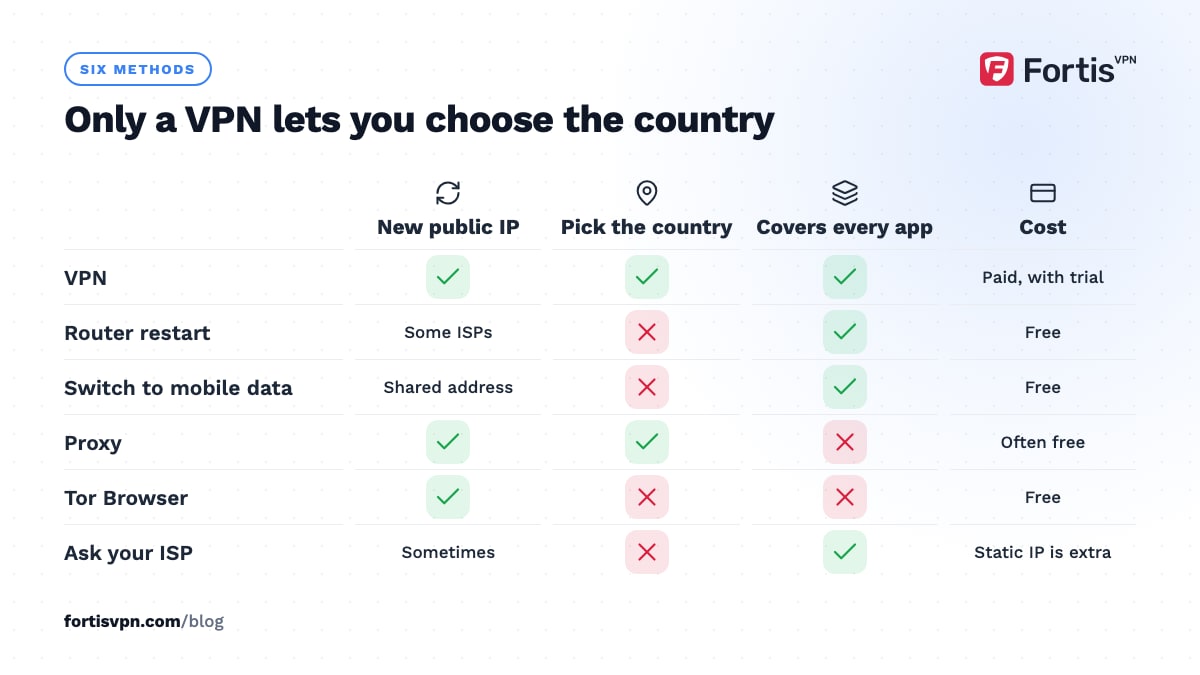
- A VPN is the only method that lets you choose the country.
- Router restarts work with some ISPs and not others; leave it off longer if the address sticks.
- A new IP does not log you out or delete cookies.
Which IP address do you want to change?
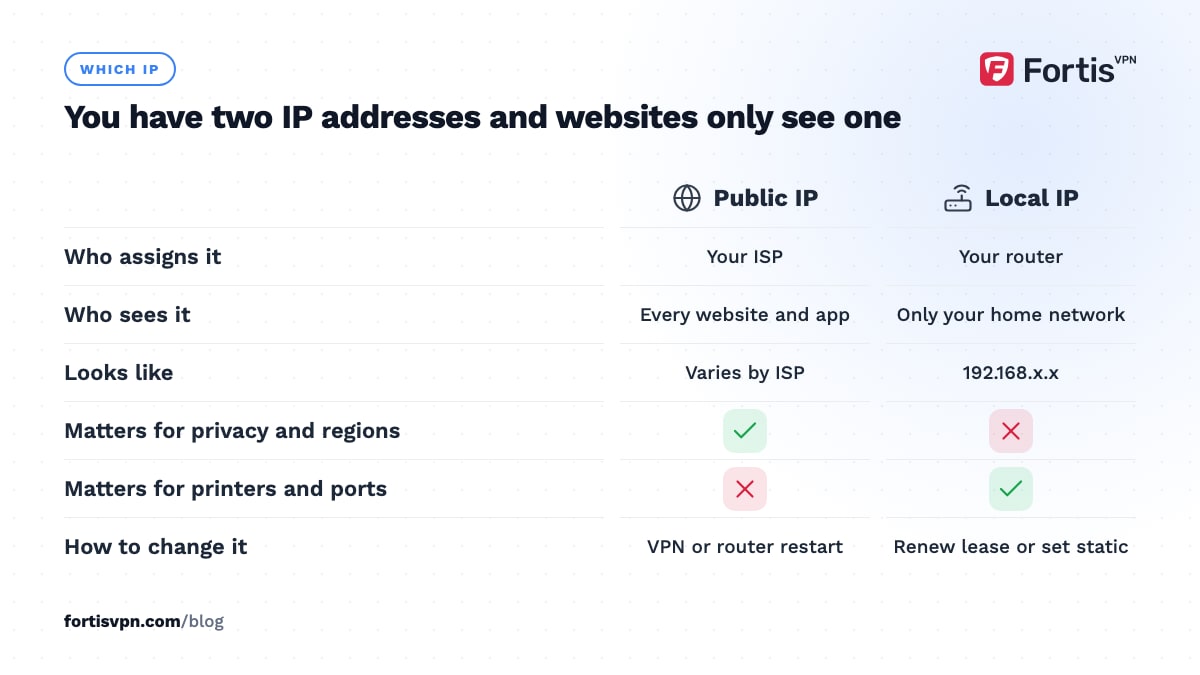
You have two. Your public IP is the address your ISP assigns to your connection and the one websites, apps and online games see. Your local IP (often 192.168.x.x) is assigned by your router and only exists inside your home network.
Almost every reason people search for this concerns the public IP: privacy, a region block, a ban, or a site showing the wrong country. The local IP matters only for home networking: fixing an address conflict, setting up a printer or server, or port forwarding.
| Goal | Which IP | Best method |
|---|---|---|
| Appear in another country | Public | VPN |
| Hide your address from websites | Public | VPN |
| Get a different address from your ISP | Public | Router restart, or wait for the lease to change |
| Fix an IP address conflict at home | Local | Renew the lease or set a static local IP |
| Keep the same address every time | Public | Dedicated IP from a VPN, or a static IP from your ISP |
The fastest way: change your public IP with a VPN
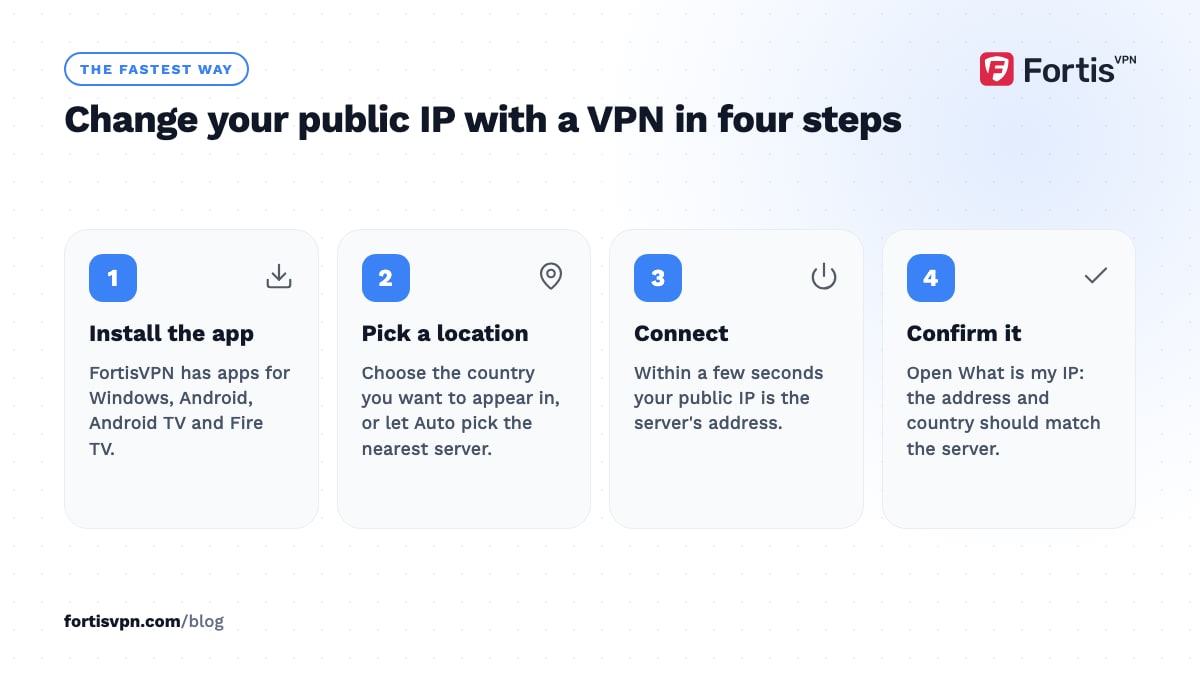
A VPN routes your traffic through a server run by the VPN provider. Everything you visit sees that server's address instead of yours. It works the same on a phone, laptop, TV or console, and it is the only method that lets you choose the country.
- Install the VPN app on the device. FortisVPN has apps for Windows, Android, Android TV and Fire TV.
- Pick a location. Choose the country you want to appear in, or let the app pick the nearest server for speed. Our guide on choosing a VPN server location explains the trade-offs.
- Connect. Within a few seconds your public IP is the server's.
- Confirm it. Open What is my IP; the address and country should match the server.
Two limits to know. Your ISP still knows your real address; the VPN hides it from the sites you visit, not from the ISP. And a new IP does not log you out of anything. If you are signed in to Google or a shop, they still know who you are from the account and cookies, whatever your address says.
Does restarting your router change your IP address?
Sometimes. Most home connections use a dynamic public IP that the ISP leases to your router. When the router reconnects, the ISP either hands back the same address or a new one, depending on how its network is set up.
- Many cable and fibre ISPs tie the address to your router's hardware ID, so a quick restart returns the same IP. Leaving the equipment off for longer, from several minutes to overnight, sometimes lets the lease expire so a new address is assigned. Changing the router's WAN MAC address, a setting many routers call MAC clone, forces a new lease on these ISPs.
- Some DSL and mobile broadband ISPs assign a fresh address on nearly every reconnect.
- Static IP plans never change, by design.
To get a new IP address this way: unplug the modem and router, wait at least 5 minutes, plug them back in, then check your IP. If it has not changed after an overnight power-off, your ISP is not going to give you a new one this way. A router restart also never changes the country you appear in; only a VPN or proxy does that.
Switch between WiFi and mobile data
On a phone or tablet, turning off WiFi and using mobile data gives you a completely different public IP, because it belongs to your carrier rather than your home ISP. Toggling flight mode on and off while on mobile data usually assigns yet another one.
The catch is that mobile carriers put many customers behind one shared address using carrier-grade NAT (CGNAT). The IP a website sees is shared with strangers, which is why mobile data sometimes triggers captchas or "too many requests" messages. It also means you cannot pick the address or the country; you get whatever the carrier has in your region.
Can you change your IP address without a VPN?
Yes, with trade-offs.
- Proxy. A proxy changes the IP for one app or browser and does not encrypt anything. Fine for a quick region check, poor for privacy. See VPN vs proxy for when each fits.
- Tor Browser. Routes browser traffic through volunteer relays and gives you a different exit address, usually in a country you did not choose. Slow, and many sites block Tor exits. It covers only the browser.
- Ask your ISP. Support can sometimes release and reassign your address, and most ISPs sell a static IP as an add-on if you need one that never changes. They will not give you an address in another country.
- Wait. Dynamic addresses rotate on their own, sometimes weekly, sometimes almost never. Not a plan, but it explains why your IP changed when you did nothing.
How to change your local IP address
Only do this for home-network reasons. Changing the local address does nothing to what websites see.
Windows 10 and 11
For a new address from the router: open Command Prompt and run ipconfig /release, then ipconfig /renew. For a fixed address: Settings, Network and internet, your adapter, IP assignment, Edit, choose Manual, turn on IPv4, and enter an address outside the router's DHCP range, the subnet mask, the router's address as the gateway, and a DNS server.
Android
Settings, Network and internet, Internet, tap the gear next to your WiFi network, then edit it. Under IP settings change DHCP to Static and fill in the address, gateway and DNS. Menu names vary a little by manufacturer. Forgetting the network and rejoining it usually gets a new DHCP address without any manual setup.
iPhone and iPad
Settings, Wi-Fi, tap the information icon next to your network. Tap Renew Lease to ask the router for a new address, or go to Configure IP, choose Manual, and type the address, subnet mask and router.
Router
Every router lets you reserve a specific local address for a device by its MAC address, usually under DHCP, Address Reservation or Static Leases. This is the cleanest way to give a printer, NAS or TV a permanent address without touching each device.
How to check your new IP address
Open What is my IP. It shows your current public address, the country and city the address maps to, and the ISP or organisation it belongs to. Check it before and after the change so you can see the difference.
For the local IP: Windows shows it under ipconfig as IPv4 Address, Android under the WiFi network's details, and iPhone under the information icon next to the network. If a website still treats you as local after your public IP changed, clear its cookies or use a private window; the address was never the only thing it was reading.
Changing your IP with FortisVPN
FortisVPN gives you a new public IP in any of 100+ countries from the Windows, Android, Android TV and Fire TV apps, with one account covering up to 10 devices at the same time. By default you share each server's address with other users, which is what most people want for privacy. If you need an address that stays the same, for example so a bank or a work system stops flagging a new login every day, the optional dedicated IP add-on gives you a static address that only you use. It is added when you buy a plan or later from your account dashboard, as explained in the dedicated IP help guide. Every plan starts with a 7-day free trial, with a reminder email before the first charge.
Frequently asked questions
Does a VPN change your IP address?
Yes. While the VPN is connected, every site and app sees the VPN server's public address and location instead of your ISP's. Your real address still exists and your ISP still sees it, but no website does. Disconnect and you are back to your original address immediately.
Can I change my IP address for free?
Restarting your router, switching to mobile data, or using Tor Browser costs nothing, but you cannot pick the address or country, and the router trick does not work with every ISP. Free VPN and proxy apps exist, but many of them log or sell your browsing, so treat them with care. A paid VPN with a free trial gets you a chosen country at no cost for the trial period.
How do I change my IP address to another country?
Connect to a VPN server located in that country. Nothing else you can do at home changes the country your address maps to, because router restarts and mobile data only give you another address from your own region. After connecting, check the IP page to confirm the country matches, and use a different server if a site still shows your home region.
Is it legal to change your IP address?
In most countries, yes, as of 2026. Using a VPN, restarting a router, or asking your ISP for a new address breaks no law in itself. Trouble comes from what you do with it, such as evading a ban against a site's terms, or fraud. A few countries restrict VPN use; see is it legal to use a VPN. This article is general information, not legal advice.
Why did my IP address change on its own?
Dynamic addresses rotate. Your ISP's lease expired, your modem reconnected after a power cut, or the ISP reshuffled its address pool during maintenance. On a phone, moving between cell towers or between WiFi and mobile data changes it constantly. None of this is a sign of a problem.
Last updated: 9 October 2026