How to Watch Disney+ Abroad: Get Your Home Library Anywhere
Disney+ swaps its library to match your location. Learn how to watch Disney+ abroad with a home-country VPN server, what error 73 means, and the fixes.

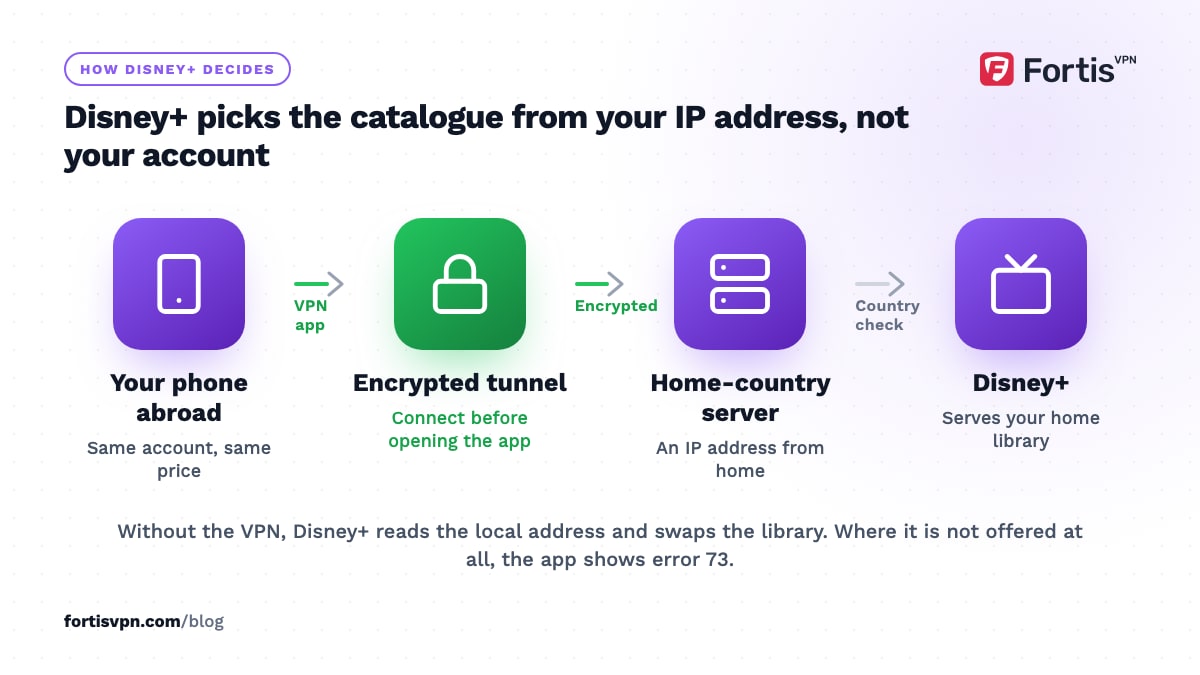
To watch Disney+ abroad with your usual library, connect to a VPN server in your home country, then close and reopen the Disney+ app. Disney+ works in most of the world, but the catalogue follows your IP address rather than your subscription, so travelling swaps your titles for the local ones, and in a few countries the app refuses to open at all with error 73. A home-country server puts things back the way you left them.
- Disney+ serves the catalogue of the country your IP address is in; your subscription and price stay the same.
- Error 73 means Disney+ is not offered in the country it has placed you in.
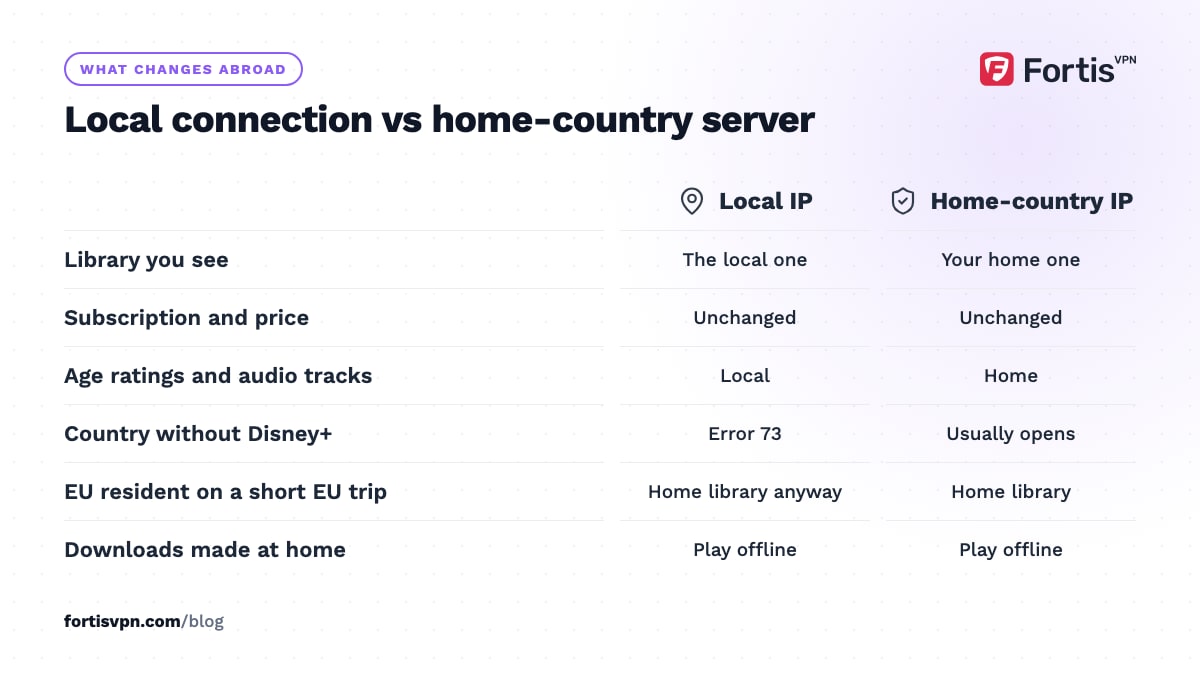
- EU residents keep their home library on temporary trips inside the EU without a VPN.
- Disney+ blocks addresses it links to VPNs, so switch servers if the library stays wrong.
Why does Disney+ show a different library abroad?
Disney+ holds different rights in each country. A Marvel series is Disney's own and usually appears everywhere, but the general entertainment titles, local films and sports differ from one market to the next, and some countries have Disney+ bundled with local services. The app decides which version to show from your IP address, not from the country you signed up in.
Two regional quirks confuse travellers. In the US, Disney+ bundle subscribers see Hulu content inside the Disney+ app; elsewhere, the Hulu tile replaced the Star tile in October 2025, but it holds whatever Disney has licensed locally rather than the US Hulu catalogue. And the Disney+ library by country changes month to month as deals expire, so a title you watched at home may be missing abroad for licensing reasons even when the app itself works.
The one place the library follows you automatically is the EU. Under the EU portability regulation, paid streaming services must give subscribers their home-country service during temporary stays in another EU country. Disney+ applies this, so a Spanish subscriber on holiday in Italy sees the Spanish library. The rule has not covered UK residents since Brexit, and it does not cover a permanent move.
Disney+ error 73 and not available in your region explained
Error 73 appears when Disney+ decides you are in a country where it is not offered. Disney's help pages show two wordings for it, depending on the app version and country: "Disney+ is only available in certain regions" and "This content isn't available to watch in your current location". Both mean the same thing.
The cause is always location. Either you are physically in an unsupported country, or your VPN has placed you in one, or Disney+ has matched your address to a VPN range and refused to assign a country. Disney's help pages treat it as a location problem and point you to the country list; turning a VPN off solves it when you are in a supported country. If you are not, a VPN server in a supported country is the only route, and Disney does not endorse it. The Disney+ error codes list covers the rest of the family, including the sign-in and playback codes that look similar but have nothing to do with region.
How to watch Disney+ abroad step by step
Connect the VPN before you open Disney+. The app remembers the country it saw at launch until it is force-closed.
Android phone or tablet
- Connect the VPN to your home country. Wait for the key icon in the status bar.
- Force-stop Disney+. Settings, Apps, Disney+, Force stop.
- Open Disney+ and check the library. Search for a title you know is in your home catalogue and not the local one.
Windows laptop
- Connect the VPN to your home country. Wait for the connected state in the app.
- Open a private browser window and go to disneyplus.com. This stops the site reusing a cached location.
- Sign in and play. If you get error 73, clear cookies for disneyplus.com, switch server and reload.
Android TV, Google TV and Fire TV
- Install the VPN app on the TV. From Google Play on Android TV and Google TV, or the Amazon Appstore on Fire TV. FortisVPN signs in with a short code at fortisvpn.com/tv so you do not type a password with the remote.
- Connect to your home country and turn on auto-connect. Disney+ then never launches before the tunnel is ready.
- Force-stop and reopen Disney+. Hold the Home button, choose Disney+, then Quit or Force stop.
The Android TV and Google TV guide walks through each step. Samsung and LG TVs cannot run VPN apps, so use a streaming stick or put the VPN on the router.
Where is Disney+ not available?
Disney+ launched in most of North and South America, Europe, the Middle East and North Africa, and much of Asia-Pacific, so for most trips the app opens and shows the local library. As of October 2026 the main gaps, based on Disney's published availability, are:
- Mainland China, where Disney+ has never launched.
- Russia and Belarus, where Disney has not launched the service.
- Most of sub-Saharan Africa apart from South Africa.
- Parts of Central Asia and South Asia; in India, Disney's content runs under the separate JioHotstar brand, not the Disney+ app.
In those countries Disney+ shows error 73 on a local connection, and the app may be missing from the local Google Play or Amazon store, so install it before you travel. Disney's help centre keeps the current country list; check it a week before you leave, because new markets open and partner deals change.
Disney+ household and sharing rules in 2026
Since late 2024, Disney+ has treated the account as belonging to one household: the devices on the internet connection at the account holder's primary residence, used by the people who live there. A relative in another home is not part of it. When Disney+ sees a device elsewhere, usually a TV, it shows a message that the TV does not seem to be part of the household and offers two choices: "I'm away from home" for travel, or "Update household" if you have moved. Both send a one-time passcode to the account email.
For travellers this means a hotel TV or a relative's TV may ask for a code, while phones and laptops usually carry on. A VPN does not trigger the household check by itself, but connecting from an unfamiliar address can, so keep access to the account email while abroad. Disney also sells an Extra Member slot for one person outside the household; that person must be an adult living in the same country as the account holder, streams on one device at a time, and, at least in the US, the slot is not offered on Disney bundle plans. VPN for travel covers the other accounts that geo-check while you are away.
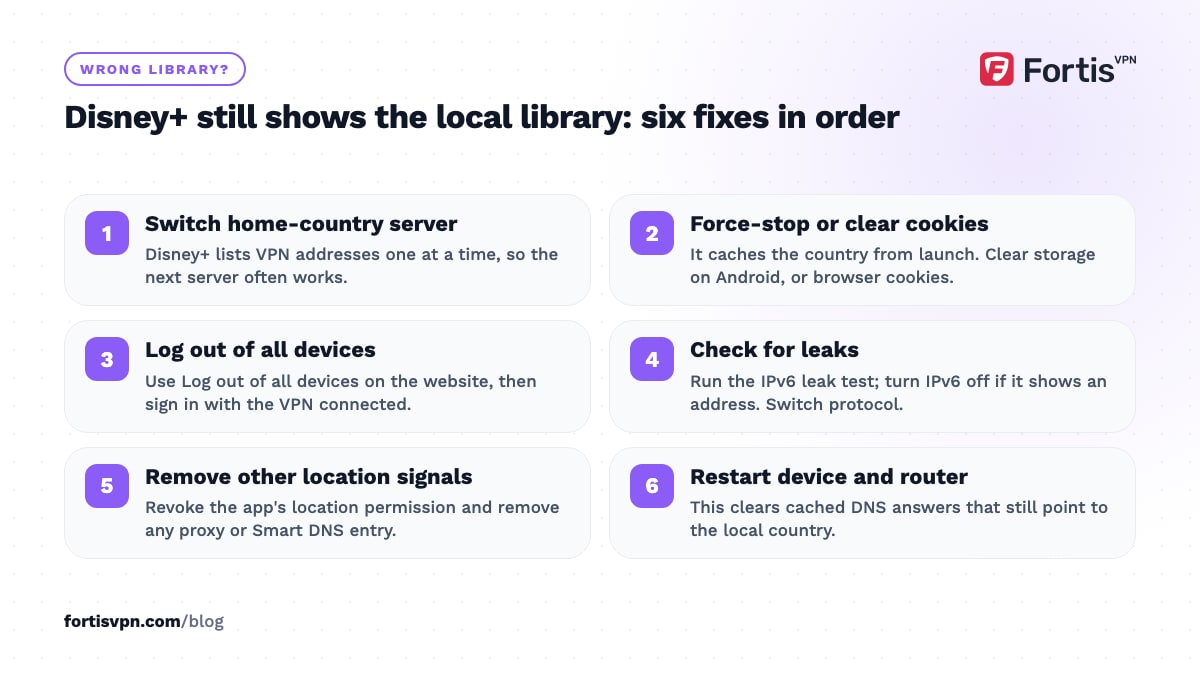
Disney+ still shows the wrong library: fixes
- Switch to another server in your home country. Disney+ lists VPN addresses one at a time, so the next server often works.
- Force-stop the app or clear cookies. Disney+ caches the country from launch. Clear storage on Android; delete disneyplus.com cookies in a browser.
- Sign out everywhere. In the account settings on the website, choose Log out of all devices, then sign in with the VPN connected.
- Check for leaks. Run the IPv6 leak test; if it shows an address, turn IPv6 off on the device. Switch VPN protocol to reset DNS.
- Revoke location permission if the app has it. On phones and tablets, with the permission off the app relies on your IP address alone.
- Remove other proxies or Smart DNS entries. A second location signal makes the app fall back to the detected country.
- Restart the device and router. This clears cached DNS answers.
The streaming service detects VPN page has the full checklist. If Hulu content is what you are missing, watching Hulu outside the US explains why the Hulu tile abroad is not the same as Hulu.
Watching Disney+ abroad with FortisVPN
FortisVPN has servers in 100+ countries, so your home country is almost certainly on the list, and the Android, Windows, Android TV, Google TV and Fire TV apps all connect in a tap. Connect to a server in the right country; if Disney+ still detects a VPN, switch to another server in that country or ask support for one that currently works. Live chat is open 24/7.
Turn on auto-connect on the Android TV and Google TV app so the TV is always on your home country before Disney+ starts, and use split tunnelling to keep local apps off the VPN. One account covers 10 devices, so the family's phones and the hotel-room Fire TV Stick fit on one plan. You can start a 7-day free trial before the trip and cancel before day 7 if it is not needed.
Frequently asked questions
Does the Disney+ household rule stop me watching abroad?
No. The household check mainly affects TVs. A hotel or relative's TV may show the not-part-of-the-household message, and choosing I'm away from home with the one-time passcode from your account email clears it for that trip. Phones and laptops usually carry on without a prompt, with or without a VPN connected.
What is Disney+ error 73?
Error 73 is Disney's region error. The app has placed you in a country where Disney+ is not offered, or has matched your address to a VPN and refused to assign a country. In a supported country, turning the VPN off or switching server fixes it; in an unsupported one, only a server elsewhere gets past it.
Can I use Disney+ in a country where it is not launched?
Your subscription stays valid, but the app shows error 73 on a local connection and may be missing from the local store. With a VPN server in a supported country it usually opens, though Disney does not endorse this and may block the address. Install the app before you travel so you at least have it on the device.
Does Disney+ block VPNs?
Yes, by address. Disney+ recognises addresses shared by many users and addresses that belong to hosting networks, and shows error 73 or a wrong library when it finds one. Blocking is incomplete and changes often, so one server fails while another works. No provider can promise a permanently working server, so be wary of anyone who does.
Will my Disney+ price change if I travel?
No. You are billed in the currency and at the price of the country where you subscribed, however long you travel. Only the library, the age ratings and the available audio tracks change. Moving permanently is a different question; ask Disney+ support how to change the account country rather than relying on a VPN.
Can I download Disney+ shows before I travel?
Yes. On ad-free plans the mobile app downloads most titles for offline viewing, and downloads play with no VPN and no internet at all. They are the surest option for a flight or for a country where Disney+ is not offered, so download the episodes you want while you are still at home.
Last updated: 7 October 2026