Is It Safe to Use a VPN? What It Protects and What It Can't
Is it safe to use a VPN? Yes, with a trustworthy provider. What a VPN protects (WiFi, ISP, IP address), what it cannot stop, and how to choose a safe one.
Yes, it is safe to use a VPN, as long as the provider is one you can trust. A VPN encrypts the traffic leaving your device and hides your IP address from websites, which protects you on public WiFi and from your ISP. That moves trust: the WiFi owner and your ISP no longer see what you do, but the VPN company can. Pick one with a no-logs policy and a kill switch, and avoid free apps of unknown origin.
- A VPN protects you from snooping on WiFi, from your ISP, and from sites tracking you by IP address.
- It does not stop malware, phishing, or tracking through accounts you are signed in to.
- The real risks come from bad providers: logging, leaks, adware and sold data.
- Using a VPN is legal in most countries; a few restrict or licence it.
What does a VPN protect you from?
A VPN does two things: it encrypts everything between your device and the VPN server, and it replaces your IP address with the server's. Those two actions protect you from a specific list of things:
- Anyone on the same WiFi. On a cafe, hotel or airport network, other users and the network owner can see which sites you visit and can tamper with unencrypted pages. With a VPN they see one encrypted stream to one server.
- Your ISP. HTTPS hides page content, but your ISP still sees the name of every site you visit through DNS lookups and the server name sent at the start of each connection. A VPN hides both. Some browsers now encrypt that server name with a feature called Encrypted Client Hello, but it is not yet universal as of October 2026.
- IP-based tracking. Websites, advertisers and anyone you connect to see the VPN's IP, not yours, so they cannot tie your activity to your home connection or your rough location.
- Throttling by content. An ISP that slows video or gaming traffic cannot classify what it cannot read.
- Location-based blocks. Services that decide what you can see from your IP address see the server's country instead.
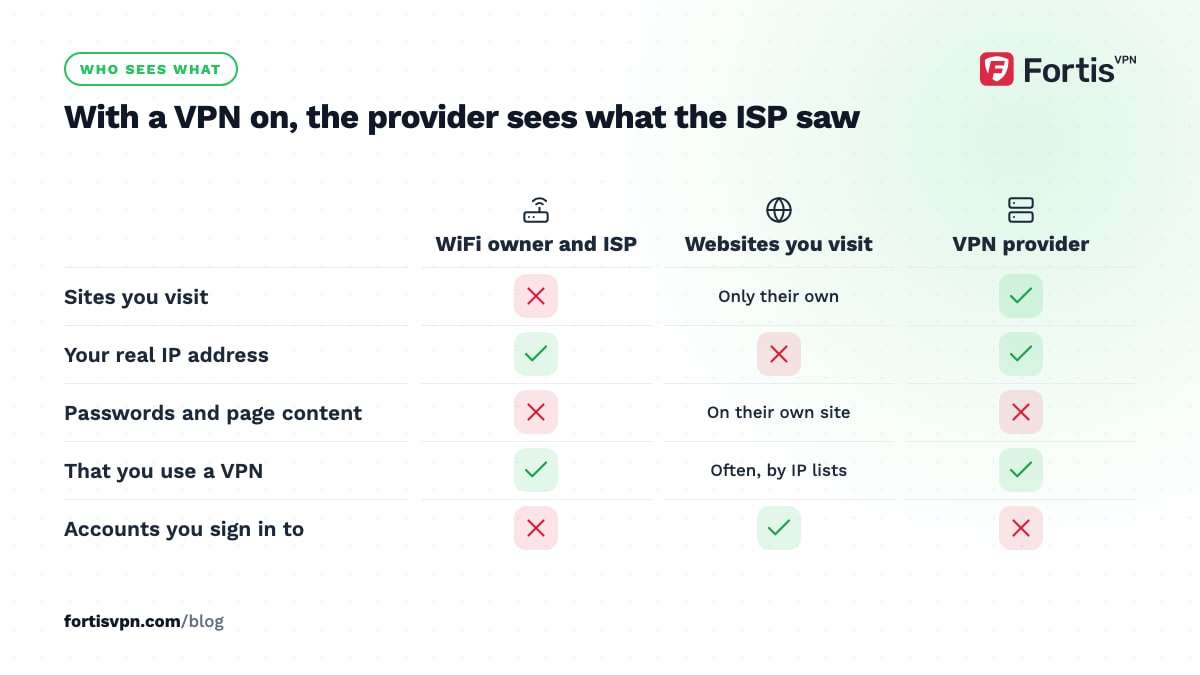
For a fuller breakdown, read what a VPN hides and what it does not.
What a VPN does not protect you from
A VPN is a privacy tool for the network, not a security suite for your device. It will not help with:
- Malware and viruses. An infected download travels through the tunnel exactly as it would without one. You still need antivirus; see VPN vs antivirus.
- Phishing and scams. A fake bank page loads perfectly over a VPN. If you type your password into it, the VPN has nothing to say about it.
- Accounts you are signed in to. Google, Facebook and your email provider know who you are because you logged in, not because of your IP.
- Cookies and browser fingerprinting. Sites recognise your browser by its cookies and by details such as screen size, fonts and extensions. A new IP does not reset any of that.
- Apps that use GPS. A phone app that asks for your location gets it from the GPS chip, not from your IP address.
- Weak passwords and reused logins. No network tool fixes these.
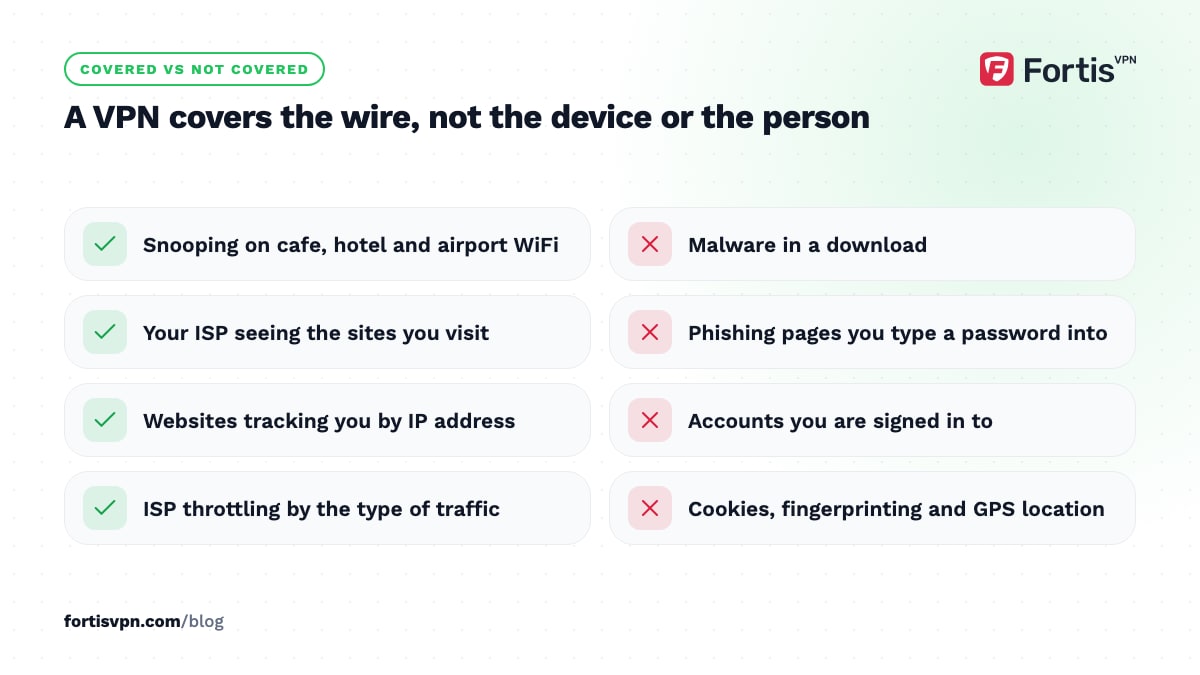
Treat the VPN as one layer: the one that covers the wire between you and the internet.
The real risks of a bad VPN
Because every packet goes through the provider, a dishonest or careless VPN is more dangerous than no VPN. The risks that matter:
- Logging. A provider that records which sites you visit and your real IP has a complete history of your activity, which can be sold, stolen or handed over.
- Leaks. Poorly built apps let DNS requests, IPv6 traffic or WebRTC reveal your real address while the app says "connected".
- No kill switch. When the tunnel drops, traffic continues on the open connection without telling you.
- Adware and malware. Studies of free Android VPN apps have repeatedly found a sizeable share flagged for malicious code. Our guide to whether free VPNs are safe covers the evidence.
- Hidden ownership. If you cannot find out which company runs the service and where, you cannot judge who has access to your data.
How to tell a safe VPN from an unsafe one
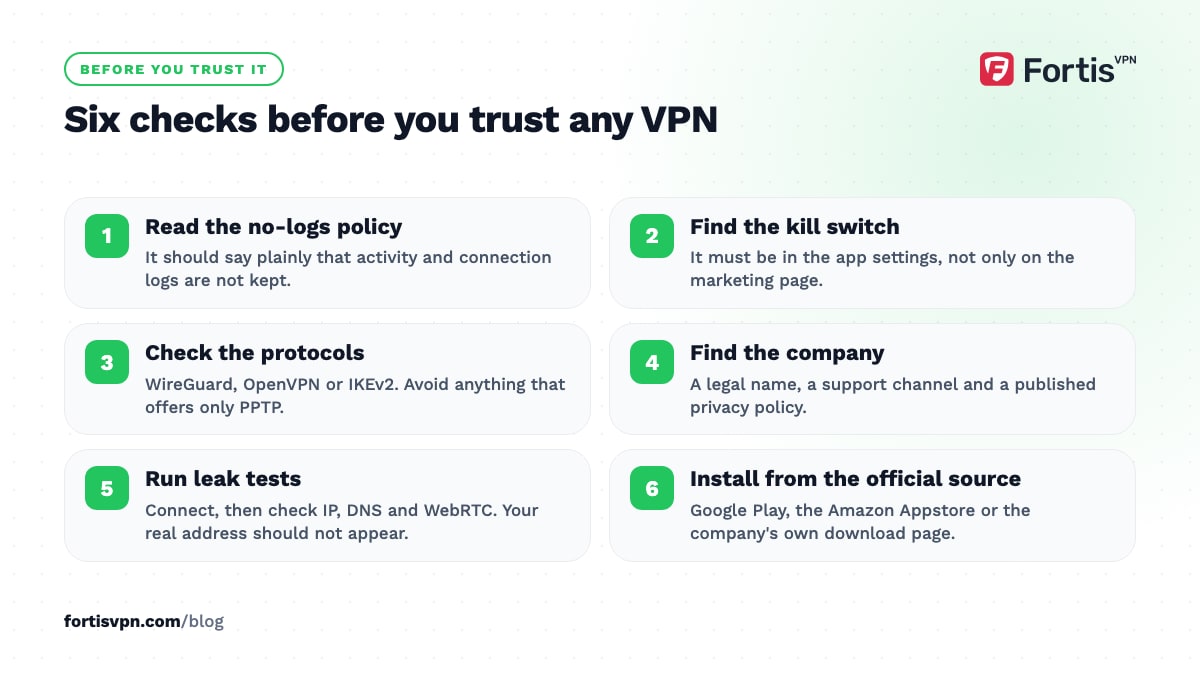
Run any VPN through this checklist before you trust it:
- A clear no-logs policy. It should state in plain words that activity and connection logs are not kept, not bury exceptions in a privacy policy.
- A kill switch. It blocks all traffic if the tunnel drops. Check that it is in the app settings, not only on the marketing page.
- Modern protocols. WireGuard, OpenVPN or IKEv2. Avoid anything that offers only PPTP or does not name its protocol.
- A named company you can contact. A legal name, a support channel and a published privacy policy.
- Transparent pricing and a refund policy. You can see what you will pay, when, and how to get out.
- Leak tests pass. Connect and check your IP, DNS and WebRTC with a tool such as the WebRTC leak test. Your real address should not appear.
- The app comes from the company itself. Install from Google Play, the Amazon Appstore or the company's own download page, under the company's name, with sensible permissions.
Is it safe to use a VPN for banking, shopping and public WiFi?
Banking. Yes. Your bank's site is already encrypted with HTTPS, and a VPN adds a second layer on untrusted networks. The one practical issue is that banks watch for logins from unexpected countries, so connect to a server in your own country or your bank may ask for extra verification. Full details in our guide to using a VPN for online banking.
Shopping. Yes, with the same note about location. Some shops show different prices or currencies by country, and a few block payments from VPN addresses, so switch server if a checkout fails.
Public WiFi. This is where a VPN earns its keep. Open and shared networks are the easiest place for someone to watch or redirect traffic, and a VPN closes off that exposure. Turn it on before you sign in to anything.
Is it safe to leave a VPN on all day?
Yes. There is no harm in a VPN that stays connected, and on a phone or laptop that moves between networks it is the safest default. The cost is a small amount of extra battery and a slight speed loss, which on a nearby server most people never notice.
The kill switch is what makes always-on safe rather than merely convenient: if the connection drops while you are on a train, nothing leaks until the tunnel is back. Turn the VPN off only for things that need your real location, such as a food delivery app or a bank that refuses a VPN login, and turn it back on afterwards. On Windows, Android, Android TV and Fire TV, split tunnelling lets you exclude those apps instead of disconnecting.
Is it legal to use a VPN?
In most countries, yes. Using a VPN for privacy, work or travel is legal across Europe, North America, most of Asia and most of the rest of the world. A small number of countries restrict VPNs to government-approved providers or block unapproved ones, and a few treat use for certain purposes as an offence. Using a VPN never makes an illegal act legal; fraud is fraud regardless of IP address. If you travel, check the rules for the country you are visiting before you connect, because the restrictions apply to where you are, not where you live. Our guide to whether VPNs are legal covers the main countries as of October 2026. This article is general information, not legal advice.
How FortisVPN handles safety
FortisVPN is built around the checklist above. It keeps no activity logs and no connection logs. The Windows app has a kill switch under Settings, with an option to launch at startup so you are covered from the moment the PC boots; the kill switch guide shows where. Every app offers WireGuard (ChaCha20-Poly1305) and OpenVPN (AES-256-GCM), with OpenVPN TCP on port 443 for networks that block VPNs. Plans are shown in full before you pay, with a 7-day free trial that costs nothing today and a 30-day money-back guarantee afterwards. If you want to run the checks yourself, start a 7-day free trial and test it with the leak tools on this site.
Frequently asked questions
Can a VPN steal my data?
A dishonest one can see and keep everything your ISP could: the sites you visit, when, and your real IP. It cannot read the content of HTTPS pages, which covers most logins and payments, but a malicious app on your device can do far more. Choose a provider with a clear no-logs policy, a named company behind it and an app from an official source.
Can you still be hacked while using a VPN?
Yes. A VPN protects the connection, not the device or the person. Malware you install, a phishing page you fill in, a weak password or an unpatched app are all unaffected by the tunnel. The VPN does stop the network-level attacks, such as someone on public WiFi intercepting or redirecting your traffic. Pair it with updates, antivirus and good passwords.
Is it safe to use a VPN on my phone?
Yes, and phones benefit most because they move between networks all day. Install the app from Google Play under the company's name, check the permissions, and turn on the kill switch or Android's own "always-on VPN" option. Avoid free VPN apps of unknown origin on a phone in particular; they have the worst record for leaks and adware.
Does a VPN protect me from viruses?
No. A VPN encrypts traffic; it does not inspect it for malicious code, and an infected file downloads through the tunnel unchanged. Some VPNs, including FortisVPN, block known tracker and ad domains at connection level, which cuts off some malicious ads, but that is not antivirus. Keep your operating system updated and use the built-in antivirus on Windows and Android.
Can my bank tell I am using a VPN?
Often, yes. Banks keep lists of IP ranges that belong to VPN and hosting companies, and they treat a login from an unexpected country as a risk signal. That usually means an extra verification step, not a block. Connecting to a server in your home country avoids most of it, and a dedicated IP address that only you use reduces the shared-address problem.
Last updated: 16 October 2026