VPN vs Antivirus: Do You Need Both?
VPN vs antivirus: a VPN encrypts your connection and hides your IP, antivirus stops malware on your device. What each protects, and whether you need both.
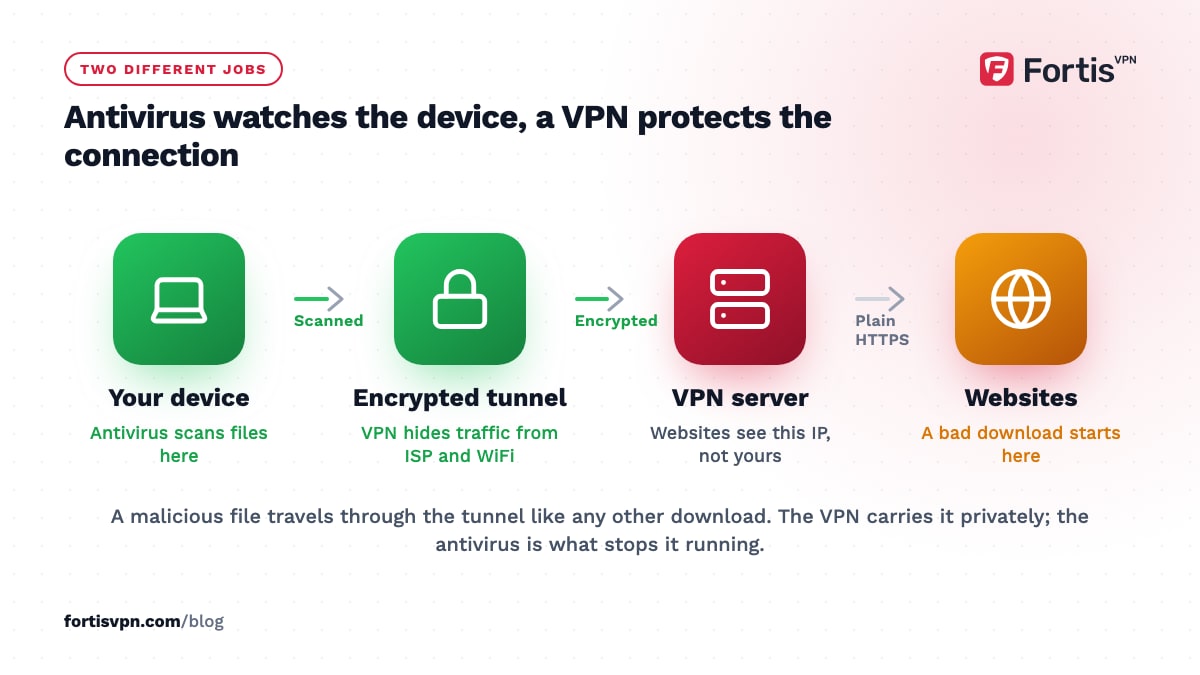
A VPN and antivirus do different jobs, and most people benefit from both. Antivirus watches the files and apps on your device and stops malware before it runs. A VPN encrypts the connection between your device and the internet and hides your IP address from the sites and networks you use. Neither one does the other's work, and the built-in antivirus on Windows and Android is enough for many people.
- Antivirus protects the device from malicious files; a VPN protects the connection from snooping and tracking.
- A VPN does not stop viruses, phishing or ransomware; antivirus does not hide your IP or your browsing.
- Microsoft Defender and Google Play Protect are free, on by default, and adequate for most people.
- An antivirus firewall can block a VPN; the fix is an allow rule, not uninstalling either one.
What does antivirus do?
Antivirus software scans files, downloads and running programs for known malware and for behaviour that looks like malware, then blocks or removes what it finds. Modern products also check websites against lists of known phishing and malware pages, watch for ransomware encrypting your documents, and scan email attachments and USB drives.
Most devices already have one. Windows 10 and 11 include Microsoft Defender Antivirus, which runs by default and updates through Windows Update. Android phones have Google Play Protect, which checks apps when you install them and scans the device periodically, whatever store the app came from. Apple devices have their own built-in checks. Paid antivirus adds extras: a managed firewall, a password manager, identity monitoring, parental controls, and a support line.
What all of them have in common is where they look: at your device. They do not see, and cannot change, what happens to your traffic once it leaves.
What does a VPN do?
A VPN creates an encrypted tunnel from your device to a server run by the VPN provider, and sends all your internet traffic through it. Three things change as a result.
- Your network cannot read your traffic. The WiFi owner, your ISP, and anyone on the same public network see encrypted data going to one server, not the sites you visit.
- Websites see the server's IP, not yours. That hides your location and stops sites linking your visits to your home address.
- Your apparent location changes. Connecting to a server in another country makes services treat you as if you were there.
Some VPN apps add a connection-level tracker blocker and ad blocker, which drops requests to known tracking and advertising domains before they load. That overlaps a little with antivirus web protection, but it is filtering, not scanning. For the full list of what a VPN does and does not hide, read what does a VPN hide.
Does a VPN protect against viruses?
No. A VPN encrypts traffic; it does not inspect it. A malware download goes through the tunnel exactly as a legitimate one does, arrives on your device, and runs if you open it. The VPN has done its job, which was to carry the bytes privately.
The same applies to the other threats people hope a VPN covers:
- Phishing. A fake bank login page loads over a VPN as well as it loads without one. The VPN hides your IP from the attacker, which they do not care about; they want your password.
- Ransomware. It arrives as an attachment or a download and encrypts your files locally. Nothing in the tunnel stops it.
- Infected apps. An app with malware inside installs over a VPN like any other app.
- Hacked accounts. If your password leaked elsewhere, a VPN does not change it.
A VPN's tracker blocker catches some malware domains as a side effect, because tracking lists and malware lists overlap, but that is not a substitute for scanning files. Is it safe to use a VPN covers what a VPN protects and what it cannot in more depth.
What antivirus does not stop
Antivirus is blind to everything a VPN handles, which is the whole antivirus vs VPN distinction in one line: it looks at the device, not the connection.
- Your ISP logging the sites you visit. Antivirus does nothing about who sees your DNS queries or the domains in your traffic.
- Eavesdropping on public WiFi. On an open or shared network, someone with the right tools can see which sites you connect to, and more on sites without HTTPS. Antivirus does not encrypt anything.
- IP-based tracking and profiling. Websites and advertisers see your IP, tie it to a location and a household, and build a profile. Antivirus leaves the IP as it is.
- Geo-blocks and price discrimination. Antivirus cannot change where a site thinks you are.
- Throttling by your ISP. If your ISP slows video, antivirus cannot hide the video from it.
Some antivirus suites now bundle a VPN. Treat a VPN with antivirus attached as a separate product that happens to share an installer: check its protocols, its logging policy, its server list and its device limit as you would any VPN, because the antivirus brand on the box says nothing about those.
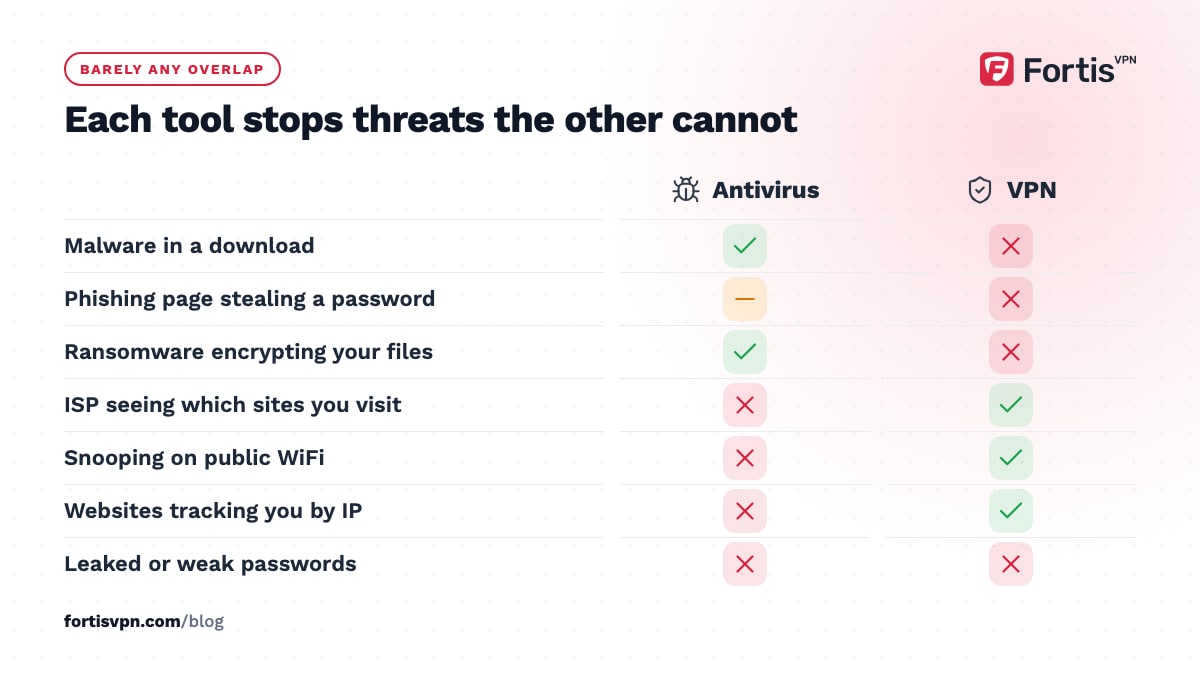
VPN vs antivirus: which tool stops which threat?
| Threat | Antivirus | VPN |
|---|---|---|
| Malware in a download or attachment | Yes | No |
| Phishing page stealing a password | Partly, via web protection | No |
| Ransomware encrypting your files | Yes | No |
| Infected app from outside the store | Yes | No |
| ISP seeing which sites you visit | No | Yes |
| Snooping on public WiFi | No | Yes |
| Websites tracking you by IP | No | Yes |
| Geo-blocked content | No | Yes, in most cases |
| Ad and tracker requests | Partly, in some suites | Partly, with a tracker blocker |
| Attacker targeting your device directly | Firewall helps | Hides your IP, which helps |
| Leaked or weak passwords | No, unless a manager is bundled | No |
Read the table as 2 columns that barely overlap. Where you see No in both, the answer is a password manager, two-factor authentication, updates and backups, which no antivirus or VPN replaces.
Do you need to pay for antivirus?
For most people, no. Microsoft Defender on Windows and Play Protect on Android are on by default, update themselves and cover the threats the average person meets. Keep the operating system updated, do not install apps from outside the official store, and do not open attachments you did not expect, and the built-in protection does the rest.
Paying makes sense if you want one subscription that covers a family's devices with a single dashboard, if you need the extras such as identity monitoring or a managed password manager, if you regularly handle files from untrusted sources, or if you run a small business and want someone to call. It does not make sense if the only reason is a vague feeling that free cannot be good enough; Defender is not a stripped-down trial, it is the full product.
A free VPN is a different matter: a VPN sees your traffic, so trust matters more than price. A paid VPN with a free trial and a refund window is not the same thing as a free VPN.
Can antivirus block your VPN?
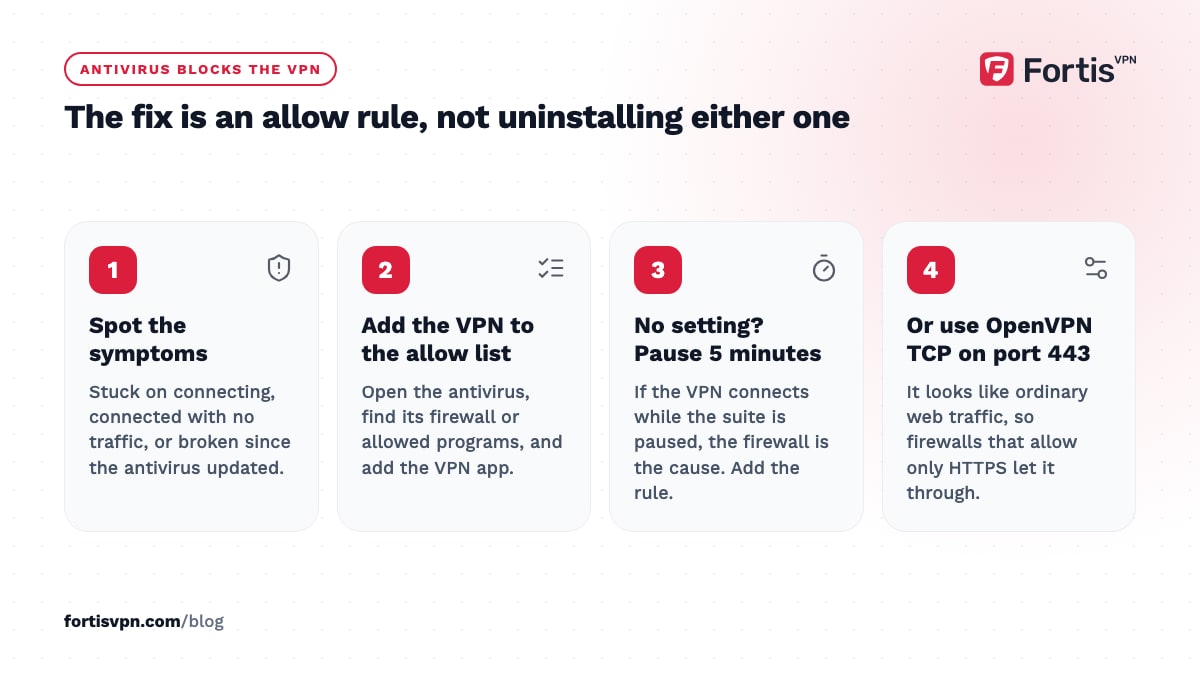
Yes, and it is one of the most common reasons a VPN will not connect on Windows. Antivirus suites ship with their own firewall, and a firewall that does not recognise the VPN adapter, or the port the protocol uses, blocks it. The symptoms are a VPN stuck on connecting, a VPN that connects but passes no traffic, or one that worked until the antivirus updated.
The fix is not to remove either. Open the antivirus, find its firewall or allowed-programs list, and add the VPN app. If you cannot find the setting, pause the antivirus for 5 minutes and try to connect; if the VPN works, you have found the cause and can add the rule. The antivirus and firewall troubleshooting guide has the steps for Windows. Switching the VPN to OpenVPN TCP on port 443 also gets past firewalls that only allow web traffic.
The reverse conflict is rarer. A VPN with a kill switch can block the antivirus's own updates while the tunnel is down, which fixes itself when the VPN reconnects.
Using FortisVPN alongside antivirus
FortisVPN runs next to Microsoft Defender, Play Protect and third-party antivirus without any special setup on most systems. If a third-party firewall on Windows blocks the connection, add the FortisVPN app to its allowed list, or change the protocol under Settings to OpenVPN TCP on port 443. The apps include a connection-level tracker blocker and ad blocker, which stops requests to known tracking and advertising domains before they load; how VPN ad and tracker blockers work explains what it catches and what it leaves to your antivirus. The Windows app's kill switch keeps traffic off the plain connection if the tunnel drops. If you want to see how it behaves with your antivirus, start a 7-day free trial on the Windows app; nothing is charged until day 7, and you can cancel before then.
Frequently asked questions
Does a VPN protect against hackers?
Partly. A VPN hides your real IP address, which makes it harder to target your device directly, and it encrypts your traffic on public WiFi, which stops someone on the same network reading it. It does not stop a hacker who gets you to run a file, guesses a weak password, or exploits an unpatched app. Antivirus, updates and strong passwords cover those.
Do I need antivirus on my phone if I use a VPN?
You need some malware protection, but on Android you already have it: Google Play Protect scans apps on install and on a schedule. A VPN does not scan anything. A separate antivirus app on a phone adds little if you install only from the official store and keep the system updated. On an iPhone, apps cannot scan other apps at all, so there is nothing to add.
Which is more important, a VPN or antivirus?
It depends on what you are worried about. If the risk is a bad download or a dodgy attachment, antivirus matters more, and you already have one built in. If the risk is public WiFi, an ISP that logs or throttles, or sites tracking your location, a VPN matters more. Since built-in antivirus is free, most people end up with both anyway.
Can a VPN and antivirus run at the same time?
Yes. They watch different things, so they do not interfere in normal use. The one exception is the antivirus firewall blocking the VPN's connection, which shows up as a VPN that will not connect. Add the VPN app to the firewall's allowed list and both run together. Do not run 2 antivirus products at once, though; those do conflict.
Is a VPN an antivirus?
No. A VPN is a privacy and connection tool: it encrypts traffic and changes your visible IP address. An antivirus is a device-security tool: it scans files and apps for malware. Some companies sell both in one bundle, and some VPN apps include a tracker or malware-domain blocker, but a VPN cannot inspect a file, and an antivirus cannot encrypt a connection.
Last updated: 8 October 2026