What Does the VPN Setting on iPhone Do? On or Off?
What the VPN setting on iPhone does, why it appeared, when to keep it on or off, why it switches on by itself, and how iCloud Private Relay differs from a VPN.
The VPN setting on iPhone turns a VPN connection on or off. It only appears in Settings after a VPN app, a work profile or a configuration profile has added a VPN to your phone, and it stays off until something switches it on. When it is on, your internet traffic travels through an encrypted tunnel to a server run by that VPN, so websites and the WiFi you are on see the server's address instead of yours.
- iPhones ship without a VPN; the toggle appears only once an app or profile adds one.
- Keep it on for public WiFi, travel and privacy; turn it off when a local app or a bank's location check misbehaves.
- It turns itself on because of Connect On Demand, an app setting, or a work management profile.
- iCloud Private Relay is not a VPN: it covers Safari, not every app.
What is VPN on iPhone and what does it do?
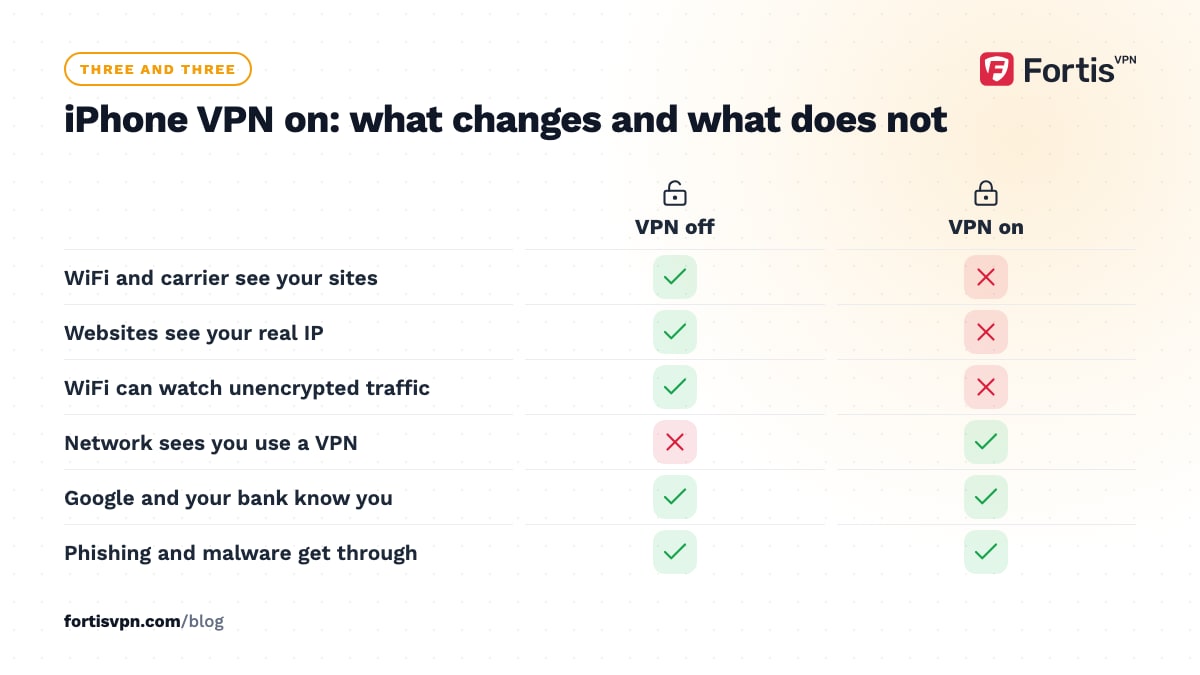
A VPN on iPhone is a service, usually from an app you installed, that encrypts everything your phone sends and routes it through the VPN's server. Three things change when it is on. The WiFi network and your mobile carrier can see that you are connected to a VPN, but not which sites you visit. Websites and apps see the VPN server's IP address and location, not yours. And anyone on the same public WiFi cannot read or tamper with your traffic.
Three things do not change. A VPN does not log you out of Google, Facebook or your bank, so those services still know who you are. It does not stop phishing, scam calls or malware. And it does not make you anonymous: the VPN company can see your traffic instead of your ISP, which is why the choice of provider matters more than the toggle. The practical setup guide is in how to use a VPN on iPhone and iPad.
Where the VPN setting lives on your iPhone
There are three places to look, and all of them control the same connection.
- Settings, General, VPN & Device Management. This is the master list. Under VPN you see every configuration on the phone, which one is selected, and a Status switch. Tap the small i next to a VPN for its details and the Connect On Demand switch.
- The VPN row near the top of Settings. Once a configuration exists, a VPN row appears in the same group as Wi-Fi and Bluetooth, with its own on-off switch. This is the "VPN setting" most people mean.
- Control Center. On iOS 18 and later, a VPN button sits in the connectivity cluster with Wi-Fi and Bluetooth.
When connected, a small VPN badge shows in the status bar; on Face ID iPhones it may appear only briefly and then live at the top of Control Center.
Why did a VPN toggle appear on my iPhone?
Something installed a VPN configuration, and it is almost always one of these four.
- A VPN app you downloaded. The first time you connect, iOS asks permission to add a VPN configuration. Tapping Allow creates the toggle.
- A security, ad-blocking or parental-control app. Many of these work by registering as a VPN so they can filter traffic, even though they never send it to a remote server.
- A work or school management profile. Employers can push a VPN through device management, sometimes set to Always On so you cannot turn it off.
- A configuration profile you installed from a link. Some services ask you to install a profile instead of an app. Treat one from a source you do not recognise with suspicion.
To see which it is, open Settings, General, VPN & Device Management. Each VPN configuration shows the name of the app that created it, and any management or configuration profiles appear further down the same screen.
Should VPN be on or off on iPhone?
On, most of the time, if you installed a reputable VPN. The cost is a small amount of battery and a slight speed reduction; the gain is encryption on every network and a hidden IP address. The cases for switching it off are short-lived; the table shows the common ones.
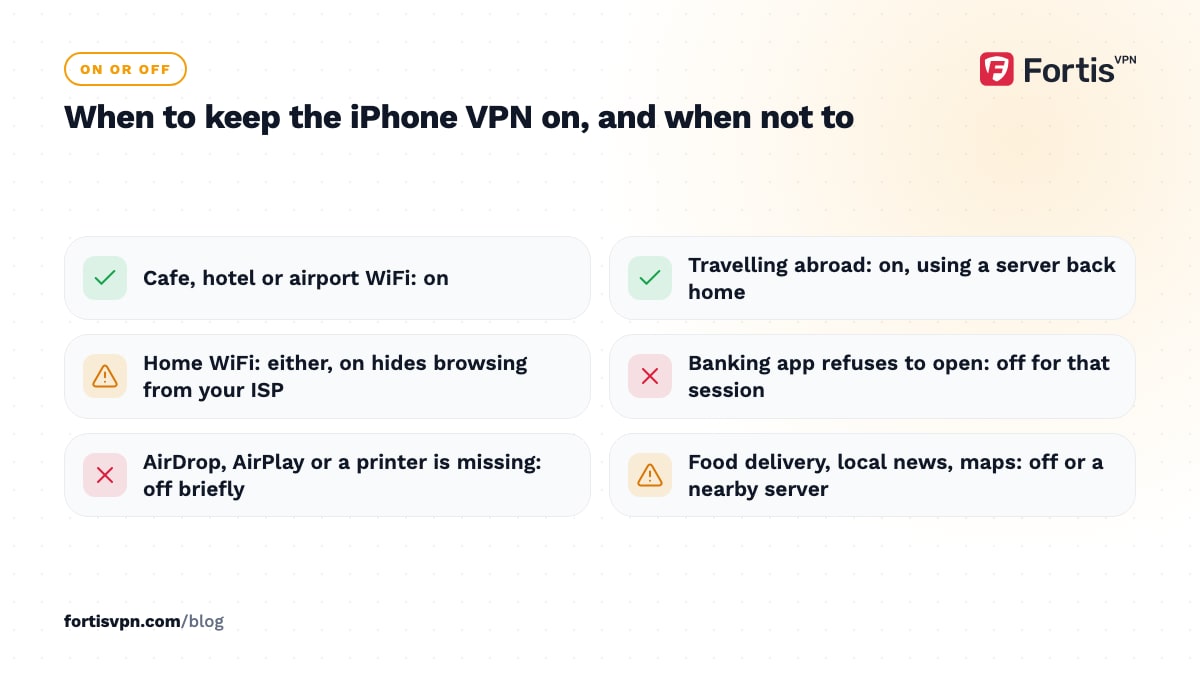
| Situation | On or off | Why |
|---|---|---|
| Cafe, hotel or airport WiFi | On | Anyone on the network could otherwise watch unencrypted traffic and see which sites you use. |
| Travelling abroad | On, connected to a home-country server | Your usual streaming, banking and shopping sites behave as they do at home. |
| Home WiFi | Either | On hides your browsing from your ISP; off is fine if you only wanted public-WiFi protection. |
| Banking app refuses to open | Off for that session | Some banks block VPN addresses or expect your real location. |
| AirDrop, AirPlay, a printer or a smart-home device will not appear | Off briefly | Some VPNs cut off the local network while connected. |
| Food delivery, local news, maps | Off, or pick a nearby server | These use your IP to guess your location and will place you at the VPN server. |
| Battery under 10 percent | Off | The encryption and keep-alive traffic are a small but real cost. |
The general argument for leaving a VPN running, and the exceptions, is set out in should you leave your VPN on all the time.
Why does my iPhone VPN keep turning on by itself?
Because something told it to, and iOS is doing as asked. There are three usual causes, in order of likelihood.
- Connect On Demand. This iOS setting reconnects the VPN whenever the phone has an internet connection, including after every switch between WiFi and mobile data. Flicking the VPN switch off only works until the next network change. To stop it: Settings, General, VPN & Device Management, tap the i next to the VPN, and switch off Connect On Demand.
- The app's own auto-connect. Most VPN apps have a setting such as connect on launch, connect on untrusted WiFi, or connect at startup. Open the app's settings and turn it off there; the iOS switch cannot override it.
- Always On from a management profile. If the VPN belongs to your employer or school and the Connect On Demand switch is missing or greyed out, the profile enforces it. Only the administrator can change that.
If you want the opposite, a VPN that stays on, Connect On Demand is the setting to switch on; without it, iOS can leave the VPN disconnected after a restart.
Is iCloud Private Relay a VPN?
No, although it shares one goal. Private Relay is part of an iCloud+ subscription, found under Settings, your name, iCloud, Private Relay. When it is on, Safari traffic and your DNS lookups pass through two relays, so neither Apple nor the website sees both who you are and what you are visiting. Websites get a rough regional IP address instead of your real one.
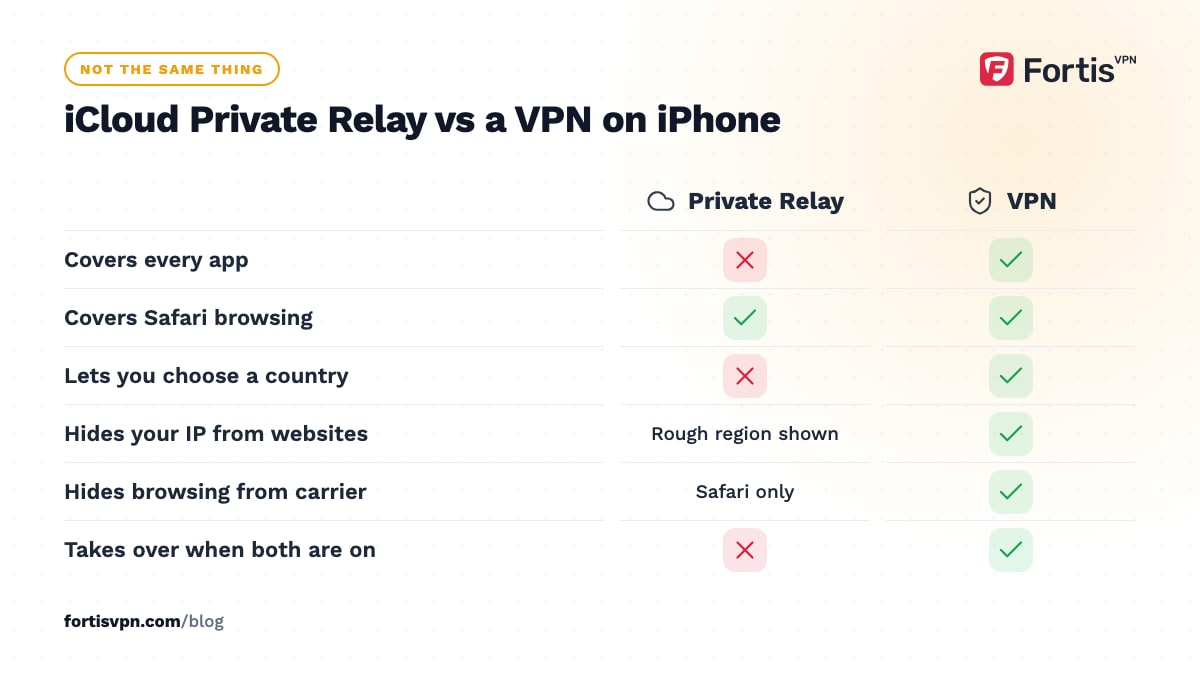
Private Relay covers Safari and a small amount of unencrypted app traffic, not every app on the phone. You cannot pick a country, so it does not help with streaming abroad or home-country banking. It is not offered in every country, and some networks block it. And the two do not run together: while a VPN is connected, iOS sends Safari through the VPN instead of Private Relay, which resumes when the VPN disconnects. For WiFi safety in Safari alone, Private Relay is a good default; for everything else, a VPN is the tool.
Is the VPN on iPhone safe?
The toggle itself is as safe as anything in iOS. The question is who runs the server at the other end, because a VPN provider sees what your ISP used to see. Four signs of a provider you can trust: a published no-logs policy, a named company with a real address and support, modern protocols such as WireGuard or IKEv2, and a free trial or money-back period instead of an ad-funded "free forever" plan. The checklist in is it safe to use a VPN goes through each sign.
Three limits are built into iOS. Only one VPN can be active at a time, so turning on a second app's VPN switches the first off. Personal Hotspot does not pass the VPN to devices tethered to your iPhone; a laptop on your hotspot needs its own VPN. And the VPN uses some battery and a little extra data, covered in does a VPN use more data or battery.
To remove a VPN you do not recognise, open Settings, General, VPN & Device Management, tap the VPN, then Delete VPN. If it came from a profile, tap the profile on the same screen and choose Remove Profile; iOS asks for your passcode. Deleting the app that created a configuration normally removes the configuration with it. A profile that will not delete belongs to a management system; only the organisation that installed it can remove it.
FortisVPN and iPhone
The FortisVPN app for iPhone and iPad is coming soon and is listed that way on the download page; there is no FortisVPN configuration to add on an iPhone today. What FortisVPN covers now is Windows 10 and 11, Android phones and tablets, Android TV and Google TV, and Amazon Fire TV, with WireGuard and OpenVPN, split tunnelling and servers in 100+ countries. One account connects up to 10 devices at the same time, so a plan bought for a laptop and a TV will carry the iPhone when the app ships. Every plan starts with a 7-day free trial, card required, with nothing to pay if you cancel before day 7, and a 30-day money-back guarantee after that.
Frequently asked questions
Why is there a VPN icon on my iPhone?
The VPN badge in the status bar or at the top of Control Center means a VPN configuration is connected right now. It could be a VPN app, an ad blocker or security app that works as a VPN, or a work profile. Open Settings, General, VPN & Device Management to see the name of whichever app or profile is responsible.
Does VPN on iPhone drain the battery?
A little. Encrypting traffic and keeping the tunnel alive uses some power, and a VPN that reconnects constantly on weak signal uses more. On a recent iPhone with a modern protocol such as WireGuard or IKEv2 the difference over a day is small. Prefer WiFi over mobile data while connected if battery matters.
Can I use iCloud Private Relay and a VPN at the same time?
No. While a VPN is connected, iOS routes Safari through the VPN and sets Private Relay aside, then brings it back when the VPN disconnects. If you want Private Relay active, disconnect the VPN. If you want full-device coverage and a choice of country, the VPN wins and Private Relay waits.
Does the VPN on iPhone hide my browsing from my mobile carrier?
Yes. With the VPN on, your carrier sees encrypted traffic going to one VPN server and nothing about the sites or apps behind it. It still sees how much data you use and that a VPN is in use. Private Relay hides Safari browsing from the carrier in a similar way, but app traffic outside Safari remains visible to it.
Last updated: 13 October 2026