VPN vs Tor: Which Is Better for Privacy?
VPN vs Tor: Tor gives stronger anonymity but is slow and browser-only; a VPN is fast and covers every app but needs a trusted provider. See which one fits you.
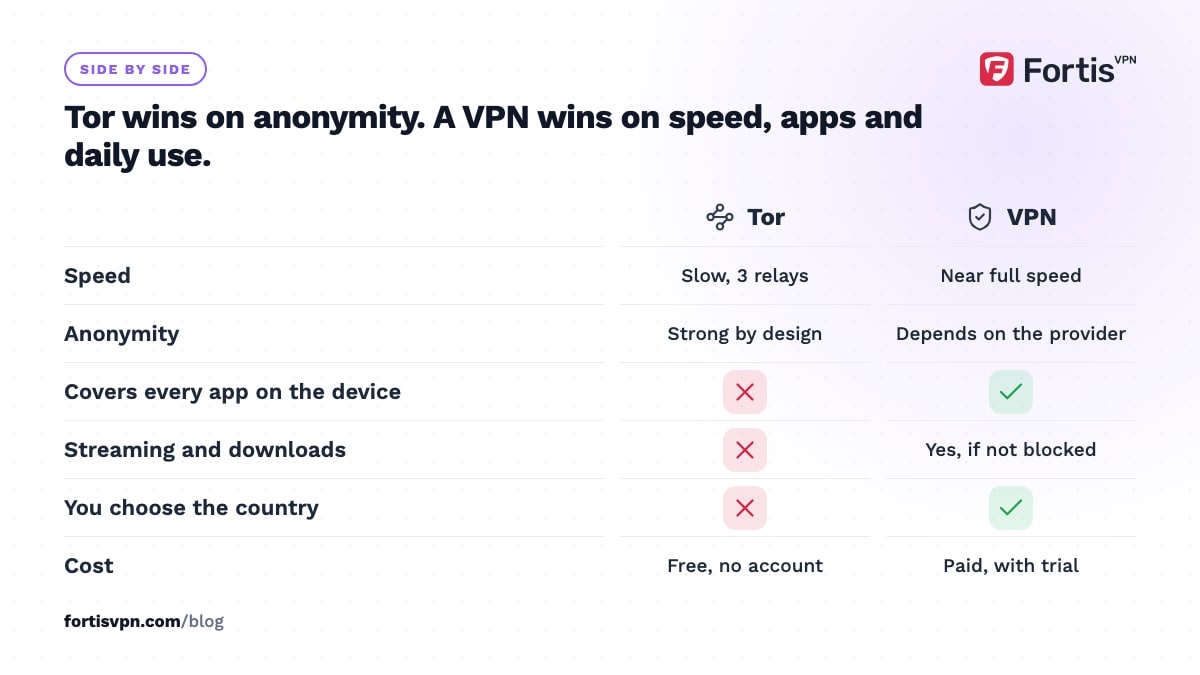
Tor and a VPN solve different problems. Tor gives strong anonymity by passing your traffic through 3 volunteer-run relays, at the cost of speed, and only covers Tor Browser. A VPN encrypts everything on your device and hides your IP behind one provider you must trust, at close to full speed. For daily privacy, streaming and public WiFi, a VPN is better. When nobody, including the provider, may be able to link you to what you do, Tor is better.
- Tor: free, slow, very hard to trace, browser-only, blocked or challenged by many sites.
- VPN: fast, whole-device, hides Tor use from your ISP, but the provider can see your traffic.
- Tor over VPN (connect the VPN, then open Tor Browser) is the only combination most people should consider.
- Tor is legal in most countries but visible to your ISP unless you use a bridge or a VPN.
How does Tor work?
Tor (The Onion Router) is a free network of several thousand relays run by volunteers. When you open Tor Browser, it builds a circuit through 3 of them: a guard relay that sees your IP but not your destination, a middle relay that sees neither, and an exit relay that sees your destination but not your IP. Each hop peels off one layer of encryption, hence the onion.
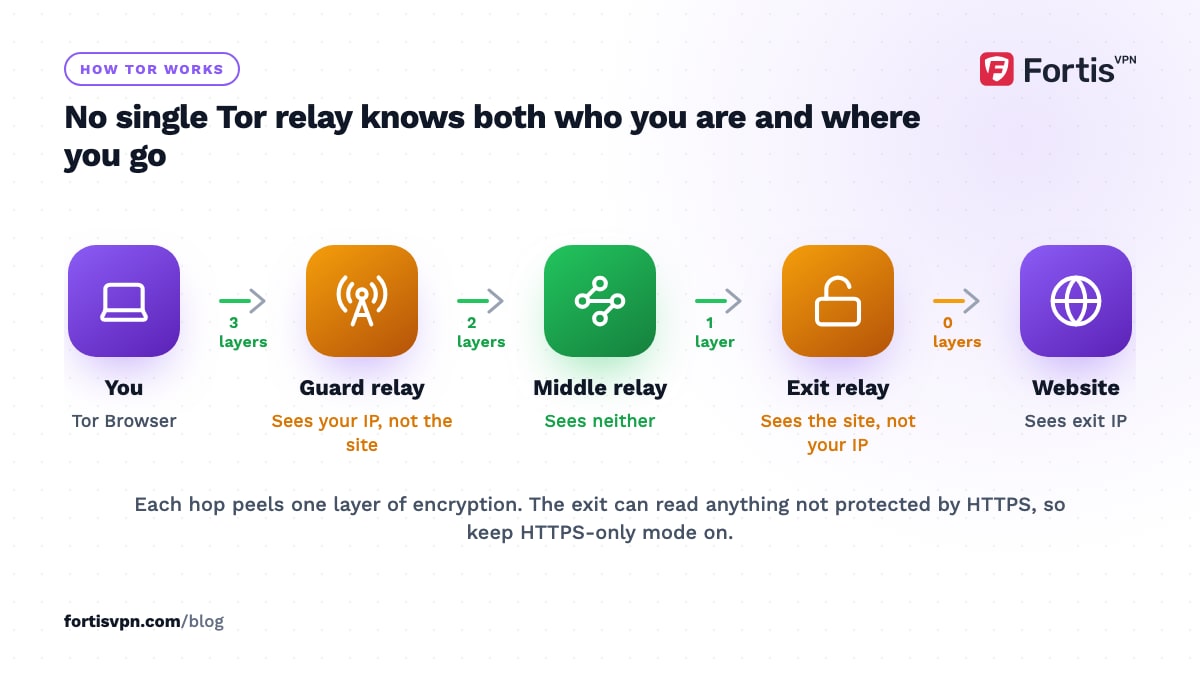
No single relay knows both who you are and where you are going, and Tor Browser builds fresh circuits for new connections roughly every 10 minutes. Websites see the exit relay's IP. Your ISP sees that you connected to a Tor guard, unless you use a bridge, which is a relay that is not publicly listed.
Three practical limits follow from the design. First, Tor is slow, because every request crosses 3 relays on volunteer bandwidth, so video and large downloads are painful. Second, the exit relay can read any traffic that is not itself encrypted; Tor Browser turns on HTTPS-only mode by default to limit that, but a plain http site is readable at the exit. Third, Tor Browser protects only the browser. Other apps on your computer or phone use your normal connection. Tor also hosts onion services, sites with .onion addresses that are reachable only inside the network and never pass through an exit relay.
How does a VPN work?
A VPN creates one encrypted tunnel from your device to a server run by the VPN provider. Everything the device sends, from every app, travels through it. Your ISP and the WiFi owner see encrypted traffic to the VPN server; websites see the server's IP. There is one hop, so the speed cost is small, and with WireGuard it is often hard to notice on a nearby server.
The trade-off is trust. The VPN provider is in the position your ISP used to hold: it can see your real IP and the sites you connect to. Whether it records that is a matter of policy, which is why a no-logs policy is the single most important thing to check. A VPN also identifies you to the provider by your account and payment, which Tor never does. The other ways a VPN user can still be identified are in can you be tracked with a VPN.
VPN vs Tor side by side
| Criterion | Tor | VPN |
|---|---|---|
| Speed | Slow; 3 relays on volunteer bandwidth | Near full speed on a nearby server |
| Anonymity | Strong; no single party sees source and destination | Depends on one provider's logging policy |
| Who can see your traffic | The exit relay sees unencrypted traffic; the guard sees your IP | The provider sees your IP and destinations |
| Coverage | Tor Browser only, plus apps you configure separately | Every app on the device |
| Streaming and downloads | Impractical; torrenting over Tor is discouraged by the Tor Project | Works, subject to each service's VPN blocks |
| Blocked by websites | Often; many sites refuse or challenge exit IPs | Sometimes; mainly streaming services and some banks |
| Ease of use | Install Tor Browser; no account | Install an app, sign in, press connect |
| Cost | Free | Paid subscription; free ones carry their own risks |
| Visible to your ISP | Yes, unless you use a bridge | Yes, as a VPN connection |
| Legal status | Legal in most countries; blocked in some | Legal in most countries; restricted in some |
When Tor is the better choice
- Your safety depends on not being identified. Journalists protecting a source, people reporting wrongdoing, or anyone whose activity could put them at risk if linked to them. A VPN asks you to trust a company; Tor asks you to trust the design and a distributed network.
- You need to reach onion services. Some news organisations, whistleblowing systems and privacy tools publish .onion addresses that only work through Tor.
- You cannot or do not want to pay. Tor is free and needs no account, email or card.
- You are somewhere the authorities target VPN providers. There is no company to compel. Tor's bridges exist for networks that block the public relays.
In all of these, accept the speed and keep Tor Browser's own settings. Do not add extensions, keep the default security settings, and do not log in to accounts tied to your real name, because any of those undoes the anonymity the network gives you.
When a VPN is the better choice
- Everyday privacy from your ISP and WiFi networks. Hiding your browsing list from the people who run your connection does not require anonymity from everyone, and a VPN does it for every app without slowing you down.
- Streaming, gaming, downloads and video calls. Tor cannot carry these well, and the Tor Project advises against torrenting over it.
- Public WiFi. A VPN encrypts everything on the device from the moment it connects, including background app traffic that Tor Browser never touches.
- Changing your apparent location. A VPN lets you pick the country; Tor picks the exit for you, and most sites treat Tor exits with suspicion.
- Devices with no Tor Browser. Smart TVs, Fire TV sticks and consoles can run or sit behind a VPN; they cannot run Tor Browser.
The general rule: if the question is "who can see what I do on this network", you want a VPN. If the question is "who can prove it was me", you want Tor. A proxy, the third option people compare, is weaker than either; see VPN vs proxy.
Tor over VPN vs VPN over Tor
You can combine them, and the order matters. The names describe the order the traffic takes from your device.
Tor over VPN (also called Onion over VPN) means you connect to the VPN first, then open Tor Browser. Your ISP sees only a VPN connection and never learns you use Tor. The Tor guard relay sees the VPN server's IP instead of yours. The VPN provider sees that you connect to Tor but, because Tor's encryption is layered on top, not what you do inside it. This setup needs no configuration beyond pressing connect, and it is the only one most people should consider.
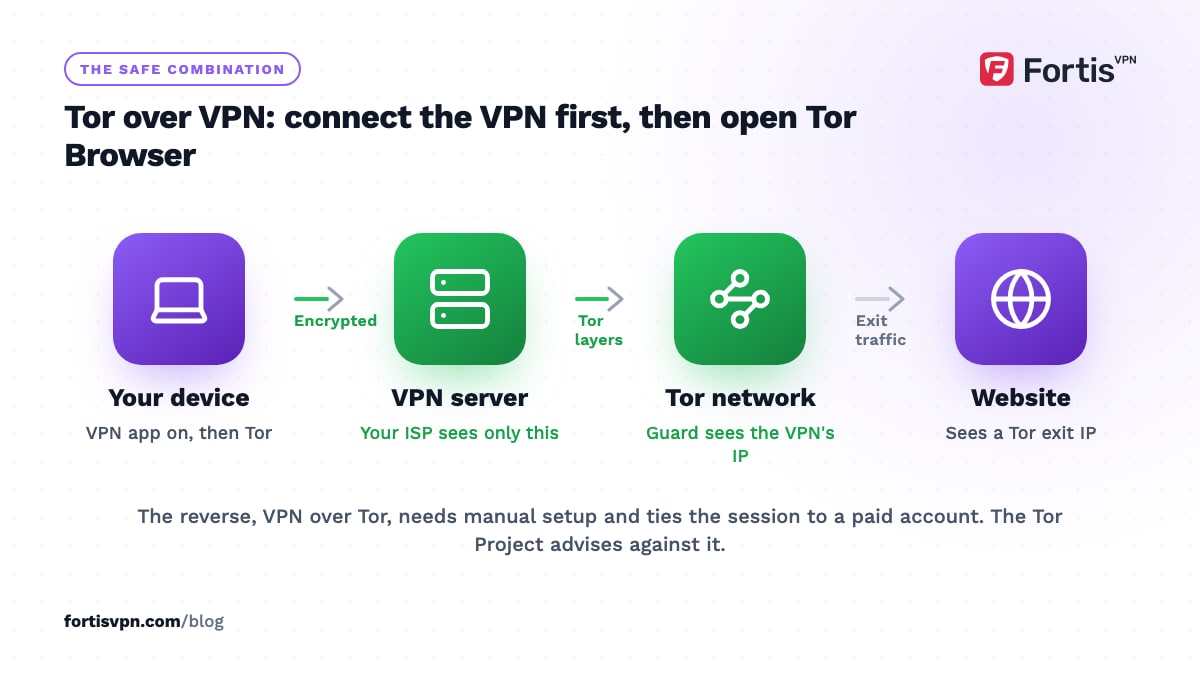
VPN over Tor means routing Tor's traffic through a VPN at the exit, so websites see the VPN's IP instead of a Tor exit. It needs a provider that supports it and manual setup, it ties your Tor session to an account you paid for, and it lets the VPN see your traffic as it leaves Tor. The Tor Project's own FAQ on VPNs says it does not recommend combining a VPN with Tor unless you are an advanced user who can configure both without weakening your privacy. Take that seriously: for most people, Tor over VPN is harmless, and VPN over Tor is a mistake.
Is Tor legal, and does using it attract attention?
Using Tor is legal in most countries, including the UK, the EU, the US, Canada and Australia, as of October 2026. A handful of governments block or penalise it, with China, Iran and Russia the usual examples, and several others block the public relays without a clear law against use. The rules change, so check before you travel; our VPN legality guide covers the same countries from the VPN side.
Attention is a separate question from legality. Your ISP can see a connection to a known Tor relay, and in some places that is noted. Websites see a Tor exit and respond with CAPTCHAs, blocks or extra verification. Running Tor through a VPN removes the first; nothing removes the second, because exit IPs are public. This article is general information, not legal advice.
Where FortisVPN fits
FortisVPN is a VPN for daily use, not a replacement for Tor when your safety is at stake. The Windows, Android, Android TV and Fire TV apps encrypt every app on the device, keep no activity or connection logs, and include a kill switch on Windows so a dropped tunnel never exposes your IP. If you want to hide Tor use from your ISP, connect FortisVPN first and then open Tor Browser; OpenVPN TCP on port 443 also helps on networks that block VPN traffic, and the obfuscated server guide explains the next step up. For everything that Tor handles badly, from streaming on a Fire TV to a video call on hotel WiFi, the VPN is the right tool. Start a 7-day free trial, with nothing charged today, or get the apps from the download page.
Frequently asked questions
Is Tor safer than a VPN?
For anonymity, yes: no single relay or company can connect you to your activity, and there is no account or payment on record. For everyday security, the VPN is often the safer habit, because it covers every app and does not route traffic through exit relays run by strangers. Which is safer depends on who you are protecting yourself from.
Can you use Tor and a VPN together?
Yes. The simple way is Tor over VPN: connect the VPN app, then open Tor Browser. Your ISP sees a VPN, the Tor network sees the VPN's IP, and your browsing inside Tor stays hidden from both. The reverse order, VPN over Tor, needs special setup and the Tor Project advises against it for anyone who is not an expert.
Does Tor hide your IP from your ISP?
Your ISP always knows your IP, because it assigns it. What Tor hides is where you go: the ISP sees an encrypted connection to a Tor guard relay and nothing beyond it. It can tell you are using Tor, since relay addresses are public. A bridge or a VPN in front of Tor hides that too.
Why is Tor so slow?
Every request travels through 3 relays, often on different continents, each run by a volunteer with limited bandwidth. Add 3 layers of encryption and a new circuit every few minutes, and latency climbs while throughput drops. Tor is tuned for anonymity, not speed. A VPN takes a single hop to a commercial server, which is why it feels close to normal.
Can the police track you on Tor?
Not by breaking the network in ordinary cases. People using Tor have been identified through mistakes outside it: logging in to a real account, reusing a username, a malware-infected device, or browser exploits against outdated Tor Browser versions. Keep Tor Browser updated, keep its default settings, and never mix Tor sessions with your real identity.
Last updated: 8 October 2026