VPN vs Incognito Mode: What Each One Actually Hides
VPN vs incognito: incognito deletes history on your device, a VPN hides your IP and traffic from the network. What each one hides, and when to use both.
Incognito mode and a VPN protect you from different people. Incognito hides your browsing from anyone who picks up your device later, by not saving history, cookies or form entries. A VPN hides your browsing from everyone on the network side: your ISP, the WiFi owner and the websites that would otherwise see your real IP address. Neither does the other's job, which is why the honest answer to "VPN vs incognito" is usually both.
- Incognito deletes local traces when the window closes; it sends identical traffic over the network.
- A VPN changes your visible IP and encrypts traffic; it does not touch your browser history.
- Your ISP, WiFi owner and websites can see incognito browsing in full detail.
- Use incognito for the device, a VPN for the network, and sign out for the websites.
What does incognito mode actually do?
Incognito mode (called private browsing in Firefox and Safari, InPrivate in Edge) opens a browser session that forgets itself. While the window is open it works like normal browsing. When you close it, the browser discards:
- The history of pages you visited in that window.
- Cookies and site data created during the session, so you are signed out of everything you signed in to.
- Text you typed into forms and search boxes.
- Permissions you granted to sites during the session.
It also starts with no cookies, so sites do not recognise you from earlier visits and your saved logins are not applied. That makes it useful for checking a page as a stranger would see it, logging in to a second account, or using a shared computer without leaving your accounts open. Chrome's own incognito help page is clear that the goal is privacy from other people who use the same device.
What incognito mode does not do
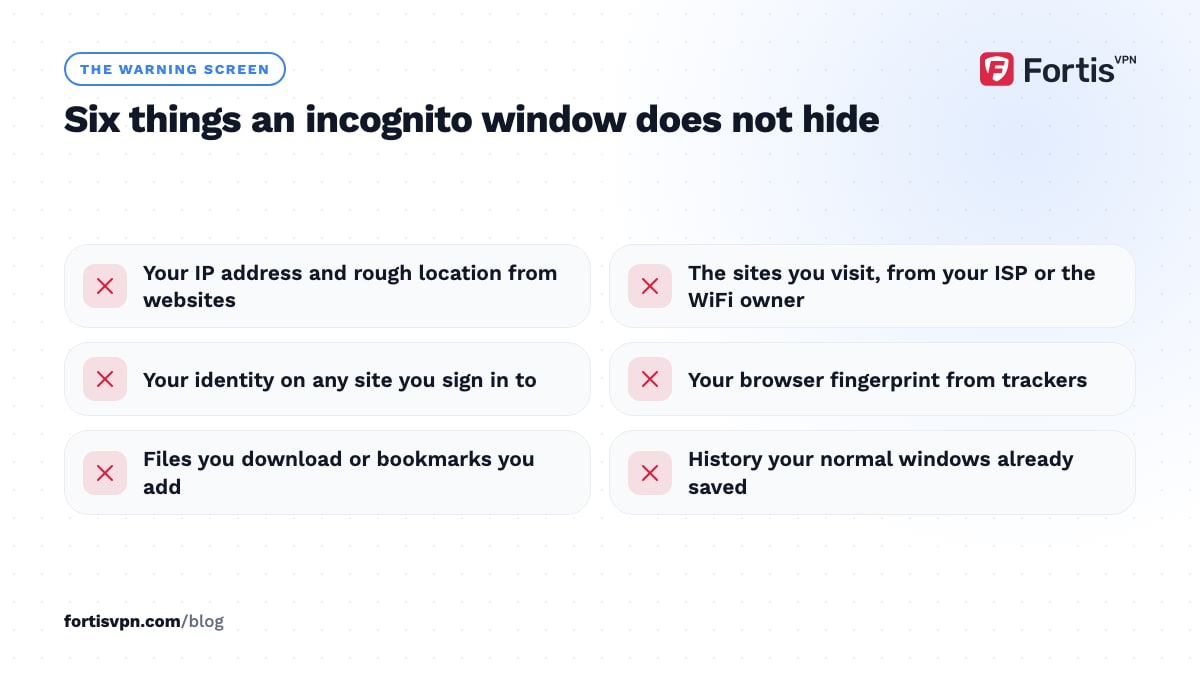
Every incognito window opens with a warning, and it is worth reading once. Chrome's version says your activity might still be visible to the websites you visit, your employer or school, and your internet service provider. Specifically, incognito does not:
- Hide your IP address. Websites see the same IP as always, and with it your approximate location. Check it on our what is my IP page: it is the same in a normal and an incognito window.
- Hide anything from your ISP or the WiFi owner. The network sees the same DNS lookups and the same connections. Your home router, your school and your employer get an identical list of sites.
- Hide you from sites you sign in to. Log in to Google in incognito and Google records that session against your account like any other.
- Stop fingerprinting. Your browser's screen size, fonts, time zone and dozens of other details are unchanged, so trackers can recognise you without cookies.
- Protect downloads or bookmarks. Files you download stay on the device, and bookmarks you add stay in your normal bookmarks list.
- Remove existing history. Incognito starts a clean session; it does not clear what your normal windows already saved.
What does a VPN hide, and what does it not?
A VPN works at the network level, below the browser. It encrypts everything your device sends and routes it through a VPN server, so two things change: your ISP and the WiFi owner see only encrypted traffic to that server, and websites see the server's IP address instead of yours. That covers every app on the device, not only the browser.
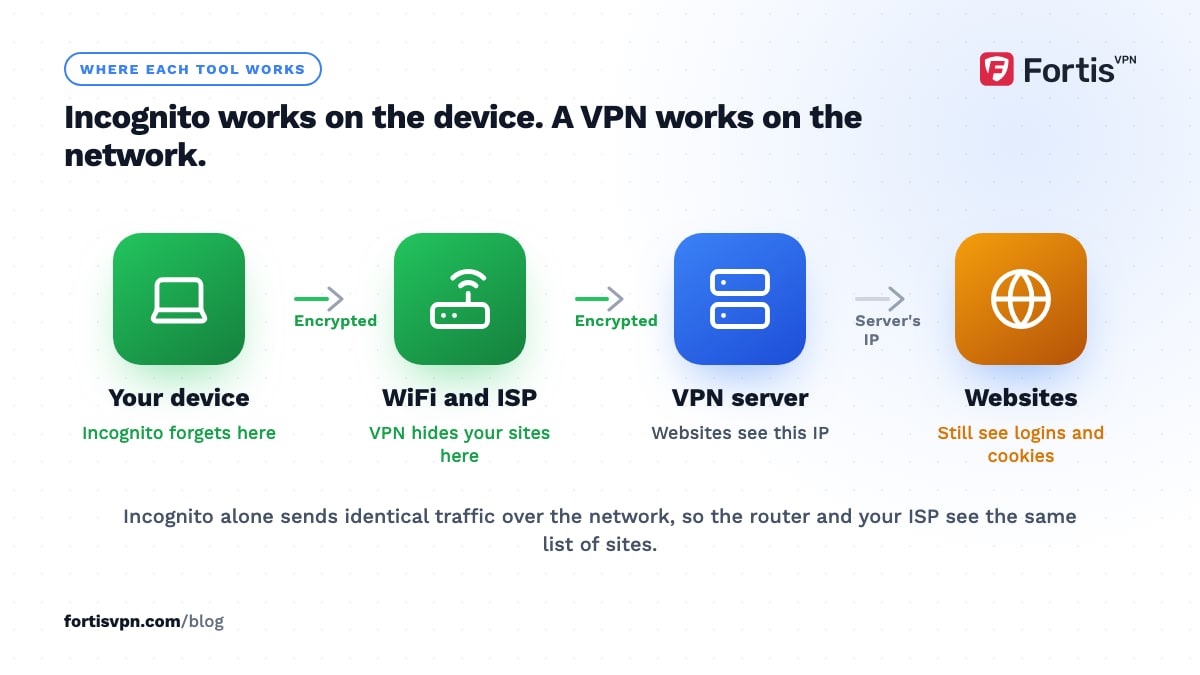
What it leaves untouched is everything stored on the device and everything tied to your identity. Your browser history still fills up. Cookies still follow you. If you sign in to a site, it knows who you are regardless of IP. Your browser fingerprint is the same. A VPN also cannot stop a tracker that is already on the page from loading, unless the VPN includes a tracker blocker. Our full breakdown is in what does a VPN hide.
VPN vs incognito mode side by side
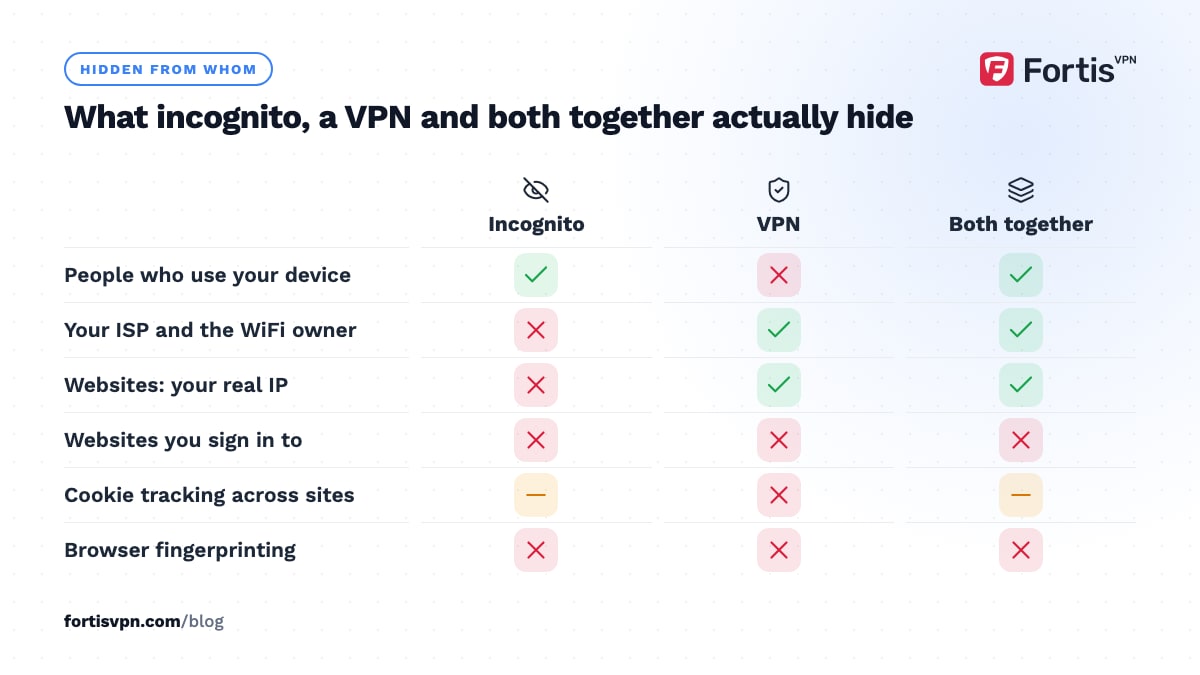
| Hidden from | Incognito mode | VPN | Both together |
|---|---|---|---|
| People who use your device | Yes (history, cookies, forms) | No | Yes |
| Your ISP | No | Yes | Yes |
| The WiFi owner, school or employer network | No | Yes | Yes |
| Websites (your IP address) | No | Yes | Yes |
| Websites (your location from IP) | No | Yes, they see the server's location | Yes |
| Websites you sign in to | No | No | No |
| Cookie tracking across sites | Yes, within the session | No | Yes, within the session |
| Browser fingerprinting | No | No | No |
| Downloads and bookmarks | No, both are kept | No | No |
| Other apps on the device | No, browser only | Yes, whole device | Yes |
The table makes the pattern obvious: incognito is a device-side tool, a VPN is a network-side tool, and the gaps they share, sign-ins and fingerprints, need a third habit, which is signing out and using a browser that resists fingerprinting.
Should you use a VPN and incognito together?
Yes, for anything you want kept off both the device and the network. They do not interfere with each other; incognito is a browser setting and the VPN sits underneath the whole system. Together they cover the three common worries: someone picking up your laptop (incognito), the WiFi owner or ISP (VPN), and websites seeing your real IP (VPN).
A practical routine: connect the VPN first, then open an incognito window, then do the browsing. Close the window when you finish. If you want to be unrecognised by a site you normally use, stay signed out in that window. For who can still see what on a shared network, read can the WiFi owner see your history with a VPN.
Common myths about incognito and VPNs
- "Incognito makes me anonymous." It makes you forgettable to your own browser. Websites, your ISP and your network see you as clearly as ever.
- "A VPN deletes my history." It never touches your history. Your browser saves every page as usual while the VPN is on, unless you also use incognito.
- "Incognito hides my searches from Google." Only if you are signed out and Google cannot match your fingerprint or IP. Signed in, every search is saved to your account.
- "With a VPN I cannot be tracked." Logins, cookies, fingerprints and leaks all survive a VPN. The ways are listed in can you be tracked with a VPN.
- "Incognito blocks ads and trackers." Pages load the same ads and tracking scripts. Chrome blocks third-party cookies in incognito, which limits cross-site tracking, but the trackers still run. A connection-level blocker does more; see how a VPN ad and tracker blocker works.
- "Private browsing protects me on public WiFi." It does nothing for the network. Only a VPN encrypts your traffic on a hotspot.
Using FortisVPN alongside private browsing
FortisVPN covers the network half. The Windows, Android, Android TV and Fire TV apps encrypt every app on the device, replace your IP with the server's, and keep no activity or connection logs, so there is no record of your browsing on our side to match what incognito removes from your device. The connection-level tracker blocker and ad blocker also stop many tracking scripts loading in the first place, which closes part of the gap incognito leaves open. Get the apps from the download page, connect, open an incognito window, and confirm the change at the IP checker. Start a 7-day free trial to try it; nothing is charged today.
Frequently asked questions
Does incognito hide your IP address?
No. Incognito changes nothing about your connection, so websites see the same public IP address and the same approximate location as in a normal window. Only a VPN, a proxy or Tor replaces the IP that websites see. You can confirm this by opening an IP checker in a normal tab and an incognito tab and comparing the result.
Is incognito mode really private?
It is private from other people who use your device, and that is all it claims. Your history, cookies and form entries are not saved. Your ISP, the WiFi owner, your employer or school, and every website you visit can see your activity as usual, and any account you sign in to records the session like any other.
Can the WiFi owner see incognito history?
Yes. The router sees the same DNS lookups and connections whether the window is incognito or not, so the list of sites you visited is identical. Incognito removes the copy on your device, not the copy on the network. To hide the sites from the WiFi owner you need a VPN switched on before you browse.
Is a VPN better than incognito?
They are not competing. A VPN protects you from observers on the network and hides your IP from websites; incognito protects you from people with access to your device. If you can pick only one for privacy from outsiders, the VPN does far more. If your concern is a shared computer, incognito is the one that helps.
Does incognito work on a phone?
Yes. Chrome on Android, Safari on iPhone and Firefox on both have a private tab mode that behaves like the desktop version: no saved history or cookies for those tabs, and no change to your IP or to what your mobile carrier or WiFi owner can see. A VPN app on the phone is still needed for the network side.
Last updated: 13 October 2026