Can You Use a VPN for Fortnite, PUBG, and Call of Duty?
Can you use a VPN for Fortnite, PUBG and Call of Duty? Yes, with limits. What Epic, Krafton and Activision allow in 2026, the ban risks, and safe settings.
You can use a VPN for Fortnite, PUBG and Call of Duty, and none of the three publishers bans VPN use by itself. What gets accounts punished is what the VPN is used for: faking your region, dodging a ban, or gaming the matchmaking. Used for security and better routing, a VPN is fine. Used to cheat the system, it can cost you the account.
- None of the three bans VPN use outright, but all three punish location spoofing, ban evasion and matchmaking abuse.
- PUBG Mobile's terms forbid using IP proxies to disguise where you live.
- A VPN rarely lowers ping; it helps with DDoS, bad ISP routing and networks that block game traffic.
- Pick the nearest server, use WireGuard, and never switch regions mid-session.
What a VPN can do for Fortnite, PUBG and Call of Duty
The honest list is shorter than the marketing suggests, but each item is real.
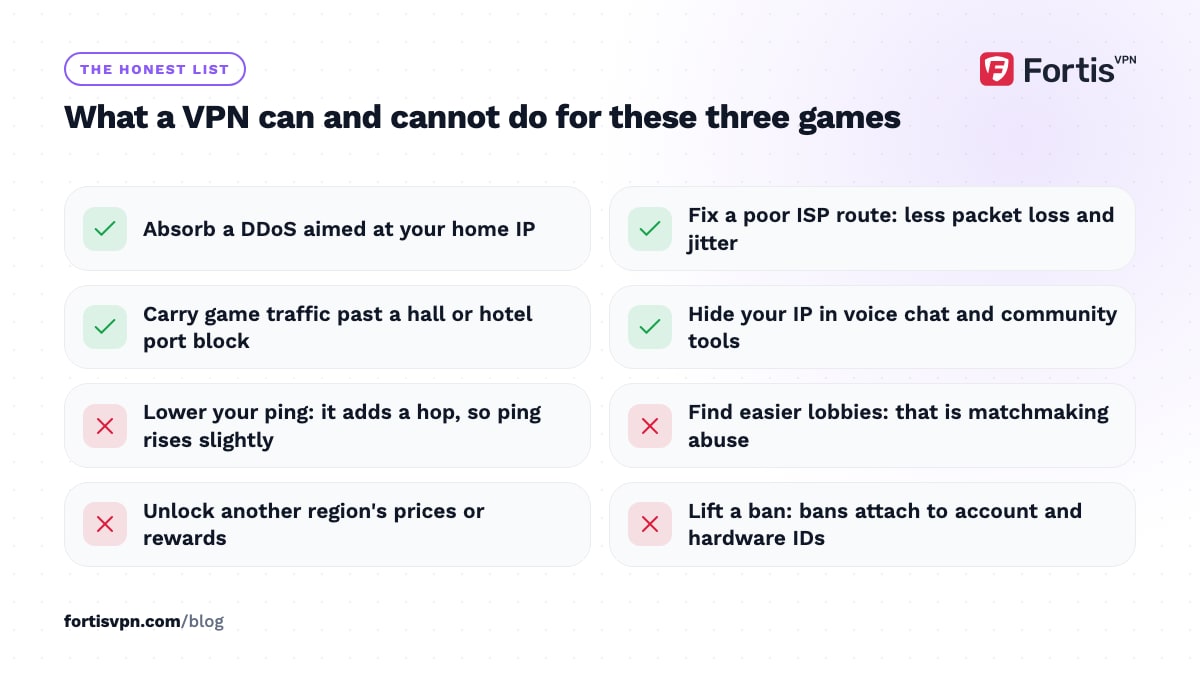
- Protection from DDoS attacks. If you stream, play in tournaments or have annoyed someone in a lobby, your home IP can be targeted. Behind a VPN the attacker hits the VPN server, which absorbs it, and your connection stays up.
- Better routing on a bad ISP. Some ISPs send game traffic on a long or congested path. A VPN server with a cleaner route to the game's data centre can cut packet loss and jitter, even if raw ping stays the same.
- Playing on networks that block games. University halls, offices and some hotels block the ports these games use. A VPN carries the traffic on a port the network allows.
- Stable play while travelling. Connecting to a server near your usual region keeps you in familiar lobbies with your friends, as long as the ping stays reasonable.
- Hiding your IP from strangers. Most matches run on dedicated servers, so other players rarely see your IP. Voice apps and community tools are where it leaks, and the VPN covers those too.
Our guide to VPNs for gaming goes deeper on the ping and DDoS questions.
What a VPN cannot do
- Lower your ping in most cases. The VPN adds a hop. Unless your ISP's route is unusually bad, ping goes up by a few milliseconds, not down.
- Get you easier lobbies. Connecting to a quiet region to find weaker players is matchmaking manipulation. It raises your ping, often drops you into a laggy or restricted lobby, and all three publishers treat it as abuse.
- Unlock regional prices or rewards. Buying currency through a cheaper region, or claiming region-locked events, breaches the terms of every game here and can void the account.
- Hide cheating or lift a ban. Bans attach to accounts and hardware IDs. A new IP does nothing against those, and using one to get around a ban is ban evasion, which is itself a permanent-ban offence.
Fortnite: what Epic allows
As of October 2026, Epic's public rules do not name VPNs, and ordinary VPN use does not get accounts banned. Epic's enforcement focuses on cheating software, account selling, harassment and getting around earlier bans.
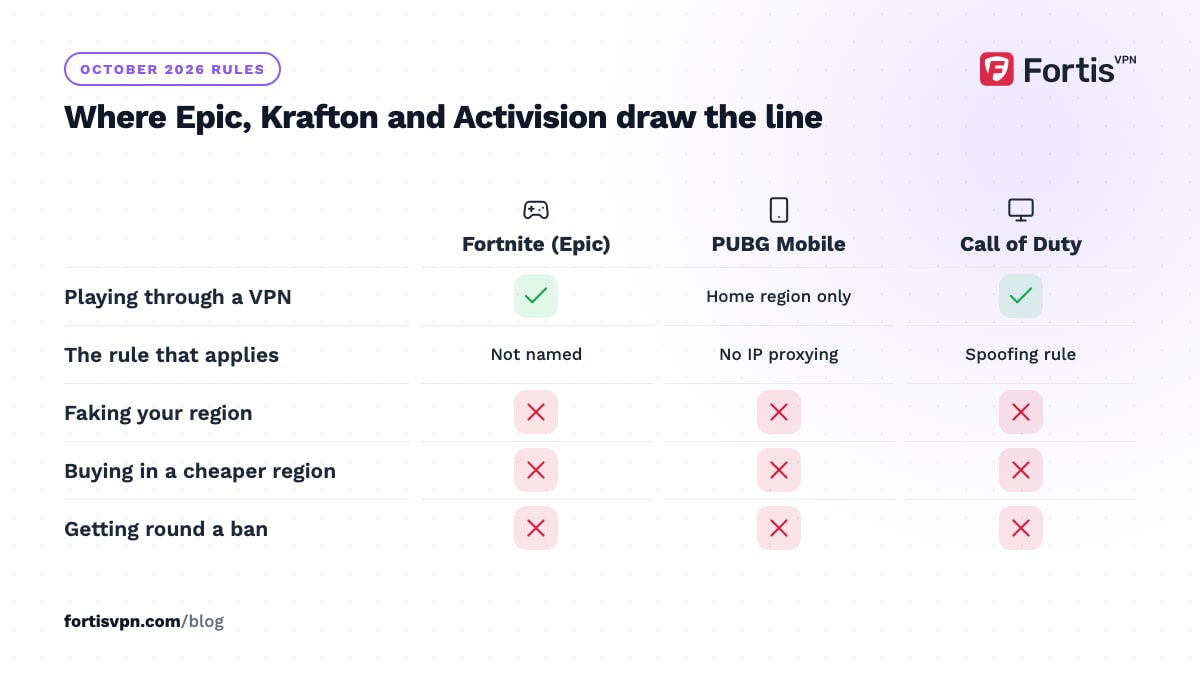
What does happen is detection at the match level. Players report being removed from a match with a message that lists VPN usage alongside lag, a flagged IP or machine, and suspected cheating as possible reasons. The usual cause is a VPN address that Epic already blocked because someone else abused it. Switching to another server in the same region normally fixes it. Epic's own connection-troubleshooting steps also tell you to identify and disable proxy servers, which is the standard advice when a match will not connect.
Two lines not to cross: do not use a VPN to get back into Fortnite after a ban, and do not use it to enter competitive events under a region you do not live in. Both are treated as serious breaches.
PUBG and PUBG Mobile: what Krafton and Tencent allow
PUBG Mobile is the strictest of the three on paper. Its terms of service list the things you agree not to do. One of them is using "IP proxying or other methods to disguise the place of your residence, whether to circumvent geographical restrictions on the Services or for any other purpose". That wording covers a VPN used to appear in another country, regardless of why. The same terms say content, items and even whole games may differ or be unavailable depending on the territory you are in.
This matters because PUBG Mobile is split into regional builds. India has Battlegrounds Mobile India from Krafton, China has Game for Peace, and other markets have their own versions and events. Using a VPN to install or play a version not offered where you live, or to claim another region's rewards, is exactly what that clause targets.
PUBG on PC and console matches you by ping rather than by a region setting, and its rules of conduct concentrate on cheating, teaming and stream sniping. Playing with a VPN for stability is tolerated; using it to land in a region you have no business in is not, and the high ping gives it away.
Call of Duty and Warzone: what Activision allows
Activision's Security and Enforcement Policy does not mention VPNs by name as of its July 2026 revision. It does list "Spoofing", defined as any attempt to hide, disguise or obfuscate your identity or the identity of your hardware, and it bans unauthorised software that gives an unfair advantage. A VPN used for security on your own account does not fit either. A VPN used to pretend you are somewhere else to manipulate matchmaking is the kind of behaviour the spoofing rule exists for.
The "VPN for bot lobbies" trend is the one to avoid. Activision has published how its matchmaking works: connection quality is the most heavily weighted factor, and the system tries to place you in the data centre closest to you. Connecting through a distant server defeats that, so you get a high-ping match or none at all. In November 2024 Activision also tightened ping thresholds for Black Ops 6 and Warzone to keep players in their own region, and said it was cutting down on VPN abuse.
The penalties are graded. Suspicious accounts are first placed in limited matchmaking, meaning lobbies with other flagged accounts and restricted progression. Repeat or serious cases get temporary bans, then permanent bans across titles, and hardware bans cannot be appealed. Read the policy itself before you rely on any forum summary.
How to use a VPN with these games safely
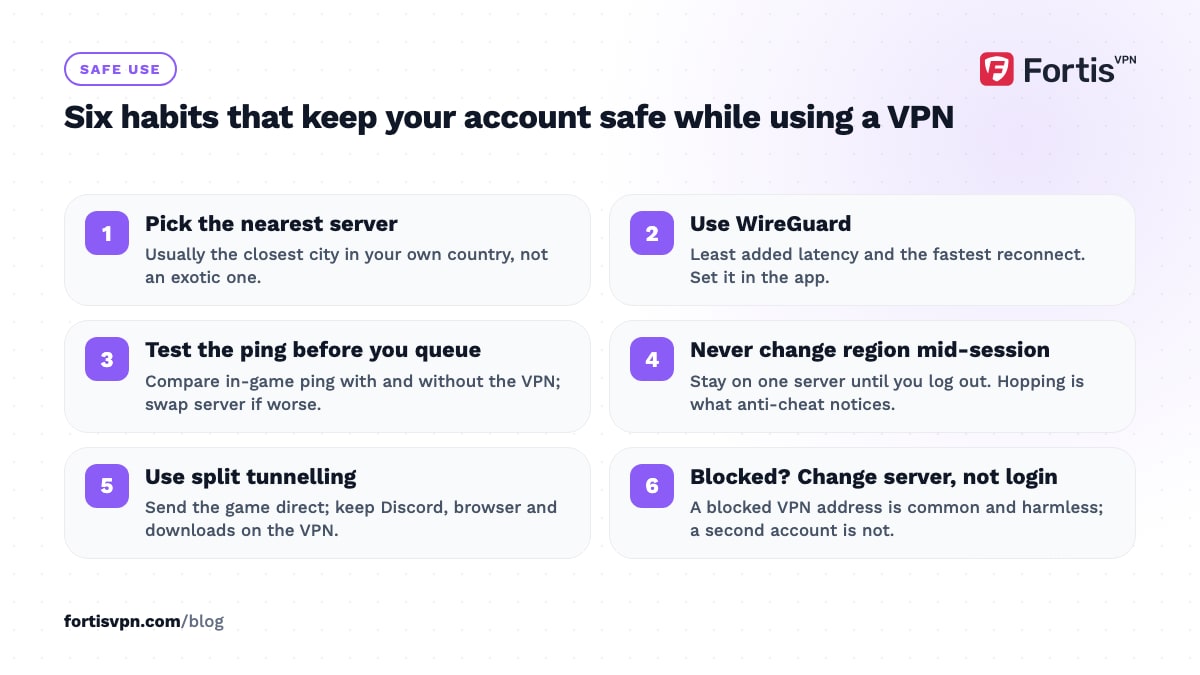
- Pick the server nearest to the game's region, not the exotic one. For most people that means the closest city in your own country. See which server location to choose.
- Use WireGuard. It adds the least latency and reconnects fastest. Change it in the app's settings if Auto picked something else.
- Test the ping before you queue. Compare the in-game ping with and without the VPN. If it is worse by more than a few milliseconds, try another nearby server.
- Do not change location mid-session. Pick one server and stay on it until you log out. Region hopping is what anti-cheat systems notice.
- Use split tunnelling if the game does not need the VPN. Route Discord, your browser and downloads through the VPN and let the game talk directly, which keeps your IP private from everything except the game server. What is split tunnelling? explains the setting.
- If the game refuses the connection, change server, not account. A blocked VPN address is common and harmless; making a second account to get around a block is not.
If speeds drop, how to make your VPN faster lists the settings that matter.
Console vs PC vs mobile
| Platform | How to run the VPN | Notes |
|---|---|---|
| Windows PC | VPN app on the PC | Full control of protocol, split tunnelling and kill switch. Covers Fortnite, PUBG and Call of Duty on PC. |
| Android phone or tablet | VPN app on the device | Covers PUBG Mobile, Call of Duty: Mobile and Fortnite on Android. Split tunnelling lets you exempt the game. |
| iPhone or iPad | Any VPN app that supports iOS | No per-app split tunnelling at the system level, so the whole device is tunnelled. |
| PlayStation or Xbox | VPN on the router, or shared from a Windows PC | Consoles have no VPN apps. The router approach protects every device on the network. |
| Nintendo Switch | VPN on the router | Same as the other consoles. |
For consoles, VPN for PS5 and Xbox explains the router and PC-sharing options step by step.
Gaming with FortisVPN
FortisVPN's Windows and Android apps let you set WireGuard under Settings, which keeps the added latency to a few milliseconds on a nearby server. Split tunnelling on both lets you decide per app: send the game direct and everything else through the tunnel, or the other way round. The kill switch on Windows stops your real IP from showing if the tunnel drops during a match, which is the moment a DDoS attacker is waiting for.
Servers in 100+ countries mean there is almost always one in the same region as the game's data centre. Install the Windows app for PC play, and start the 7-day free trial to check your in-game ping before the first charge.
Frequently asked questions
Can you get banned for using a VPN on Fortnite?
Not for the VPN itself. Epic removes players from matches when a VPN address looks suspicious, and that is a kick, not a ban. Bans come from what you do with the VPN: evading an earlier ban, buying through another region, or entering a competition under a false location. Keep to a server near you and your account is not at risk.
Does a VPN lower ping in PUBG?
Rarely. A VPN adds a hop between you and the game server, so ping usually rises by a few milliseconds. The exception is an ISP with a poor route to PUBG's data centre, where a VPN server on a better path can reduce packet loss and jitter. Test it: note your in-game ping with and without the VPN and keep whichever is lower.
Is a VPN allowed in Call of Duty Warzone?
Activision's enforcement policy does not ban VPNs, but it does ban spoofing your identity and manipulating the game for advantage. Playing Warzone through a nearby VPN server for security is fine. Connecting through a distant server to find easier lobbies risks limited matchmaking and, if repeated, a suspension. Activision has also tightened region checks since late 2024.
Does a VPN stop DDoS attacks in gaming?
Yes, for attacks aimed at your home IP. The attacker can only see the VPN server's address, and VPN servers are built to absorb floods that would knock a home router offline. It does not help if the attacker already has your real IP from before, so get a new one from your ISP, by restarting the router or asking them, then keep the VPN on.
Which server should I pick for gaming?
The one closest to the game's servers for your region, which is normally also the one closest to you. Fortnite, PUBG and Call of Duty all match you by connection quality, so a nearby server keeps you in your usual lobbies with the lowest ping. If that server is slow, try the next-nearest city rather than another country.
Last updated: 2 October 2026