How to Make Your VPN Faster: 10 Settings That Matter
How to make your VPN faster with 10 settings that work: a closer server, WireGuard, UDP, split tunnelling, 5 GHz WiFi, plus what speed loss is normal.

To make your VPN faster, connect to the nearest server, switch the protocol to WireGuard, and use UDP rather than TCP unless your network blocks it. Those 3 changes recover most of the speed a VPN costs. The rest comes from your WiFi, your ISP and whatever else is using the connection. This guide covers all 10 settings in the order they usually pay off.
- Distance to the server adds latency; server load and protocol decide your download speed.
- WireGuard over UDP is the fastest combination on almost every network.
- Measure speed with and without the VPN before changing anything, or you will chase the wrong problem.
- A VPN cannot fix slow WiFi or a congested ISP, but it can beat ISP throttling.
Why is my VPN so slow?
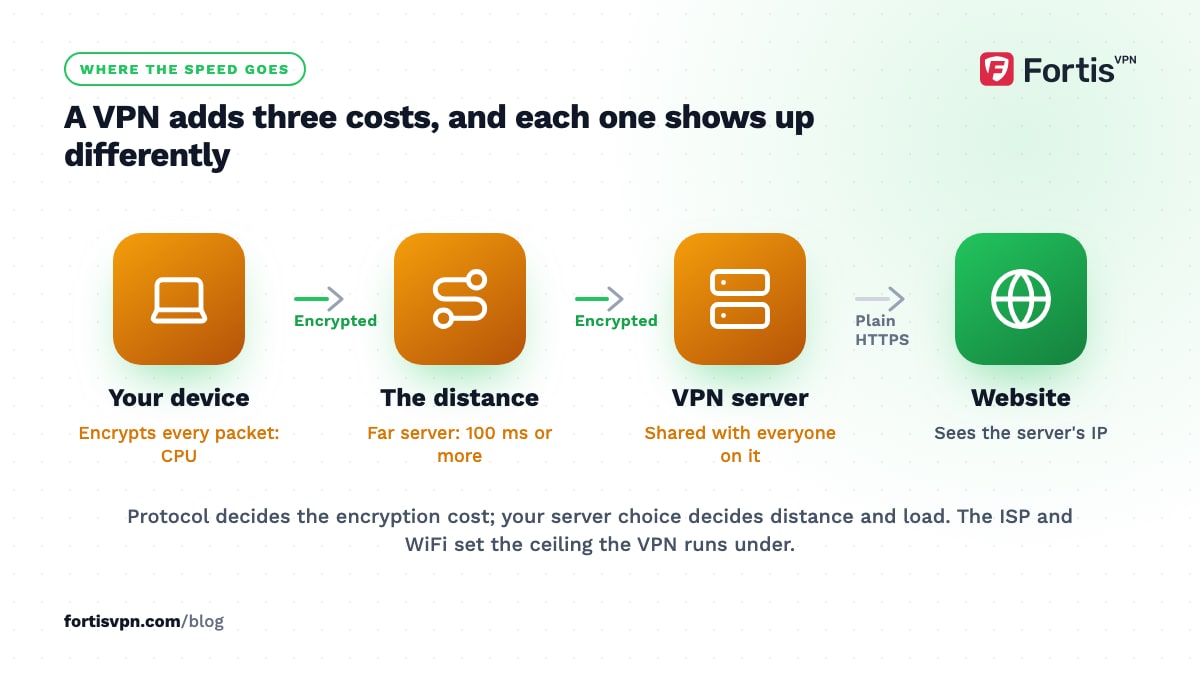
A VPN adds 3 costs to every connection, and each one shows up differently.
- Distance. Your traffic travels to the VPN server and back before it reaches the website. A server 100 km away adds a few milliseconds; a server on another continent can add 100 ms or more. That is latency, and you feel it as lag in games, calls and page loads rather than as slow downloads.
- Encryption. Every packet is encrypted on your device and decrypted on the server. Modern processors handle this well above home broadband speeds, but a cheap TV stick or an old phone can hit its ceiling, especially on OpenVPN.
- Server load. One server serves many people. A busy server at peak time shares its bandwidth thinly, and that is where the big download-speed drops come from.
The protocol decides how much the second cost bites, and your choice of server decides the first and third. Your ISP and WiFi set the ceiling the VPN works under; the VPN cannot go faster than the line it runs on. For the full explanation of each cost, read does a VPN slow down your internet.
Test your speed with and without the VPN first
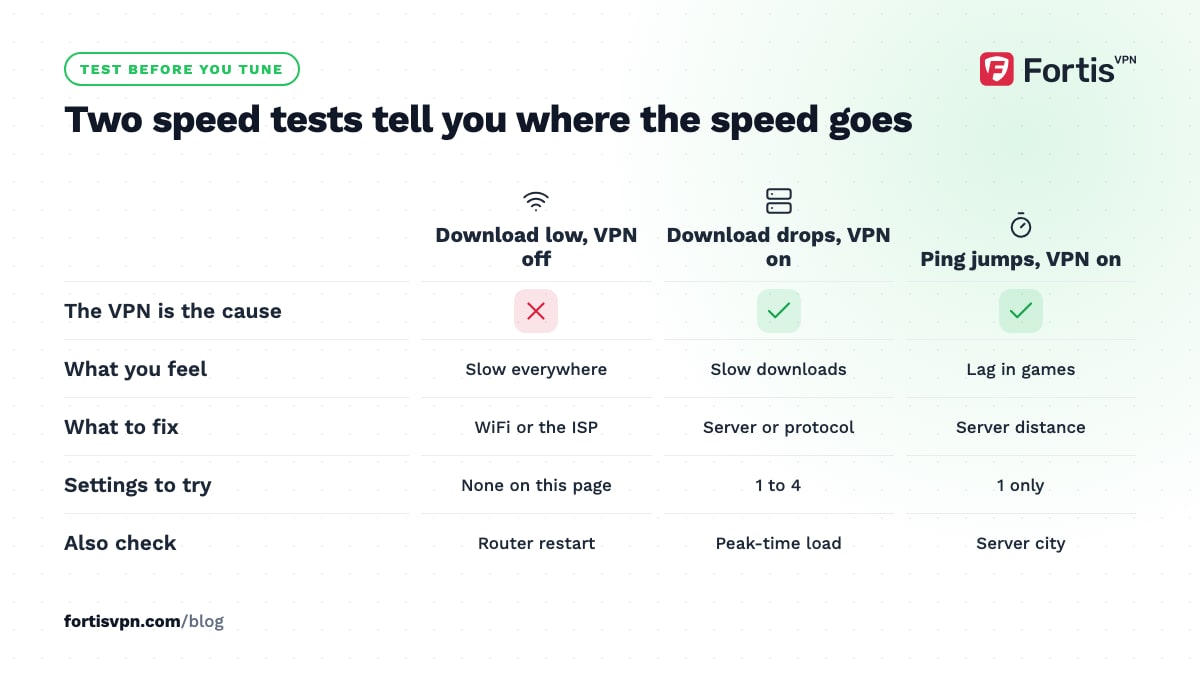
Before changing settings, run the same speed test twice: once with the VPN off, once connected to your usual server. Note 3 numbers each time: download, upload and ping. Use the same device, the same WiFi band, and nothing else downloading.
Read the results like this. If download without the VPN is already low, the VPN is not your main problem; fix the WiFi or talk to your ISP. If download is fine without the VPN and much lower with it, the server or protocol is the issue, and settings 1 to 4 below will increase VPN speed the most. If download is similar but ping jumps, the server is too far away, and only setting 1 helps. Keep the numbers; you will compare against them after each change.
10 settings that make a VPN faster
These are the fastest VPN settings, listed in the order they usually pay off. Work down the list to speed up your VPN and re-test after each change. Stop when the speed is good enough for what you are doing; there is no prize for the last few percent.
1. Pick a closer server
Choose the server nearest to you, or nearest to the service you are using. For general browsing and downloads, that is your own country or the one next door. For streaming a foreign library, pick the city in that country closest to you. The server location guide covers each case.
2. Switch to WireGuard
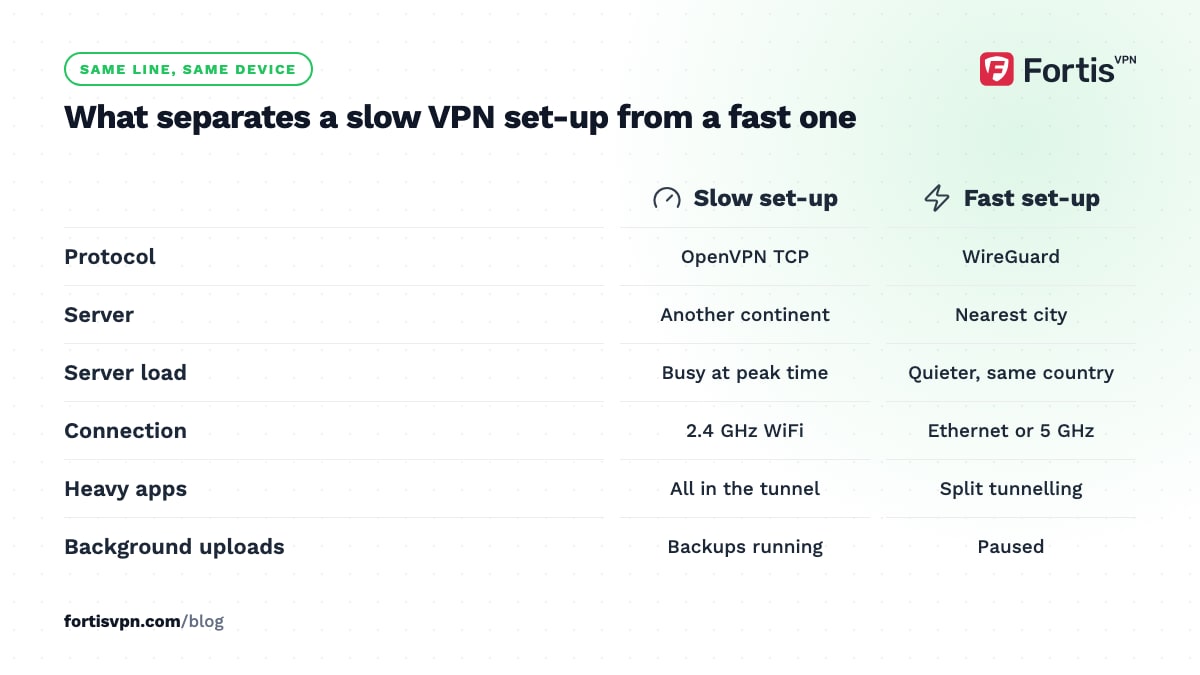
WireGuard is the fastest protocol on offer in most VPN apps. It uses a modern cipher, ChaCha20-Poly1305, and a far smaller codebase than OpenVPN, so it costs less processor time per packet and recovers faster after any packet loss. In the FortisVPN apps, open Settings, Protocol and choose WireGuard. The WireGuard vs OpenVPN comparison shows the difference in detail.
3. Use UDP, not TCP
If you are on OpenVPN, pick UDP. TCP adds its own error checking on top of the traffic inside the tunnel, so a lost packet can be retransmitted by both layers. The only reason to use TCP on port 443 is a network that blocks everything else. Switch back to UDP or WireGuard as soon as you leave that network.
4. Change to a less busy server
If a nearby server is slow at 8 pm and fast at 8 am, it is overloaded, not far away. Try another server in the same city or country. Apps that pick a server automatically usually route you to a quieter one; if yours does not, try 2 or 3 and keep the fastest.
5. Use Ethernet or 5 GHz WiFi
Most complaints about a VPN being slow on WiFi are about the WiFi. A cable removes the problem entirely. If you must use WiFi, use the 5 GHz band when the router is in the same room, and 2.4 GHz when it is not; 5 GHz is faster but does not go through walls well. A VPN makes WiFi loss worse because every lost packet also stalls the tunnel.
6. Use split tunnelling for heavy apps
Split tunnelling lets you choose which apps go through the VPN. Put the apps that need it in the tunnel, and let big game downloads, cloud backups and local streaming go direct. Everything in the tunnel then gets more of its bandwidth. It is available in the FortisVPN apps for Windows, Android, Android TV and Fire TV; the split tunnelling guide explains the privacy trade-off.
7. Close background uploads
Upload is the smaller half of most home connections, and the VPN tunnel needs it to acknowledge every download. A phone backing up photos, a cloud drive syncing, or a torrent seeding can fill the upload and make the whole connection feel slow. Pause them, re-test, and you will often see the download speed climb at once.
8. Restart the router and the device
A router that has been up for months can run short of memory and hold stale connection entries, which slows every long-lived connection, a VPN tunnel included. Power it off for 30 seconds. Restart the device too; a sleeping network driver or a leftover tunnel from a previous session can halve your speed.
9. Check for ISP throttling
Some ISPs slow specific types of traffic, usually video streaming or large downloads at peak time. Inside a VPN the ISP cannot see what the traffic is, so it cannot single it out. If a stream buffers without the VPN and plays smoothly with it, that is throttling, and the VPN is the fix rather than the problem. Does a VPN stop ISP throttling explains how to confirm it.
10. Update the app
Protocol implementations get faster with releases, and an old app may be using a slower code path or a server list that has since changed. Update the VPN app and your operating system, then reconnect. Reinstall if the update fails.
How much speed loss is normal with a VPN?
On a nearby server with WireGuard, a modern device loses a small share of its download speed and gains a few milliseconds of latency; most people cannot tell the difference while browsing or streaming. On a distant server, or with OpenVPN on a low-powered device, the loss is larger and noticeable, especially in anything real-time.
What is not normal: losing most of your speed on a nearby server, speed that drops to a crawl at the same time each day, or ping above a few hundred milliseconds to a server in your own country. Those point at server load, throttling or a WiFi fault, and the settings above find which.
When the slowness is not the VPN
Some problems look like a slow VPN and are not. Check these before changing more settings:
- A TV stick behind the TV. The metal back of a television blocks WiFi. Move the stick out on an HDMI extender, or run a cable.
- Your plan's speed. A VPN cannot deliver more than the line provides. Check the plan speed and whether the test without the VPN reaches it.
- The website or service itself. A slow server on the other end is slow with or without a VPN. Test 2 or 3 sites.
- Browser extensions and other security software. A second filtering tool inspecting the same traffic doubles the work.
- Peak-time congestion. If everything is slow after 7 pm, the VPN is sharing your ISP's problem, not causing it.
The slow speeds troubleshooting page is the short checklist version.
Speeding up FortisVPN
In the FortisVPN apps the fastest configuration is WireGuard on the nearest server. The Auto protocol setting picks a fast option on most networks, but if you want to be certain, set WireGuard yourself under Settings, Protocol. The server list shows every country and which protocols each location supports, so you can pick a nearby city rather than a whole country. Split tunnelling on Windows, Android and the TV apps keeps heavy downloads out of the tunnel, and the TV apps support WireGuard, the lightest protocol for a low-powered stick. The account allows 10 devices at the same time, so you do not need to share one slow connection. To check the speed on your own line, start a 7-day free trial and run the 2 speed tests above.
Frequently asked questions
How much speed does a VPN take?
It depends on 3 things: how far the server is, which protocol you use, and how busy the server is. On a nearby server with WireGuard the loss is small enough that browsing and HD streaming feel the same. On a server on another continent, or with OpenVPN TCP, the loss is noticeable, and real-time apps feel it most.
Why is my VPN slow on a fast connection?
A fast line makes the VPN's fixed costs more visible, not less. The server you connect to has its own bandwidth limit, and it is shared with everyone else connected to it. If your line is faster than your share of the server, you hit that ceiling. Switch to a quieter server in the same country and use WireGuard.
Which VPN protocol is fastest?
WireGuard is the fastest protocol in general use. It encrypts with less processor work per packet than OpenVPN and reconnects almost instantly after a drop. OpenVPN UDP comes second, and OpenVPN TCP is the slowest because it handles packet loss twice. IKEv2 is also quick on the platforms that support it and reconnects well on mobile.
Does a VPN slow down gaming?
A VPN adds latency equal to the extra distance your traffic travels, so a server in your own country adds a few milliseconds and a distant one adds far more. Pick the server closest to the game's own servers, use WireGuard, and use Ethernet. Download speed matters less for gaming than steady ping, so test ping rather than bandwidth.
Can a VPN make my internet faster?
Only in one situation: when your ISP throttles a particular kind of traffic, such as video or large downloads. The VPN hides what the traffic is, so the throttle cannot target it. In every other case a VPN adds a small overhead and cannot exceed the speed of your line, so a VPN that feels faster is usually revealing a throttle you did not know about.
Last updated: 10 October 2026